
What is Peliqan Satellite
On-prem agent
Peliqan Satellite is a Windows agent you install on an on-prem server. It reads data from an on-prem database (SQL Server, or anything reachable via ODBC) and copies it into your Peliqan data warehouse (Postgres or BigQuery). Once the data is there, you can use it for BI/reporting, MCP access to your business data, build Data Apps, publish APIs etc.What are “pipelines” in Peliqan Satellite
Each pipeline is one source configuration → one target schema. You can run several pipelines side by side. One source configuation can capture data from one schema in one database or it can capture data from multiple databases. Use multiple pipelines if you have different source configurations or a different target configuration.Preparing the source database(s)
Create a dedicated database user on the source DB server, with read-only access. Use e.g. “peliqan” as the username.Preparing SQL Server
- Make sure TCP/IP is enabled in SQL Server.
- Use a SQL Server user for authentication, not Windows auth. The Peliqan Windows Service usually runs under a different account than the logged-in user, so Windows auth commonly fails for scheduled (background) syncs even though it works fine when testing from the UI.
Enabling access to multiple databases
If new databases can appear over time and you want the agent to pick them up automatically, grant access to all databases (including new databases that are added in the future):CONNECT ANY DATABASE lets the agent connect to every database on the instance, present and future. SELECT ALL USER SECURABLES lets it read from every table/view it can connect to.
Installing the agent
- Download the installer: https://peliqan.io/winagent/latest/PeliqanSatellite-win-x64.msi
- Run it and follow the steps in the Windows installer.
Configuration for specific data sources
Use Peliqan Satellite to sync data from your on-prem software, for example accounting software installed on your own computer.Expert/M
Add a SQL Server user for Peliqan, on the SQL Server used by your Expert/M accounting software. Grant access to all current and future databases (see above).- Select “SQL Server” as the source type and fill in all the details.
- Enable the option “Sync all databases”
- Enable “Merge all source tables based on name” since Expert/M will create a separate DB for each end-customer (dossier).
- DB include keywords: leave blank (this will select all databases)
- Schema include keywords: leave blank (this will select all schemas in each selected DB)
- Table include keywords: leave blank (this will select all tables in each selected schema)
Adsolut
Add a SQL Server user for Peliqan, on the SQL Server used by your Adsolut accounting software. Grant access to all current and future databases (see above).- Select “SQL Server” as the source type and fill in all the details.
- Enable the option “Sync all databases”
- Enable “Merge all source tables based on name” since Adsolut will create a separate DB for each end-customer (dossier).
- DB include keywords: leave blank (this will select all databases)
- Schema include keywords: leave blank (this will select all schemas in each selected DB)
- Table include keywords: leave blank (this will select all tables in each selected schema)
Plenion
Add a SQL Server user for Peliqan, on the SQL Server used by your Plenion ERP software. Select “SQL Server” as the source type and fill in all the details.Exact Venice
Add a DB user for Peliqan, on the Actian Zen DB used by Exact Venice. Create a Computer/System DSN. Select “ODBC” as the source type and fill in all the details of the Actian Zen database.Sage Bob 50
Coming soon.Winbooks
Coming soon.Other
Add a DB user for Peliqan, on the DB used by your on-prem software.Source tab — where the data comes from
SQL Server
Use this for e.g. Expert/M, Adsolut, Plenion etc.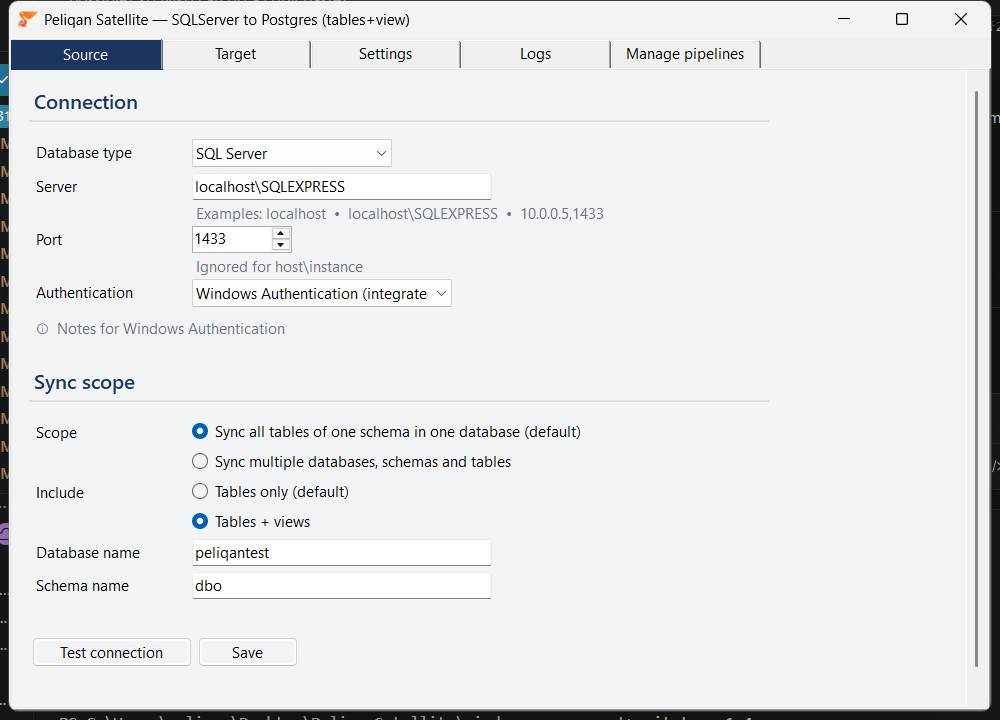
| Field | What to put |
|---|---|
| Database type | SQL Server |
| Server | Examples: localhost, localhost\SQLEXPRESS (named instance), or 10.0.0.5,1433 (IP + port) |
| Port | Ignored when you use a host\instance name — SQL Server resolves the port itself in that case |
| Authentication | SQL Server Authentication (recommended) or Windows Authentication |
| Database name / Schema name | The single database + schema to sync (only shown in the default “single schema” scope — see below) |
services.msc → Peliqan Satellite → Properties → Log On. Otherwise, just use SQL Server Authentication for anything that needs to run unattended.
ODBC
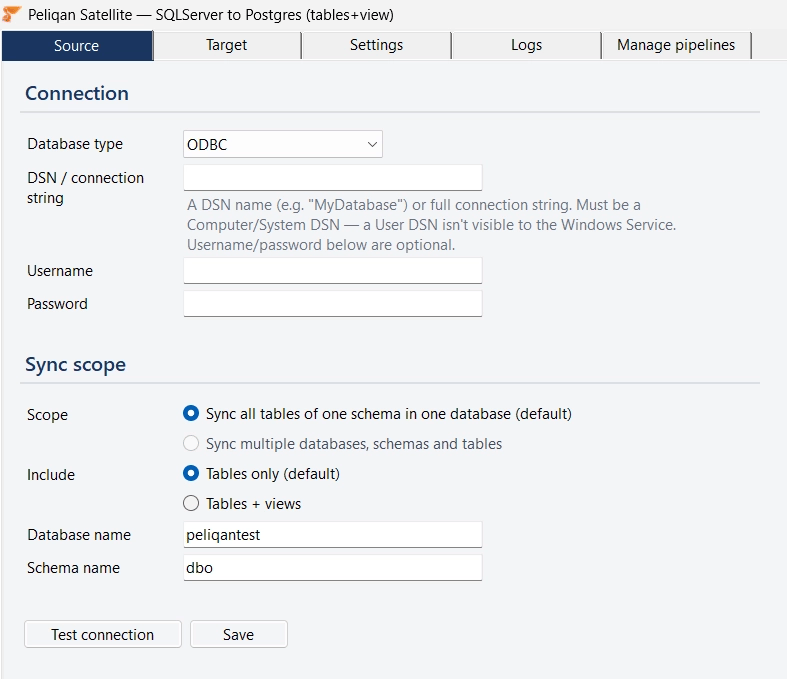
Use this for e.g. Exact Venice (using an Actian Zen DB). Set Database type toODBC and enter a single DSN or connection string, plus optional Username/Password.
- Enter either a plain DSN name (e.g.
MyDatabase) or a full connection string (e.g.Driver={Pervasive ODBC Interface};dbq=MyDatabase;). - The DSN must be a Computer/System DSN, not a User DSN. Note: a User DSN isn’t visible to the Windows Service, so scheduled syncs would fail to find it even though manual tests from the UI work fine.
- Username/Password are optional. If the DSN itself already stores credentials (common for e.g. Exact Venice/Actian Zen setups), leave them blank.
Sync scope: one schema vs. everything
Sync scope “one database”
By default the agent syncs one schema in one database — just fill in Database name + Schema name and you’re done.Sync scope “multiple databases”
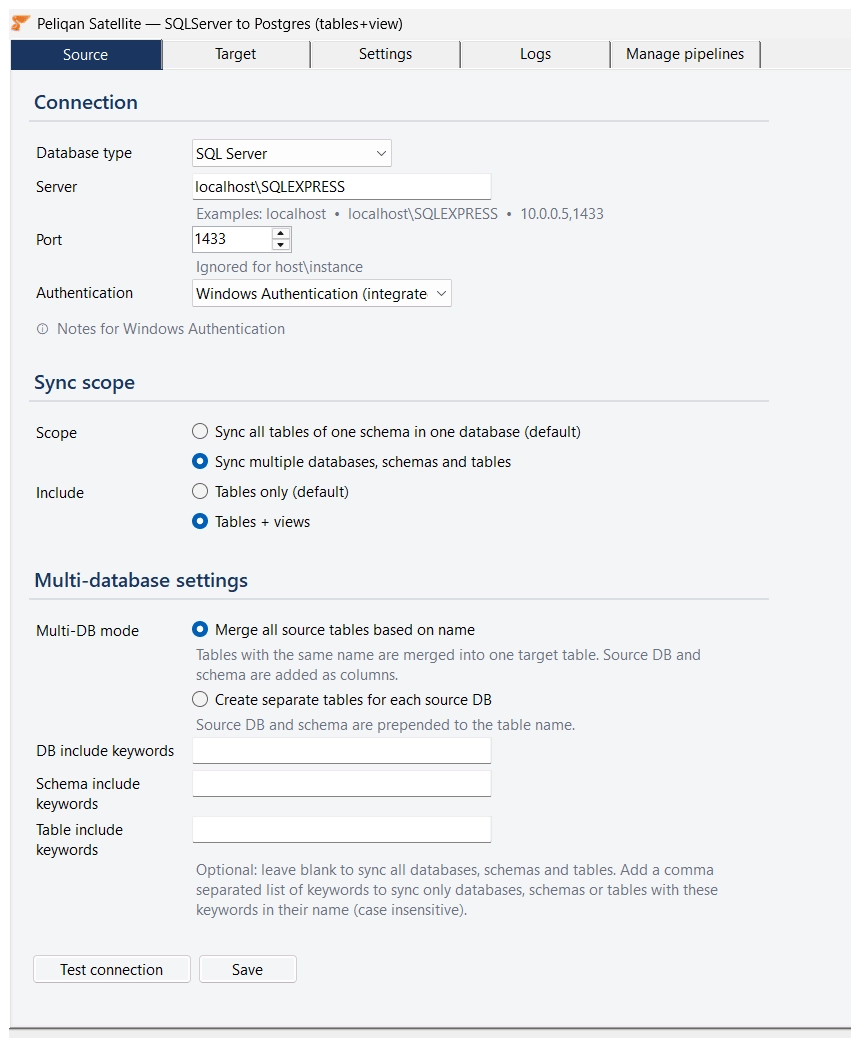
Switch to “Sync multiple databases, schemas and tables” when you need the agent to discover multiple databases/schemas/tables on its own. This is the mode various accounting-software integration uses (Expert/M, Adsolut), since those products create a separate database per end-customer. In this mode you get three include keyword fields (all optional, all comma-separated, all case-insensitive substring matches):- DB include keywords — leave blank to scan every database on the server; or list keywords to only include databases whose name contains one of them.
- Schema include keywords — same idea, scoped to schemas within each matched database.
- Table include keywords — same idea, scoped to tables within each matched schema.
- The agent connects to the server and lists every database it can see.
- It keeps only the databases matching DB include keywords (or all of them, if that field is blank).
- For each matching database, it lists all schemas and keeps only the ones matching Schema include keywords.
- For each matching schema, it lists all tables (and views too, if “Include views” is on) and keeps only the ones matching Table include keywords.
- It combines the matched tables across every database/schema and applies the Merge/Separate setting below to decide how same-named tables land in the target.
- Newly discovered tables are added to this pipeline’s table mappings automatically — nothing needs to be added by hand.
- Merge all source tables based on name — same-named tables across different databases get merged into one target table, with the source DB/schema added as extra columns. This is what Expert/M, Adsolut etc. use, since they create one DB per customer/dossier but the table structure is identical across dossiers.
- Create separate tables for each source DB — keeps every source database’s tables completely separate in the target, with the DB/schema prepended to the table name instead.
Target tab — where the data goes
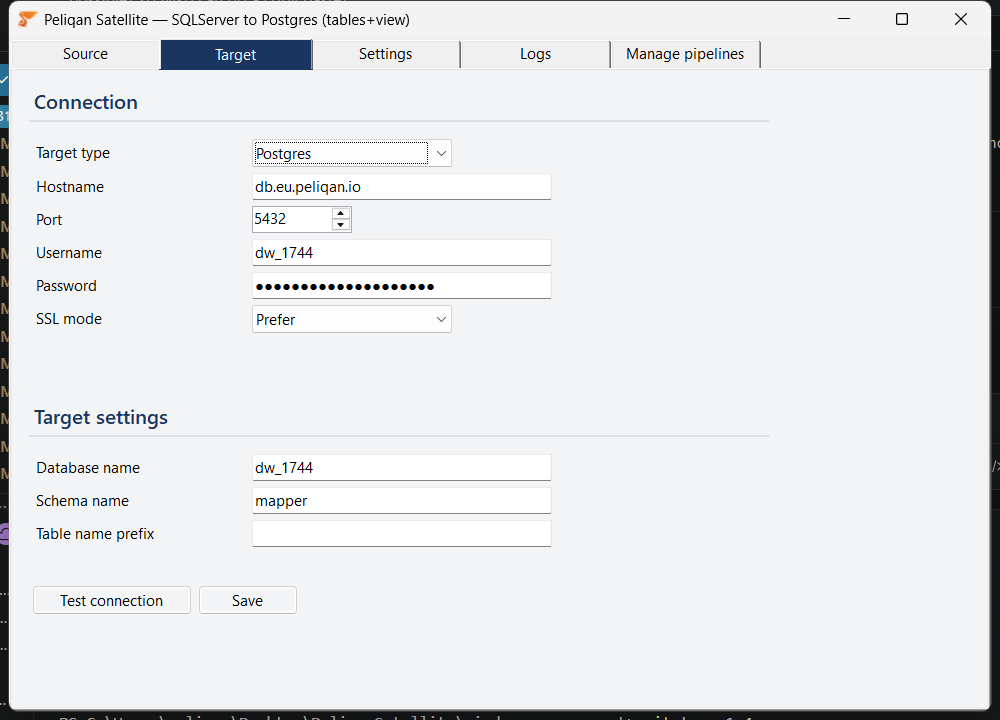
Get the connection details from your Peliqan account, under Connections → your data warehouse’s connection card. For additional security, ask Peliqan support for a dedicated DB user scoped to write access on just one target schema, rather than reusing a shared admin user.Postgres data warehouse
You can copy the details of your Peliqan Postgres data warehouse from the Connection Card under Connections: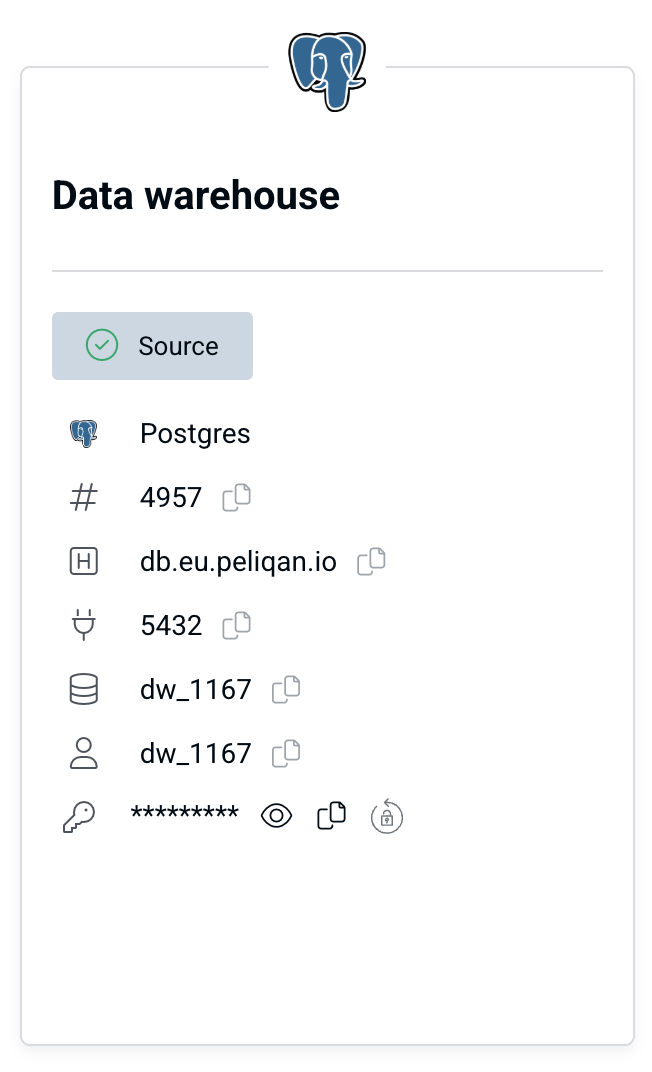
BigQuery data warehouse
You can copy the details of your Peliqan Bigquery data warehouse from the Connection Card under Connections in Peliqan. Hover over the key field (which has the “key” icon), and click the copy icon, in order to copy the service account JSON key. Paste it in the Peliqan Satellite window (see below):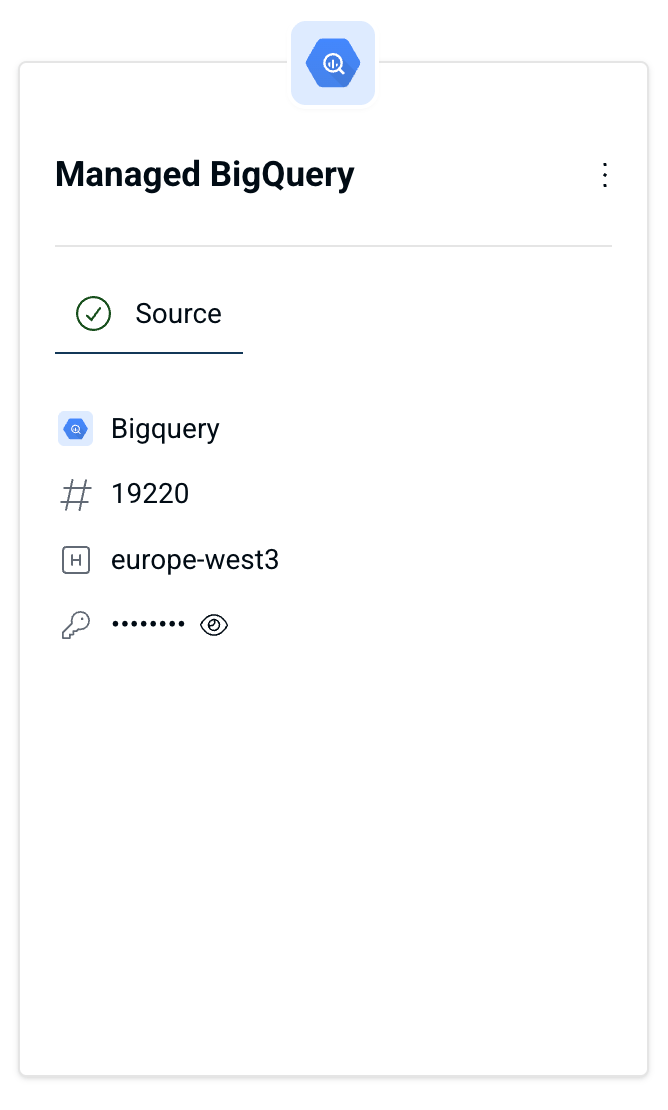
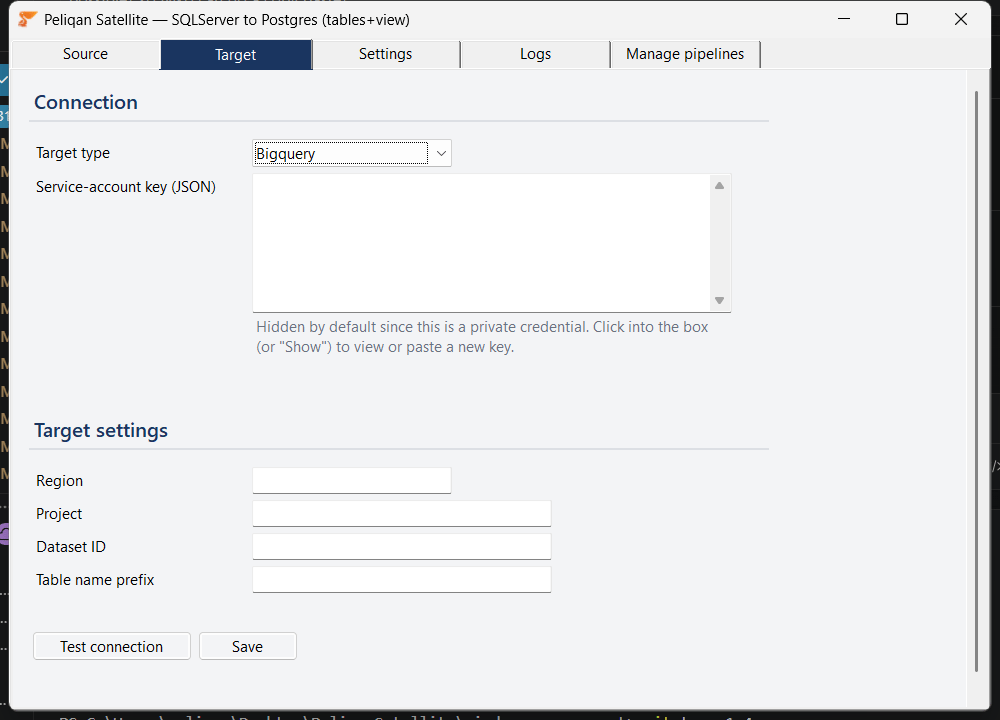
For an external Bigquery data warehouse (not provisioned by Peliqan), make sure to create an IAM user with following roles:
roles/bigquery.dataEditor: granted at dataset or project levelroles/bigquery.jobUser: granted at the project level since jobs (queries) run at this level
Settings tab — schedule and options
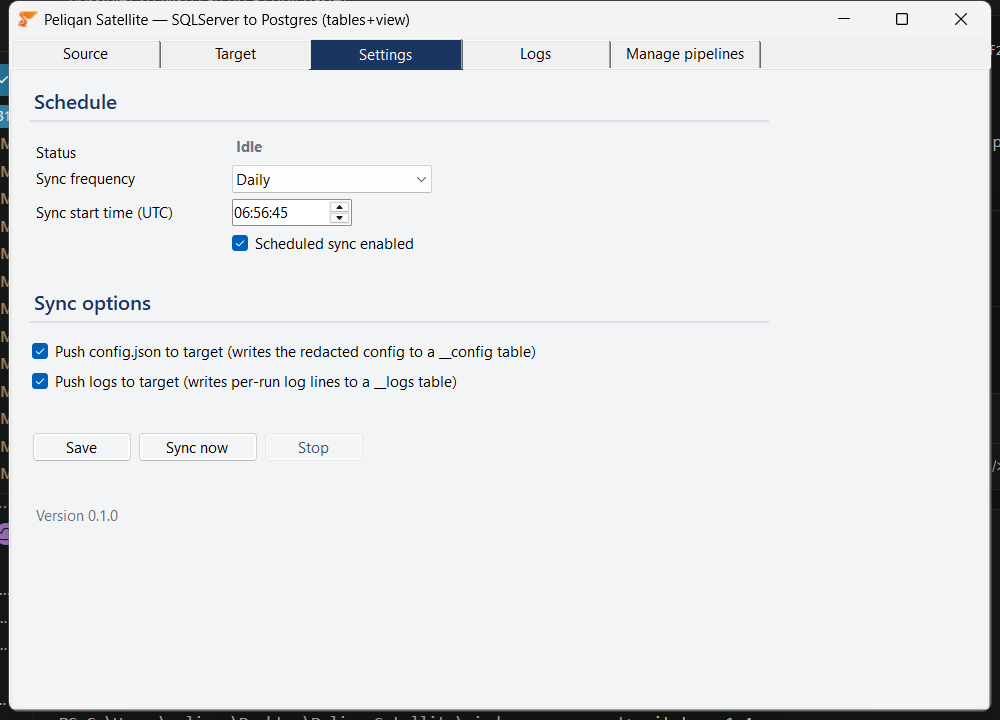
Sync now / Stop trigger or cancel a run for this pipeline immediately, independent of the schedule.
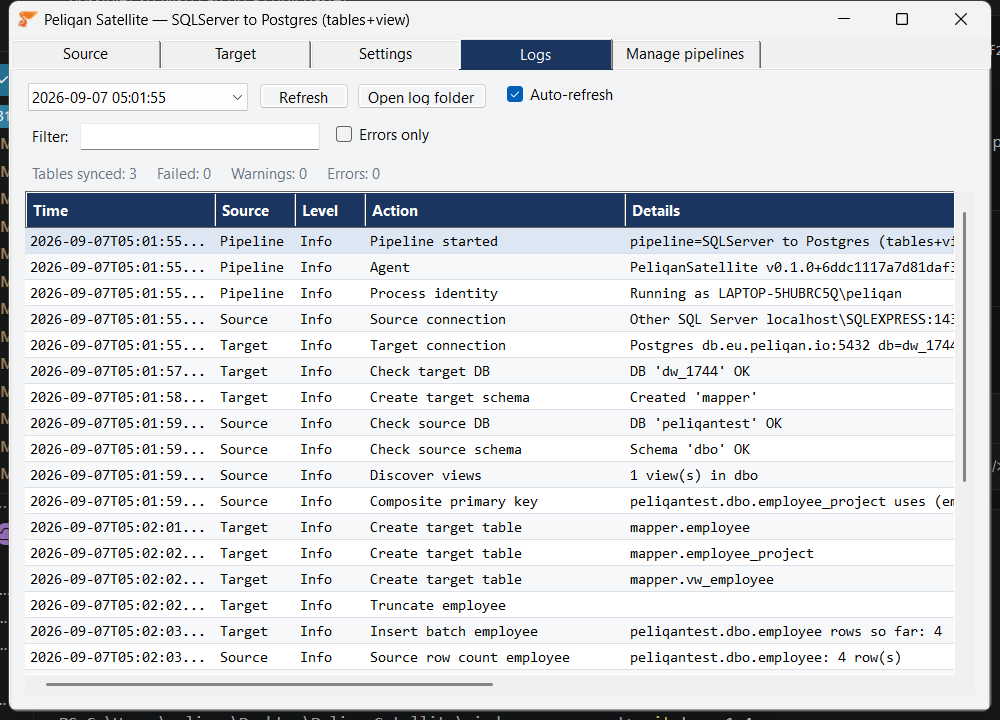
Logs tab — see what happened
Manage pipelines tab — running more than one pipeline
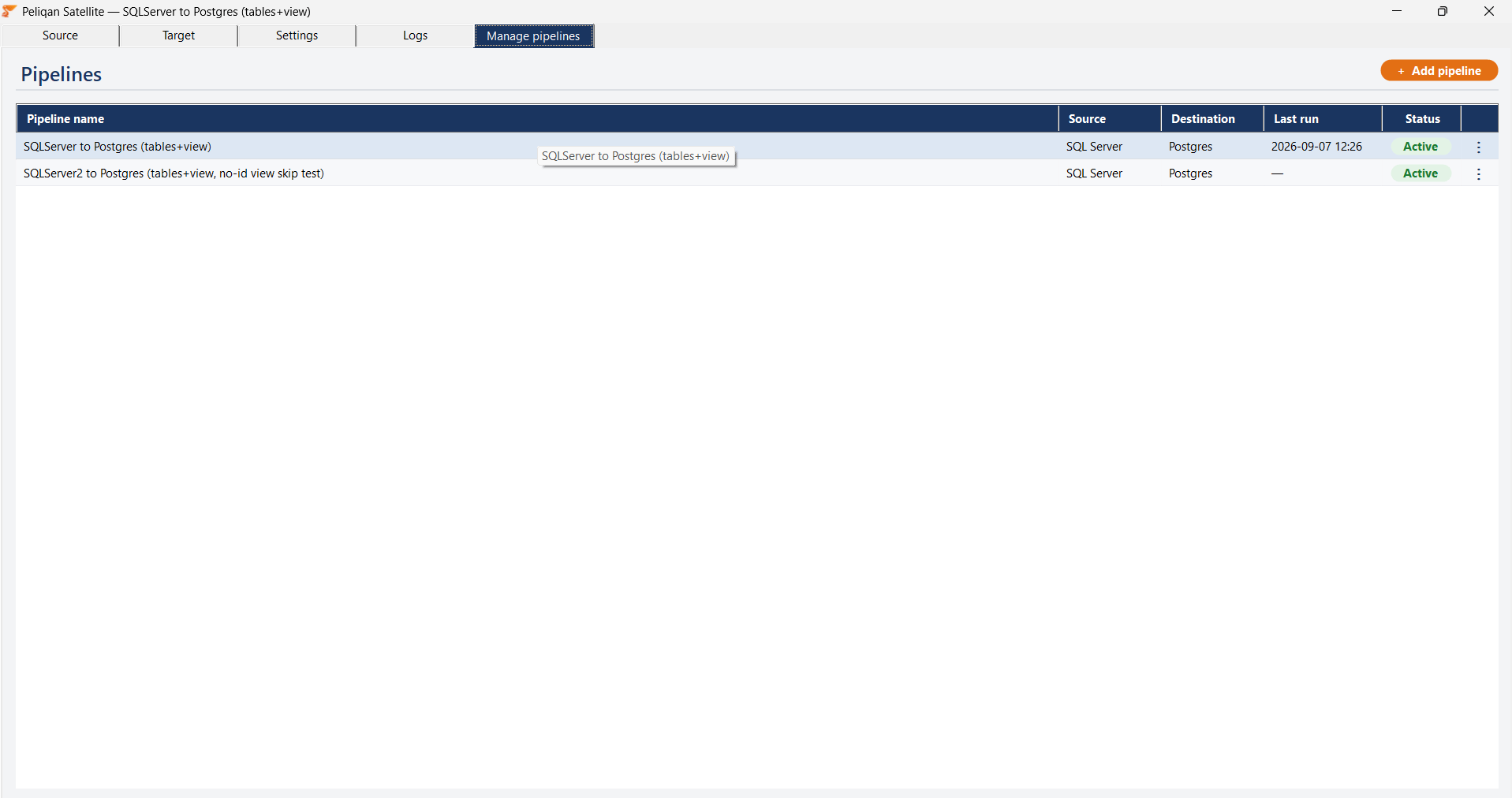
- Rename and Delete are both blocked while that specific pipeline is actively syncing — stop it first.
- Active / Inactive reuses the same “Scheduled sync enabled” flag from the Settings tab — it’s the same switch, shown in two places for convenience.
- Clicking a row switches you to that pipeline everywhere else in the app (Source/Target/Settings/Logs all follow whichever pipeline is currently selected here).
Don’t reuse the same schema/dataset across pipelines
This is a warning only — it won’t block you from saving — but treat it as something to fix immediately, not something to ignore. Give each pipeline its own schema/dataset.Advanced: setting up many pipelines at once by editing config.json directly
If you need to set up a large number of near-identical pipelines (e.g. one per end-customer dossier, each just pointing at a different DSN with a different target schema), clicking through the UI once per pipeline doesn’t scale well. There’s a faster path: The agent’s entire configuration is one plain JSON file:source, target, settings, and table_mappings:
- Passwords can be plain text. The agent auto-encrypts every secret field the next time anything saves that pipeline (via the UI, or via its own first sync run) — you don’t need to pre-encrypt anything yourself.
- No new pipelines need
table_mappingsfilled in. Leave it as[]— the agent discovers the schema automatically on first sync, exactly like a pipeline created through the UI. - The target schema/dataset gets created automatically on first sync if it doesn’t already exist — no manual DB setup needed on the target side either.
- Malformed JSON fails safely. If the file doesn’t parse, the agent backs up the bad file (as
config.json.corrupt-<timestamp>) and shows a clear error instead of silently wiping your configuration. - What it won’t catch: valid JSON with a typo’d value (e.g. a wrong hostname) loads without any error — it only surfaces when that specific pipeline’s first sync actually runs and tries to connect. Spot-check a few pipelines after a bulk import rather than assuming everything is correct just because the agent started cleanly.
config.json, start it again (or just reopen the desktop app — either picks up the file fresh). Always keep a backup of the previous file until you’ve confirmed the new one works.
FAQ
What are the alternatives to this for on-prem connectivity? A VPN connection (e.g. Site to Site VPN) is the main alternative. Can Peliqan Satellite write to the on-prem database? No — it only reads data (SELECT only) and sends it to your Peliqan cloud data warehouse.
Do I need to open my firewall?
Only outbound: the agent needs to reach the Peliqan cloud data warehouse (Postgres or BigQuery). No inbound connections from the public internet are required.
Can it conflict with other tools using the same database (e.g. backup software)?
No — it only ever runs SELECT queries and never takes locks on tables.
Can I have two pipelines write to the same target at once?
No — each pipeline has exactly one source and one target; there’s no such thing as two simultaneous targets for one pipeline. If you need the same data in two places, or two different sources feeding the same kind of target, that’s two separate pipelines — just make sure they don’t share the same target schema/dataset (see the warning above).
Current limitations
- No incremental sync — every run does a full truncate + reload.
- Supported sources: SQL Server and ODBC (covers on-prem accounting/ERP software such as Expert/M, Adsolut, Plenion, Exact Venice).
- Supported targets: Postgres and BigQuery.
Releases
v1.7: Support for tables without PK + “exclude” options- Reduced memory usage during large multi-database syncs.
- Support for source tables without primary key (PK)
- Ability to exclude certain DBs, schemas and tables based on name or keyword (before we only had “include” options)
- Fixed BigQuery quota errors caused by redundant schema checks during log flushing.
- Capped the in-memory log buffer to prevent unbounded memory growth.
- Fixed out-of-memory crash for large customers by splitting table-mapping data out of one config file into per-database files.
- Fixed a bug where an empty or corrupted config file could silently wipe out pipeline settings instead of failing safely.
- Moved BigQuery config/log writes also to a streaming write method.
- Improved UI settings.
- Warning on using same schema in 2 pipelines.
- Improved logging of config (keep history of config).
- Added support to configure a target for specific partners using a code.
- Discovering and mapping tables now happens in one batch per source database instead of per table.
- Copying data now streams each table over a single connection instead of reconnecting for every batch, which improves speed.
- The sync log now streams to the target’s log table incrementally during table discovery, not just at the end — so a long-running sync is visible in progress instead of appearing silent for hours.
- Fixed a bug where a table that failed during discovery could make the whole run silently report “0 failed” even though something genuinely went wrong.
- Added support for connecting to source DBs using ODBC (using DSN or DSN-less connection string), used for e.g. Actian Zen DB (Exact Venice).
- Fixed an issue affecting sync timing accuracy and a BigQuery key-field handling bug.
- Improved memory handling (avoid out of memory error).
- Support added for composite keys
- UI improvements
- Support for SQL Server as source DB
- Support for Postgres and Bigquery as target DWH