You can configure webhooks from ELT pipelines running in Peliqan, to receive events when pipelines completed, failed etc. This is useful in combination with embedding and the Partner API, to integrate Peliqan’s ELT connectivity into your own platform.
Configuration
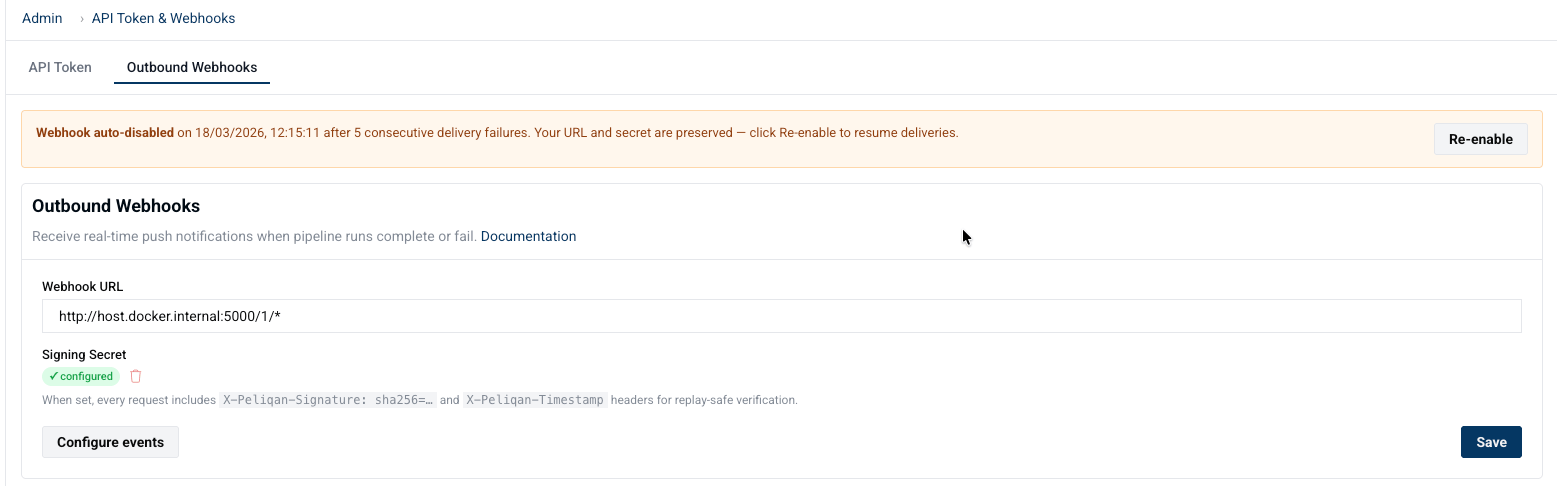
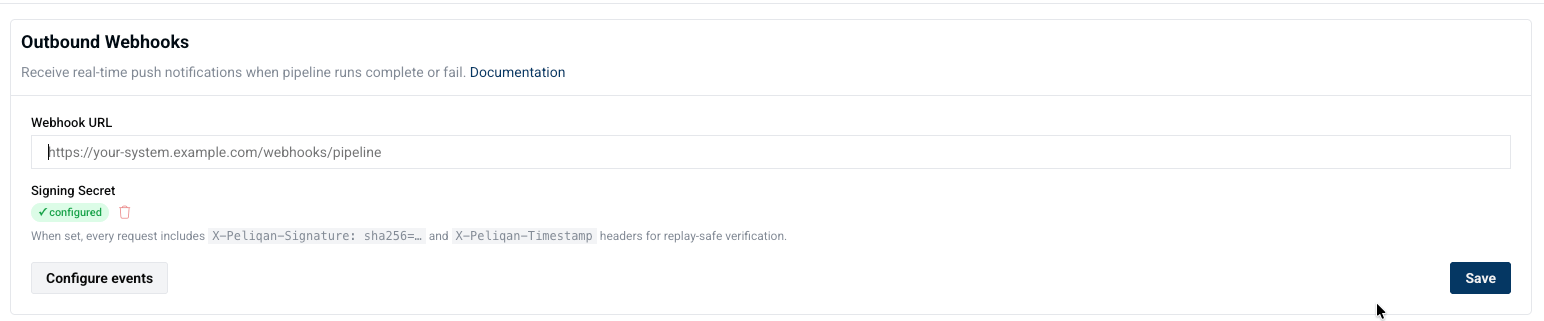
Navigate to Settings → API Token & Webhooks → Outbound Webhooks to set up your endpoint to receive webhook events from Peliqan pipelines.
Field | Description |
Webhook URL | Your HTTPS endpoint. Must be publicly reachable. |
Signing Secret | Random string you generate — used to sign every request with HMAC-SHA256. Optional but strongly recommended. |
Generate a strong secret:
openssl rand -hex 32Subscriptions: Event subscriptions default to all events. You can restrict to a specific subset as well in the UI
Event Types
Connection Events
Fired when data connections are created or deleted.
These use a slightly different payload shape — see the Payload section below.
Event type | When it fires |
connection_added | A new data connection has been created on the account. |
connection_removed | A data connection has been deleted from the account. |
Pipeline Events
Fired by Peliqan's pipeline runner as a sync progresses from start to a terminal state.
Event type | Run status | When it fires |
pipeline_run_started | RUNNING | The Peliqan worker picks up the run and execution begins. Fires once per run, before any data is fetched. |
pipeline_run_completed | COMPLETED | All enabled streams synced to the destination without any row-level errors. |
pipeline_run_completed_with_errors | COMPLETED_WITH_ERRORS | Sync finished but at least one stream had row-level write failures. Data was partially synced — other streams may be complete. |
pipeline_run_internal_error | INTERNAL_ERROR | Peliqan's own task runner crashed — unhandled exception inside the pipeline orchestrator, not inside the connector. |
pipeline_run_error | ERROR | The Singer tap/connector process exited with a non-zero code or raised an exception during execution. |
pipeline_run_remote_error | REMOTE_ERROR | The remote data source returned an error — e.g. database connection refused, credentials rejected, or the source API returned a 5xx. |
pipeline_run_killed | KILLED | A user manually cancelled the run via the UI or API. |
pipeline_run_killed_for_system_upgrade | KILLED_FOR_SYSTEM_UPGRADE | Peliqan stopped the run automatically to perform a rolling system upgrade. Safe to re-trigger; no data corruption occurs. |
pipeline_run_timeout | TIMEOUT | The run exceeded the maximum execution duration configured for the connector. The process was force-terminated. |
pipeline_run_rate_limited | RATE_LIMITED | The source API returned an HTTP 429 or a connector-specific rate limit that cannot be retried within the allowed window. |
pipeline_run_no_streams | NO_STREAMS | The connector found no streams/tables to sync — either none are enabled on the connection, or discovery returned an empty catalog. |
pipeline_run_failed | (unexpected) | Catch-all for any terminal status not covered above. Should not occur in normal operation. |
Typical event sequence for a normal scheduled run:
pipeline_run_started → pipeline_run_completed
Payload
Every webhook event sends a JSON body with the following shape:
{
"account_id": 123,
"external_account_id": "your-customer-id",
"event_type": "pipeline_run_completed",
"timestamp": "2026-03-13T05:40:00.000Z",
"connection_id": 42,
"run_id": 8872,
"run_status": "COMPLETED",
"run_source": "SCHEDULER",
"metadata": {}
}Field | Type | Notes |
account_id | integer | Peliqan account ID |
external_account_id | string | Your identifier for the account; "" if not set |
event_type | string | See event types above |
timestamp | string | ISO-8601 UTC — time the event was dispatched by Peliqan |
connection_id | integer or null | Connector/data-source ID |
run_id | integer or null | Pipeline run ID |
run_status | string or null | Exact PipelineRuns.status value at the time the event fired |
run_source | string or null | MANUAL, SCHEDULER, SCRIPT, or SALTEDGE_REFRESH |
metadata | object | {} for pipeline events; {"connectortype": {...}} for connector-specific events |
HTTP Headers
Every request includes the following headers:
Content-Type: application/json
User-Agent: Peliqan-Webhooks/1.0
X-Peliqan-Event: pipeline_run_completed
X-Peliqan-Timestamp: 1741839600
X-Peliqan-Signature: sha256=3d9e2f1a... (only when a secret is configured)Signature Verification
When a signing secret is configured, Peliqan computes:
HMAC-SHA256(secret, "{unix_timestamp}.{canonical_json}")canonical_json is the body serialized with keys sorted alphabetically, compact (no extra whitespace). The timestamp is included in the signed string for replay protection — reject requests where X-Peliqan-Timestamp is more than 300 seconds old.
Response & Retry
Your endpoint must return a 2xx status code within 10 seconds. Any non-2xx response or network error (connection refused, DNS failure, TLS error, timeout) is treated as a failure.
Each event gets up to 4 delivery attempts with exponential backoff:
Attempt | Delay |
1st | Immediate |
2nd | 1 s |
3rd | 2 s |
4th (final) | 4 s |
All 4 attempts use the same WebhookCall log row — the attempt counter increments on each retry so you can see the full history in Settings → Webhooks → Call Log.
If all 4 attempts fail, the event is permanently marked failed and the account's consecutive failure counter increments by 1.
Auto-disable: After 5 consecutive events each exhausting all retries, Peliqan:
- Sets
webhook_disabled_aton the account — all further webhook dispatches are skipped immediately (no HTTP calls made) - Sends an alert email to the account's configured alert recipients
- Preserves your URL and secret — nothing is cleared

Re-enable via Settings → API Token & Webhooks → Outbound Webhooks → Re-enable. Any single successful delivery resets the consecutive failure counter to 0.
SSRF protection: In production, Peliqan uses theadvocatelibrary to block webhook URLs that resolve to private or reserved IP ranges (RFC 1918, loopback, link-local, etc.). These are rejected immediately without a network call and logged as"Blocked — the webhook URL points to a private or reserved IP address".
Call log retention: The most recent 500 WebhookCall records are kept per account. Older entries are trimmed automatically after each delivery.Idempotency
Retries and the occasional duplicate delivery mean your endpoint may receive the same event more than once.
Scenario | Deduplication key |
Pipeline events | (run_id, event_type) |
SaltEdge events ( run_id is null) | (metadata.saltedge.connection_id, event_type, timestamp) |
Use these keys to deduplicate or perform idempotent upserts on your side.
Example: Simple Webhook Endpoint (Python)
How to test
- Create a webhook endpoint in Peliqan
- Update the URL and secret in the Settings → API Token & Webhooks → Outbound Webhook
- Trigger an event (e.g., run a pipeline)
- Check logs to confirm:
- Signature verification passes
- Event payload is received correctly