
Configure AI usage

Configure data access and AI usage (including Peliqan’s MCP Server): in Peliqan go to Settings > Security > Peliqan AI and MCP. Choose between one of the options:
  • AI turned off
  • AI turned on with access to metadata
  • AI turned on with access to metadata and data in your DWH tables
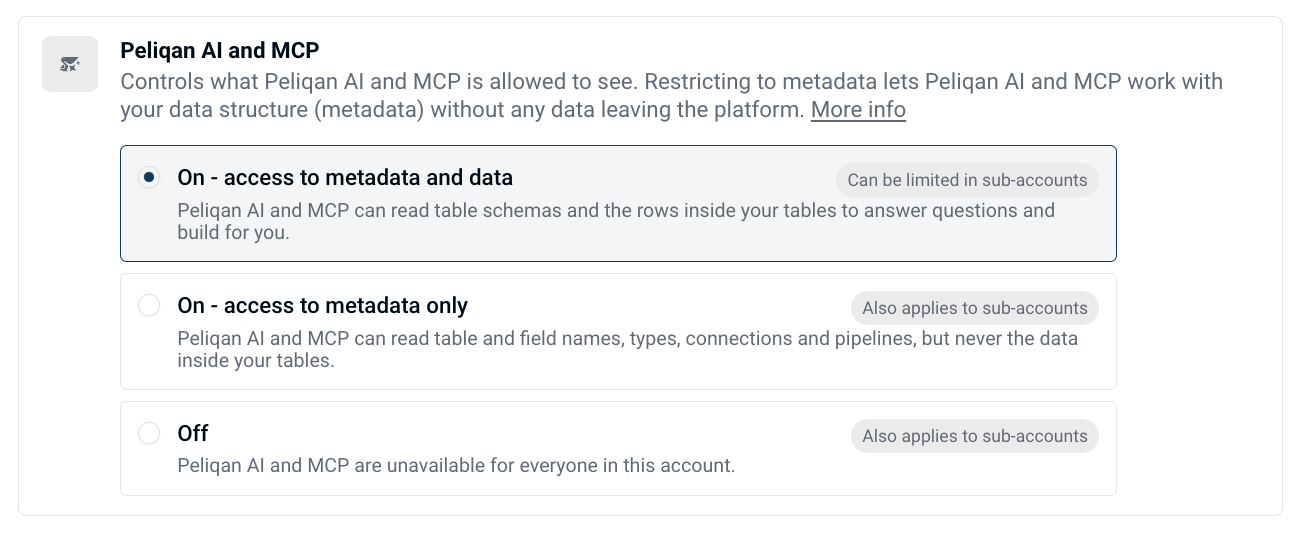
Ai Data Access Config

AI in Peliqan

Peliqan AI

An AI assistant that helps to use the Peliqan platform, write queries, build Data Apps, build Machine apps, analyze pipelines and errors and more.

Peliqan MCP

Use the Peliqan MCP Server to connect Peliqan in your AI Client such as ChatGPT, Claude, Gemini, Copilot etc. More info: Peliqan MCP Server

AI in Data apps

Use Peliqan’s AI connectors to Claude, Gemini, OpenAI, Jev etc. to use AI in your own Data Apps and Machine apps, for example to do inference.

RAG

Implement RAG pipelines in Peliqan for unstructured data. More info: Implement RAG