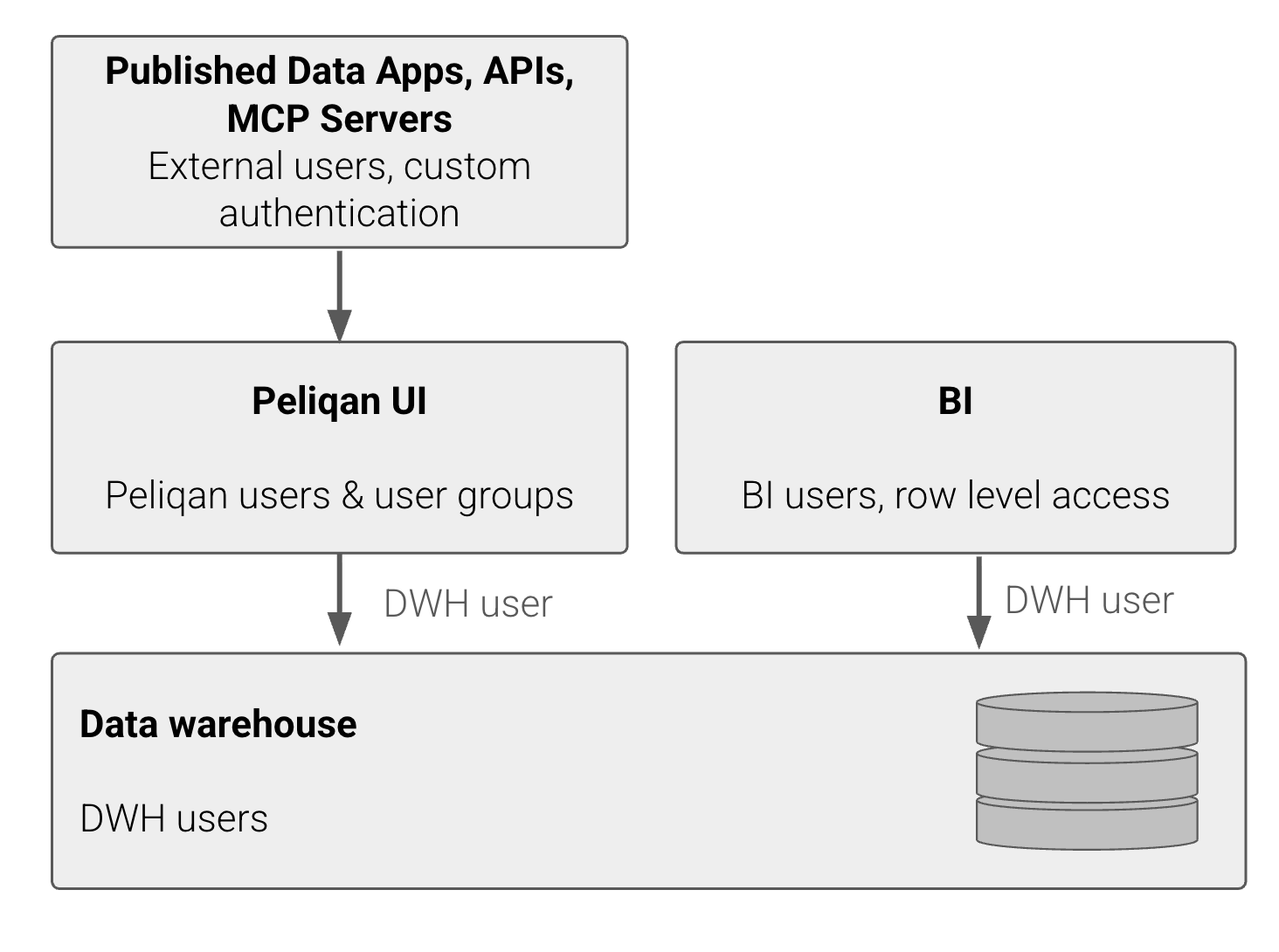
- Peliqan UI
- Data warehouse layer
- BI layer
- Published Data apps, API’s and MCP Servers layer
Permissions in the Peliqan UI
Groups
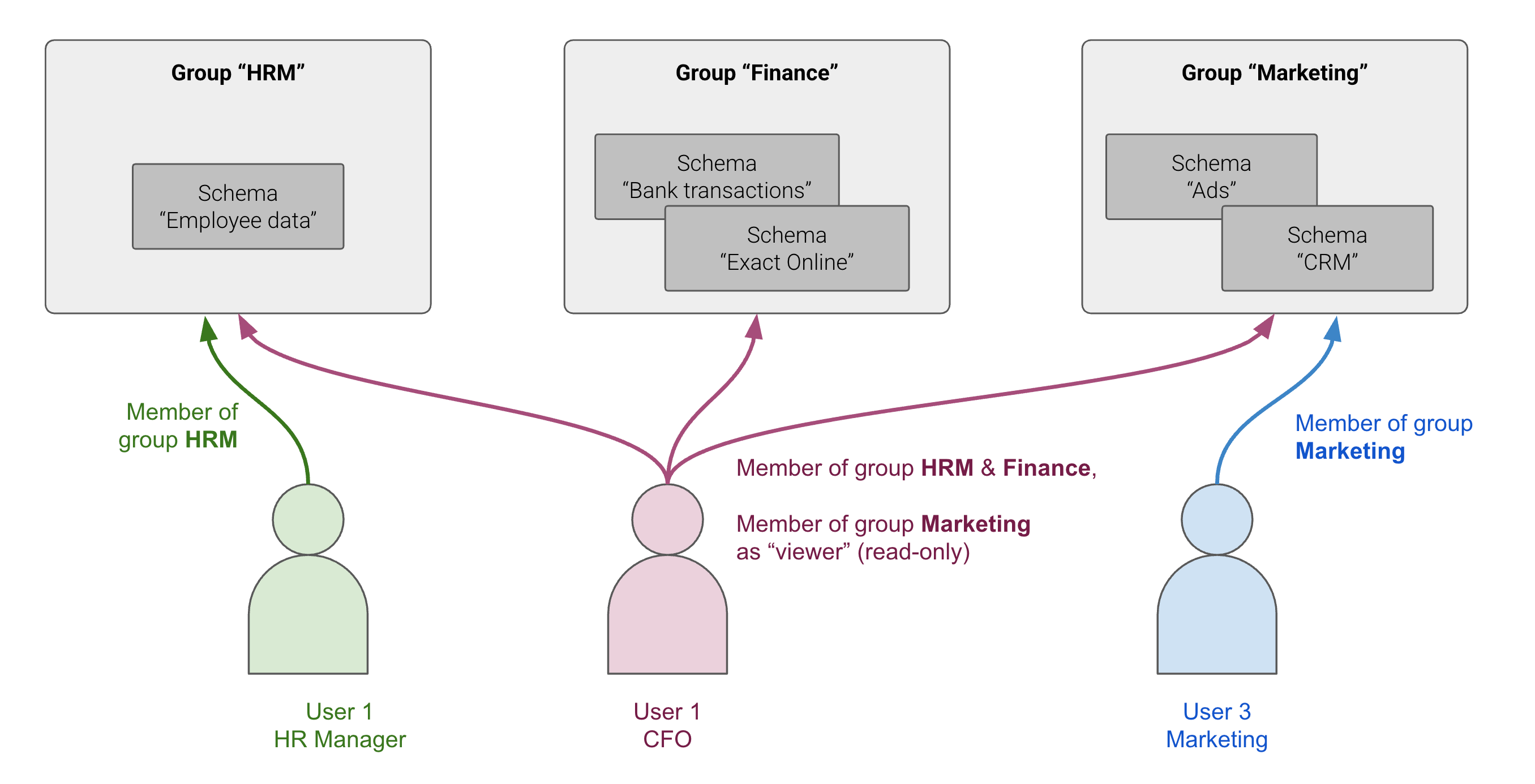
The Peliqan UI user permission model is based on groups. You can manage Users and Groups in Peliqan under Admin. Users can be added as member to multiple groups. Users have a role within each group. Available group roles:- Admin:
- Can access and edit resources in the group (schemas, connections, data apps etc.)
- Can invite new users to group (this will create a new user and make them member of the group)
- Can change role of users within group
- Member:
- Can access and edit resources in the group (schemas, connections, data apps etc.)
- Viewer:
- Has read-only access to resources in the group
- Schemas (collection of tables within a DB or DWH)
- ELT Connections
- Data apps
Account admins
Account admins have access to following features in Peliqan:- Get API key of the account
- Configure Account Security Settings
- Configure AI
- Create, invite and edit users
- Create new groups and add users to groups
- Partner settings
- Data app settings (e.g. install Python pip modules)
- Billing (account owner only)
Only Account Owners can turn normal users into Account Admins.
Account owner
The account owner receives billing emails. The account owner also has all the permissions of an Account Admin. Only the account owner can add and remove Account Admins.Permission matrix
Peliqan accounts & sub accounts
Access to data and other resources, can also be managed by using separate Peliqan accounts and sharing data between accounts. For example, Partner accounts in Peliqan can create sub accounts per end-customer. Sub accounts can also be used to provide controlled access to individual teams, divisions or other groups of users. More info on managing sub accounts: Manage sub accounts Customers with Enterprise licences can contact Peliqan Support, to request the setup of a separate Peliqan account for testing (dev), staging and production. More info on sharing data between Peliqan accounts: Sync data between parent & sub accountsLogging in to sub accounts
Every user in a Partner Account has access to the sub accounts via the “Login as” button, except if Support access is disabled inside the sub account.Every user in the partner account can create new sub accounts.After logging in to the sub account with the “Login as” feature, the user will be an Account Admin in the sub account (full access to all features in the sub account).
support+<sub_account_name>+<sub_account_id>@<domain.com> (e.g. your whitelabel domain or peliqan.io), for example for customer ACME from MySaaS.com this will become support+acme+123@mysaas.com.
Permissions in the Peliqan AI assistant
Every user has access to the Peliqan AI Assistant. The AI Assistant has access to all metadata of the entire account, e.g. the list of all tables (regardless of the groups). However, access to the actual tables is still governed by the groups. You can disable the AI assistant under Admin > Account settings. Peliqan uses OpenAI in its AI assistant. Metadata is sent to the LLM but not the actual data.Permissions in the data warehouse layer
You can create separate users in the data warehouse for controlled access to datasets in your data warehouse. This is useful to enforce access control at the data warehouse level, so that it also applies to any data consumer connected to the DWH (e.g. a BI tool).- Peliqan built-in data warehouse: contact Peliqan Support
- External data warehouse (Bigquery, Snowflake etc.): configure users in the UI of your data warehouse