Implement app login using the Peliqan Secret Store
In order to implement user login into your Streamlit app on Peliqan, you can use the Peliqan Secret Store to store credentials per user in a secure manner, and you can validate credentials in your app.
In the below example we add a new Secret Store for each user of the app. For example if you have 5 users, you will add 5 Secret Stores.
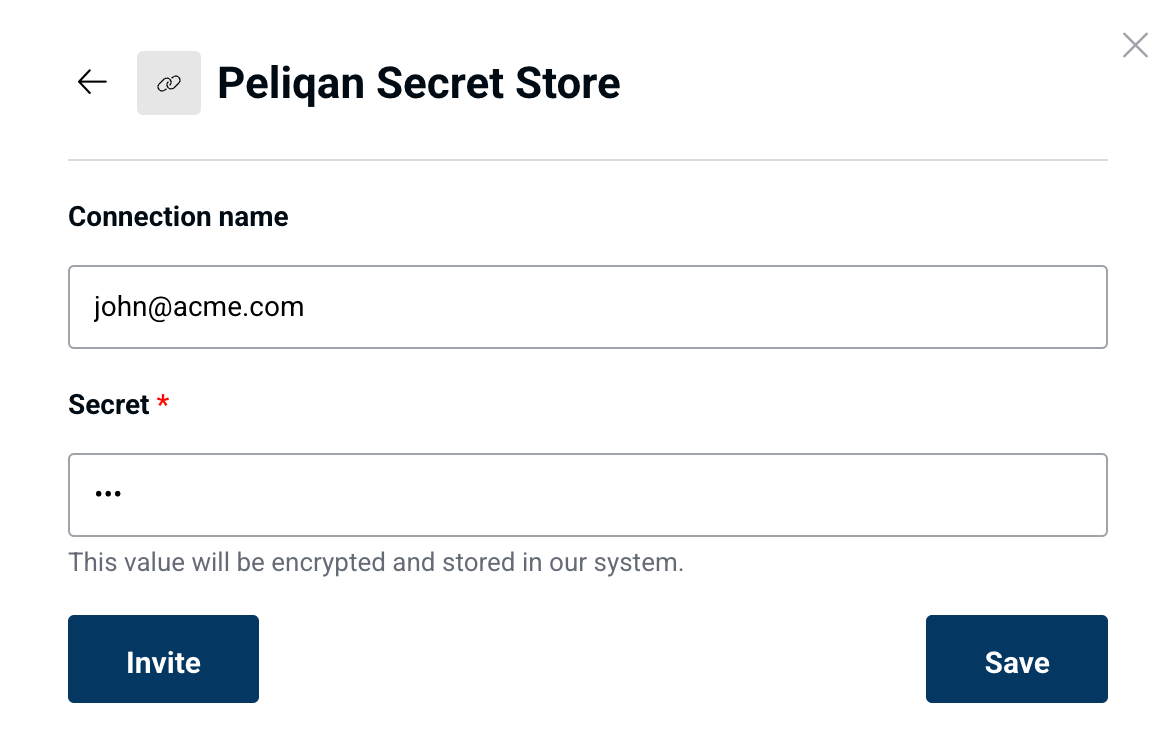
Step 1: Create a username and password and save it in a Secret Store. In Peliqan, go to “Connections”, click on “Add new connection” and select “Secret Store”. Give it a name, this will be the username (login) and enter a password for the Secret.
Step 2: Use pq.get_secret('<connection_name>')to verify login credentials in your app where the connection name is the user login.
Example code:
SSO with Microsoft Azure Entra
Here are the steps to enable Single Sign On in your Streamlit app on Peliqan using Microsoft accounts from Azure Entra.
Steps to follow in Azure
In Azure, go to "Enterprise applications".
Click on "+ Create your own application".
Enter a name (e.g. "Peliqan SAML Streamlit") and select "Integrate any other application you don't find in the gallery (Non-gallery)".
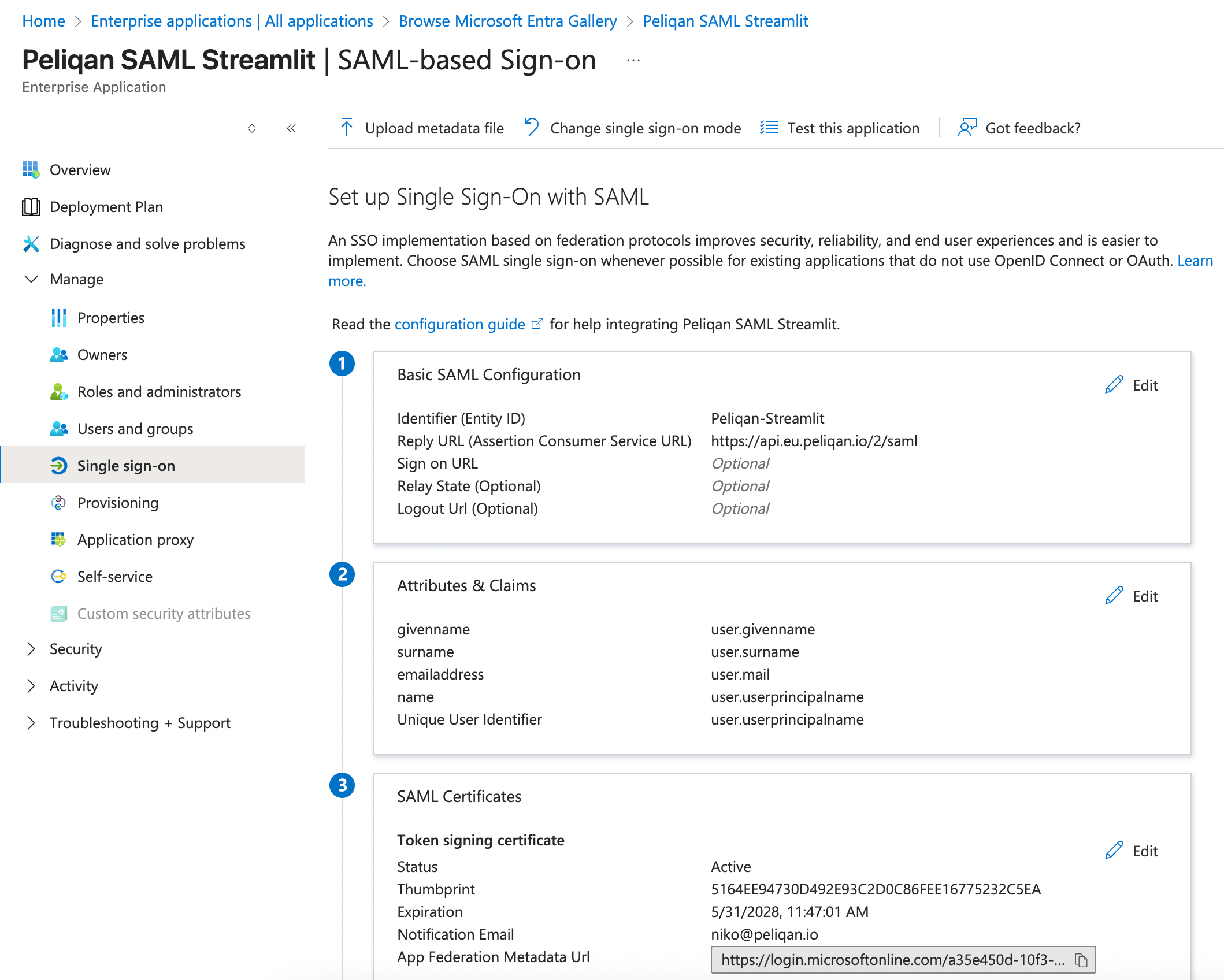
In the app details, go to Manage > Single sign-on.
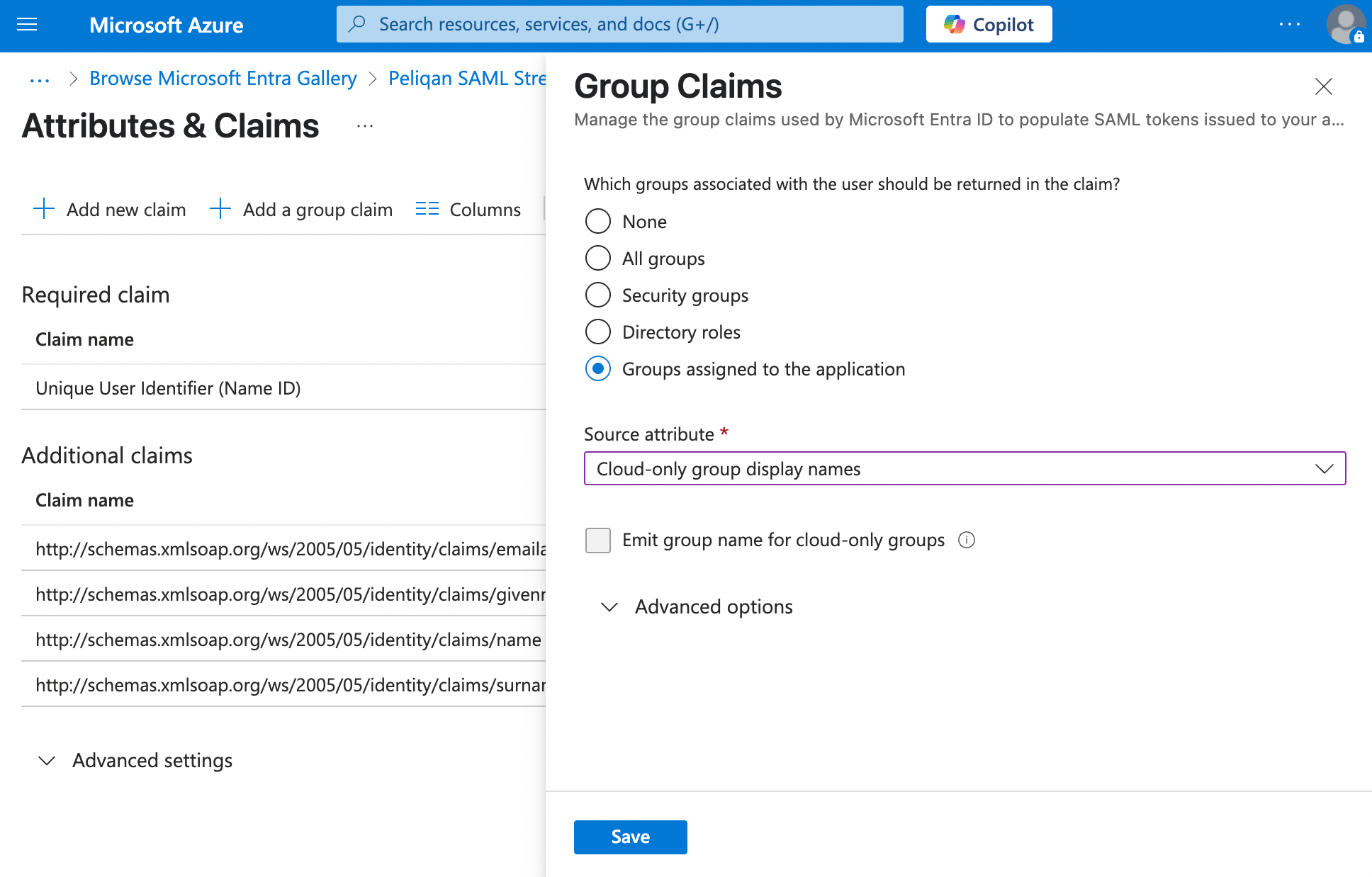
Under “Source attribute”, select “Cloud-only group display names”.
Under "Users and groups":
Click on "+ Add user/group".
Select all groups that you want to use in the SAML login and add them to your app.
You will also need your Azure Tenant ID:
In the Azure portal in the left menu, select Microsoft Entra ID (used to be called Azure Active Directory).
In the Overview blade, under Tenant information, you’ll see:
Tenant name
Tenant ID (a guid) → Copy this and paste it in the SSO script below in Peliqan
Steps to take in Peliqan
Add 2 apps:
Streamlit app with login, named e.g. "App with SSO login"
API handler to receive redirect (reply) after login, named e.g. "SAML Redirect API handler"
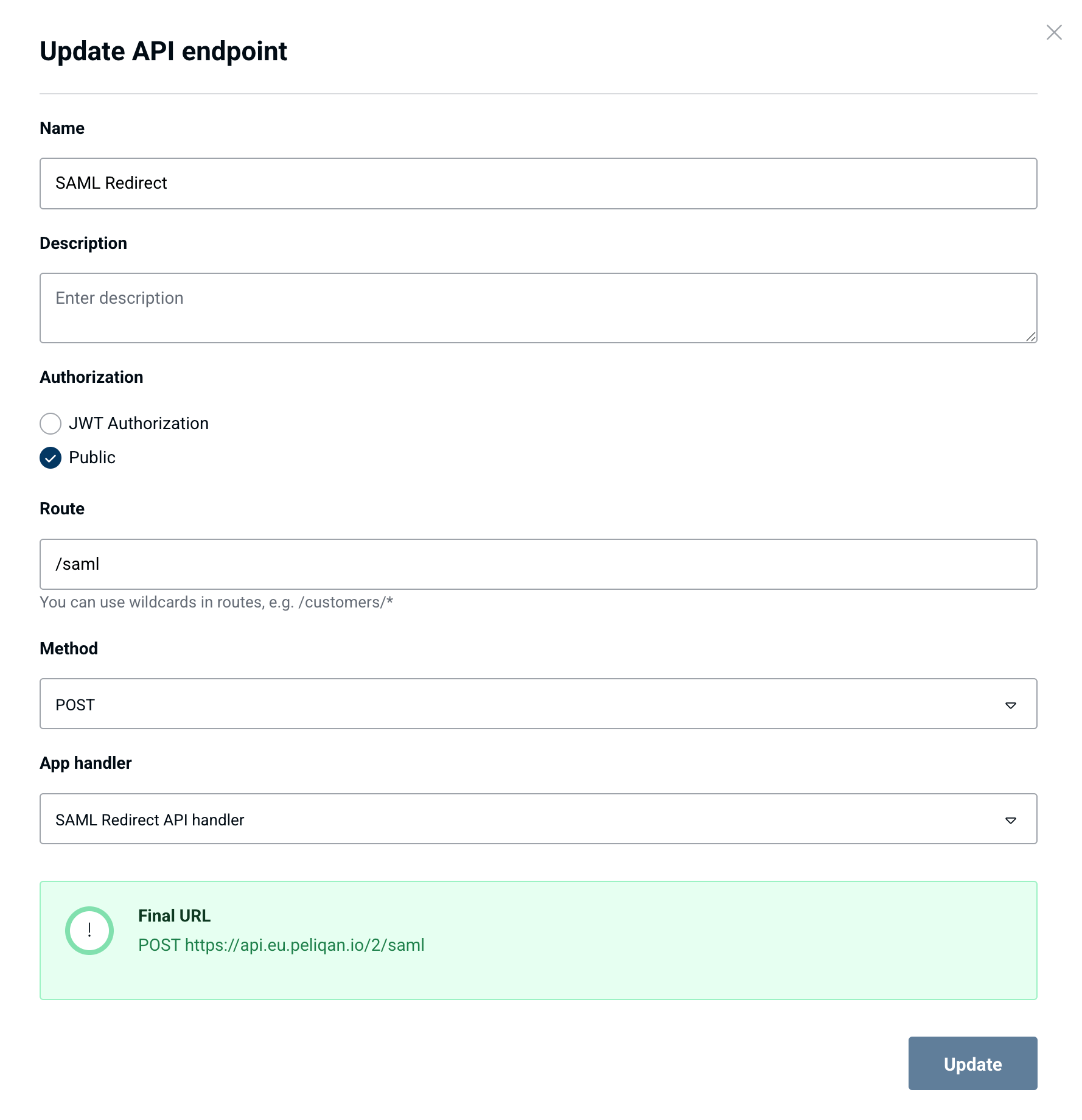
Add an API endpoint:
Name e.g. "SAML Redirect"
Authorization: Public
Path, e.g. /saml
Method: POST
App handler: the API handler script from above, e.g. "SAML Redirect API handler"
The URL will be e.g.: https://api.eu.peliqan.io/123/saml
Example configuration:
Note down the URL and configure it as redirect URL in the main app with SAML login.
Also configure this URL in Azure for your app, as the Reply URL (Assertion Consumer Service URL).
Example script with SSO login:
‣
Click here to expand script
Example script to handle SAML reply:
‣
Click here to expand script
Remember logged in users (cookie)
Example script that uses cookies to keep users logged in for e.g. 24 hours:
‣
Click here to expand script
def check_login(login, password):
try:
return pq.get_secret(login) == password
except:
return False
if "logged_in" not in st.session_state:
st.session_state.logged_in = False
# Login form
if not st.session_state.logged_in:
st.title("Login")
with st.form("login_form"):
login = st.text_input("Username")
password = st.text_input("Password", type="password")
submitted = st.form_submit_button("Log In")
if submitted:
if check_login(login, password):
st.session_state.logged_in = True
st.session_state.login = login
st.experimental_rerun()
else:
st.error("Invalid username or password")
# After login
if st.session_state.logged_in:
st.success(f"Welcome %s, you are logged in!" % st.session_state.login)
if st.button("Log out"):
st.session_state.logged_in = False
st.experimental_rerun()
import base64
import zlib
import urllib.parse
from datetime import datetime
import uuid
import time
import streamlit.components.v1 as components
peliqan_account_id = "123"
tenant_id = "a35e450d-xxxx-xxxx-xxxx-4f370161c30c"
reply_acs_url = f"https://api.eu.peliqan.io/{peliqan_account_id}/saml"
identifier_entity_ID = "Peliqan-Streamlit"
def show_log_in():
request_id = "_" + str(uuid.uuid4())
st.session_state["request_id"] = request_id
# add ForceAuthn="true" in <samlp:AuthnRequest> tag
# if you want to show the Microsoft login screen on each login,
# even if user is already logged in (allowing to switch between logins)
authn_request = f"""
<samlp:AuthnRequest xmlns:samlp="urn:oasis:names:tc:SAML:2.0:protocol"
ID="{request_id}" Version="2.0" IssueInstant="{datetime.utcnow().isoformat()}Z"
Destination="https://login.microsoftonline.com/{tenant_id}/saml2"
AssertionConsumerServiceURL="{reply_acs_url}">
<saml:Issuer xmlns:saml="urn:oasis:names:tc:SAML:2.0:assertion">{identifier_entity_ID}</saml:Issuer>
</samlp:AuthnRequest>
"""
deflated = zlib.compress(authn_request.encode("utf-8"))[2:-4]
b64_encoded = base64.b64encode(deflated)
saml_request = urllib.parse.quote_plus(b64_encoded)
redirect_url = f"https://login.microsoftonline.com/{tenant_id}/saml2?SAMLRequest={saml_request}"
if st.button("Log in with your Microsoft account"):
components.html(f"""<script>window.open("{redirect_url}", "_blank");</script>""", height=0)
time.sleep(5) # Important, otherwise new browser tab will not open
st.session_state["waiting_for_login"] = True
st.rerun()
def wait_for_login():
dbconn = pq.dbconnect(pq.DW_NAME)
request_id = st.session_state["request_id"]
query = f"SELECT user_email, user_groups FROM saml.saml WHERE id = '{request_id}'"
rows = dbconn.fetch(pq.DW_NAME, query=query)
if rows:
st.session_state["user_email"] = rows[0]["user_email"]
st.session_state["user_groups"] = rows[0]["user_groups"]
st.session_state["waiting_for_login"] = False
st.rerun()
else:
st.info("Waiting for login to complete...")
time.sleep(5)
st.rerun()
def load_main_app_after_login():
if st.session_state.get("waiting_for_login"):
wait_for_login()
elif not st.session_state.get("waiting_for_login") and "user_email" in st.session_state:
main_app()
else:
show_log_in()
def main_app():
st.header(f"Welcome {st.session_state['user_email']}")
st.write(f"You can enter data based on the groups you belong to: {st.session_state['user_groups']}.")
st.subheader("Enter new data")
st.text_input("Revenue January 2025")
if st.button("Save"):
st.write("Saving your data")
load_main_app_after_login()
import base64
import xmltodict
import json
def handler(request):
try:
saml_response = request['form']["SAMLResponse"]
decoded_saml_bytes = base64.b64decode(saml_response)
decoded_saml_response = decoded_saml_bytes.decode('utf-8')
saml_dict = xmltodict.parse(decoded_saml_response)
in_response_to = saml_dict["samlp:Response"]["@InResponseTo"]
claims = saml_dict["samlp:Response"]["Assertion"]["AttributeStatement"]["Attribute"]
email = ""
groups = []
for claim in claims:
if "identity/claims/emailaddress" in claim["@Name"]:
user_email = claim["AttributeValue"]
elif "identity/claims/groups" in claim["@Name"]:
user_groups = claim["AttributeValue"]
if not isinstance(user_groups, list):
user_groups = [user_groups]
# Logging
print("Claims:")
print(json.dumps(claims, indent=2))
print("In response to: " + in_response_to)
print("User email and groups:")
print(user_email, user_groups)
saml_record = {
"id": in_response_to,
"user_email": user_email,
"user_groups": ",".join(user_groups)
}
dbconn = pq.dbconnect(pq.DW_NAME)
dbconn.write('saml', 'saml', records = saml_record, pk='id')
return "You can close this window. <script>window.close()</script>"
except:
return "Something went wrong logging you in."
if hasattr(st, "cache"):
st.cache = st.cache_data # Avoid deprecated warning caused by EncryptedCookieManager
from streamlit_cookies_manager import EncryptedCookieManager
from datetime import datetime, timedelta
logged_in = False
# Set up cookie manager
cookies = EncryptedCookieManager(
prefix = "login_", # cookie key prefix
password = "supersecret" # change this to something secure and store in Secret Store
)
if not cookies.ready():
st.stop()
# Check for existing login via cookie
username_cookie = cookies.get("username")
expire_cookie = cookies.get("expires")
if username_cookie and expire_cookie:
expire_dt = datetime.strptime(expire_cookie, "%Y-%m-%d %H:%M:%S")
if datetime.now() < expire_dt:
st.success(f"Welcome back, {username_cookie}!")
logged_in = True
if not logged_in:
username = st.text_input("Username")
password = st.text_input("Password")
login_button = st.button("Login")
#check credentials here
authentication_status = True
if login_button and authentication_status:
st.success(f"Welcome, {username}!")
logged_in = True
# Set cookies for 24 hours
cookies["username"] = username
cookies["expires"] = (datetime.now() + timedelta(hours=24)).strftime("%Y-%m-%d %H:%M:%S")
cookies.save()
st.experimental_rerun()
elif authentication_status is False:
st.error("Incorrect username or password")
elif authentication_status is None:
st.warning("Please enter your credentials")
if logged_in:
if st.button("Logout"):
cookies["username"] = ""
cookies.save()
st.experimental_rerun()
# Your app content here
st.write("This is your app content, only visible to logged in users.")