
×
‹
›
Logo
  • Go to Home
Book a demo

Search

Basics

Advanced

For developers

Connectors

Contact support

Helpdesk portal

Peliqan documentation
/
Low-code Python (data apps)
/
Writing data to tables

Writing data to tables

Writing to tables

Here are basic examples of writing data to tables:

Difference between upsert() and write()

Difference between dbconn.upsert() and dbconn.write():

dbconn.upsert()
dbconn.write()
Use case
Insert and update records in operational tables.
Implement a pipeline: write records to a target table.
Avoids duplicates
Yes (based on PK).
Yes (based on PK).
Creates columns
No.
Yes. If record contains new keys, the columns in the table are automatically added. All columns (except PK field) are created as nullable.
If PK does not exist
Inserts new row.
Inserts new row.
If PK exists
Updates row: Columns not present in upsert() will remain unchanged.
Replaces row: Columns not present in write() will become empty.
Metadata columns
None
Adds and updates meta data columns: _sdc_batched_at: timestamp update _sdc_sequence etc.
Avoids unneeded updates (*)
Yes
Yes
Creates child tables for nested data
No
Yes

(*) The record is not updated if there are no actual changes. This means that any columns such as timestamp_lastupdate are not updated unnecessarily. This is important in incremental pipelines and data syncs that use timestamp fields to trigger updates in a target (avoid constant triggering of updates/syncs).

dbonn.write(): writing to tables using ELT data pipeline logic

The function dbconn.write() uses ELT data pipeline logic (Singer) to write rows to a target table in a data warehouse.

This function will create the table if it does not exist, and it will add or alter columns when needed.

Examples:

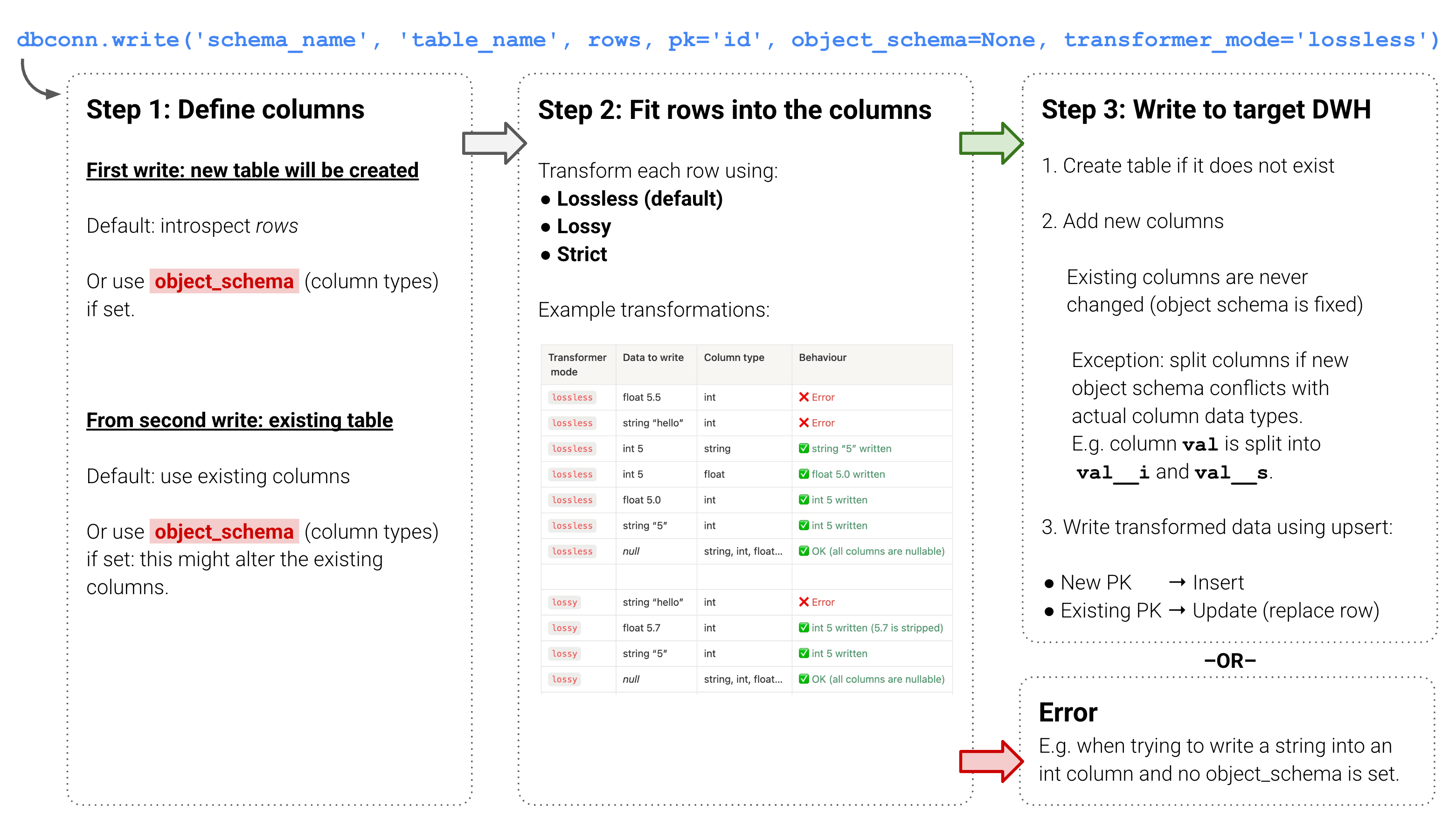
Overview of how data is written to the target data warehouse
image

Column types

dbconn.write() will first determine the column types of the target table.

On the first write, the target table does not exist yet. If an object_schema is set, this will be used to create the columns. If no object_schema is set, introspection will be performed on the rows (input data) to determine the column types to create.

From the second write into an existing table, the column types are fixed and will not change, unless an object_schema is set. If there is a conflict between the object_schema and an existing column, the existing column will be split, see detail below. New columns will be added as needed.

Once the object_schema is determined (because it is set or because the existing columns are used or because of introspection) each row if the input data is transformed, see betails below.

Setting an object_schema

Example:

☝

Especially when writing in batches, make sure to always send an oject_schema, otherwise introspection is done per batch (instead of on the entire data set at once) and this might cause the creation of split columns because in one batch all ages are numeric, and in a second batch there’s a text for the age column.

‣
Example to keep the schema of a target table fixed after initial creation. Click here to expand.

Transformer

The input rows will be transformed to the object_schema, using the parameter transformer_mode. The default value is “lossless”.

Note that if the object_schema is not set, dbconn.write() will look at the existing columns in the target table for the transformations.

Options for transformer_mode:

  • lossless (default): the transformer will perform data conversion without loosing data, for example 5.21 will not be written into an integer column but it will be written into a string column as “5.21”.
  • lossy: the transformer will perform data conversion on all data while silently ignoring data loss, e.g. 5.21 will be written as 5 if the existing column (or object_schema) is integer.
  • strict: the transformer will strictly validate data against the object_schema, without performing any transformations on the original data, e.g. int will not become string.
  • None: transformation step is skipped.
Transformer mode
Data to write
Column type
Behaviour
lossless
float 5.5
int
❌ Error
lossless
string “hello”
int
❌ Error
lossless
int 5
string
✅ string “5” written
lossless
int 5
float
✅ float 5.0 written
lossless
float 5.0
int
✅ int 5 written
lossless
string “5”
int
✅ int 5 written
lossless
null
string, int, float…
✅ OK (all columns are nullable)
lossy
string “hello”
int
❌ Error
lossy
float 5.7
int
✅ int 5 written (5.7 is stripped)
lossy
string “5”
int
✅ int 5 written
lossy
null
string, int, float…
✅ OK (all columns are nullable)
strict
int
string
❌ Error
strict
string
int
❌ Error
strict
int
float
❌ Error
strict
null
string, int, float…
✅ OK (all columns are nullable)

Example of setting a transformer_mode:

Splitting of columns

If an object_schema is set and this conflicts with existing columns in the target table, the existing column will be split into 2 columns.

For example an existing numeric (integer) column age will be split into age__s and age__i when you set an object_schema in which age is a text (string).

The __s column will contain string values, the __i column will contain the integer values.

In a similar manner an __s (string) and __t (timestamp) column will be created when writing a string (text) to an existing timestamp column.

Example:

‣
Script to fix (remove) split columns, click here to expand source code
dbconn = pq.dbconnect(pq.DW_NAME)

# Insert a row in a table
dbconn.insert('db_name', 'schema_name', 'table_name', record_dict)

# Update a row in a table
dbconn.update('db_name', 'schema_name', 'table_name', 'row_pk_value', record_dict)

# Upsert a row in a table (insert or update)
dbconn.upsert('db_name', 'schema_name', 'table_name', 'row_pk_value', record_dict)

# Execute an SQL query
dbconn.execute('db_name', query='TRUNCATE TABLE schema_name.table_name')

# Write a list of records to a table using pipeline logic, which will automatically create the table and columns (details below)
dbconn.write('schema_name', 'table_name', records, pk='id')
dbconn.write(
    schema_name,                  # required
    table_name,                   # required
    records,                      # required: list of dicts, single dict, or DataFrame
    object_schema=None,           # optional: explicit column type definitions
    pk=None,                      # optional: primary key column(s), string or list
    db_name=None,                 # optional: database name
    transformer_mode='lossless',  # optional: 'strict', 'lossless', 'lossy', or None
    decimal_separator='.',        # optional: '.' or ','
)
dbconn = pq.dbconnect(pq.DW_NAME)

# Write a record (object, dict) to a table
dbconn.write('schema_name', 'table_name', record_object, pk='id')

# Write a record (object, dict) to a table - example
dbconn.write('schema_name', 'table_name', [{'id': 1, 'name': 'John'}], pk='id')

# Write a list of records to a table
dbconn.write('schema_name', 'table_name', records_list, pk='id')

# Write a dataframe to a table
records_list = df.to_dict(orient = 'records')
dbconn.write('schema_name', 'table_name', records_list, pk='id')

# Write in batch
batch_size = 100
batches = [rows[i:i+batch_size] for i in range(0, len(rows), batch_size)]
for batch in batches:
    dbconn.write('schema_nema', 'table_name', batch, pk = 'id')
# Write records to a table with a schema definition
object_schema = {
    "properties": {
        "id": {
            "type": ["integer", "null"]
        },
        "name": {
            "type": ["string", "null"]
        },
        "age": {
            "type": ["integer", "null"]
        }
    }
}

records = [
	{
		'id': 1, 
		'name': 'John', 
		'age': 20
	}
]

dbconn.write('schema_name', 'table_name', records, object_schema=object_schema, pk='id')

# You can also extract the schema from one or more records, update it as needed, and use that object_schema in the dbconn.write() function
records = [{'id': 1, 'name': 'Bob', 'age': None}]
object_schema = pq.discover_object_schema(records)
object_schema["properties"]["age"]["type"] = ["integer", "null"] # Fix the schema for the age column
dbconn.write('schema_name', 'table_name', records, object_schema=object_schema, pk='id')

# Example writing a large amount of rows in batch with a fixed schema
batch_size = 100
batches = [rows[i:i+batch_size] for i in range(0, len(rows), batch_size)]
object_schema = pq.discover_object_schema(batches[0])
object_schema["properties"]["age"]["type"] = ["integer", "null"] # Fix the schema for the age column because it was e.g. empty in the first batch
for batch in batches:
    dbconn.write('schema_nema', 'table_name', batch, object_schema=object_schema, pk = 'id')
object_schema = {
    "properties": {
        "id": {
            "type": ["integer", "null"]
        },
        "name": {
            "type": ["string", "null"]
        },
        "age": {
            "type": ["integer", "null"]
        }
    }
}

records = [{'id': 13, 'name': 'Vero', 'age': 13.6}]

# Example that will convert age 13.6 to 13 to make it fit the provided object_schema
result = dbconn.write(schema_name, table_name, records = records, pk='id', object_schema = object_schema, transformer_mode = 'lossy')
dbconn.write(schema_name, table_name, records=[{'id': 1, 'name': 'John', 'age': 30}], pk='id')
# Result: a new table will be created with an id, name and age column. The age column will be of type 'integer'.

dbconn.write(schema_name, table_name, records=[{'id': 2, 'name': 'Anne', 'age': '20-30'}], pk='id')
# Result: the age column will be split in age__i and age__s.