> ## Documentation Index
> Fetch the complete documentation index at: https://help.peliqan.io/llms.txt
> Use this file to discover all available pages before exploring further.
# Sentiment Analysis
> Classify customer reviews or support tickets as positive, negative, or neutral to analyze the satisfaction of customers.
Classify customer reviews or support tickets as positive, negative, or neutral to analyze the satisfaction of customers.
A sentiment model analyzes text data to **determine expressed sentiment**. It is trained on a labeled dataset of positive, negative, or neutral examples. These models are used in e.g. **social media** and **customer feedback analysis.** They can provide valuable insights into customer opinions and preferences, allowing businesses to improve their products\*\*.\*\*
Here is an example on how to build an ML model in Peliqan.io with a few lines of Python code.
### Import required modules
```python theme={null}
import pandas as pd
import numpy as np
import string
from sklearn.svm import SVC
from sklearn.model_selection import train_test_split
from sklearn.metrics import accuracy_score
from sklearn.feature_extraction.text import TfidfVectorizer
from joblib import dump
```
### Load a dataset
Load data from a table into a dataframe (df), e.g. support tickets on which we want to apply sentiment analysis.
```python theme={null}
# Load Data
dbconn = pq.dbconnect(pq.DW_NAME)
df = dbconn.fetch(pq.DW_NAME, 'schema_name', 'support_tickets', df = True)
df = df.drop('Prediction', axis=1)
```
### Using Streamlit to build an app
We use the [Streamlit](https://docs.streamlit.io/library/api-reference/text) module (st), built into Peliqan.io, to build a UI and show data.
```python theme={null}
# Show a title (st = Streamlit module)
st.title("Sentiment Analysis")
# Show some text
st.text("Sample data")
# Show the dataframe
st.dataframe(df.head(), use_container_width=True)
```
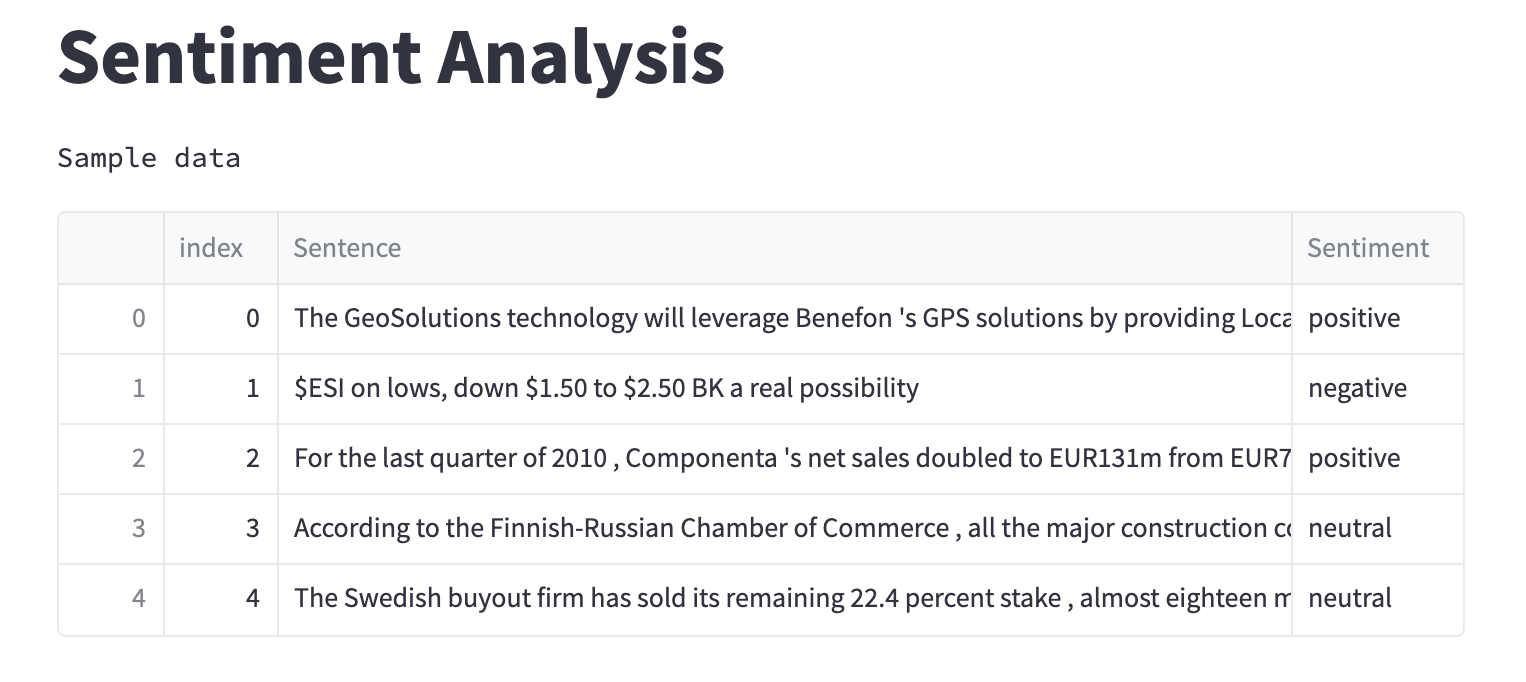
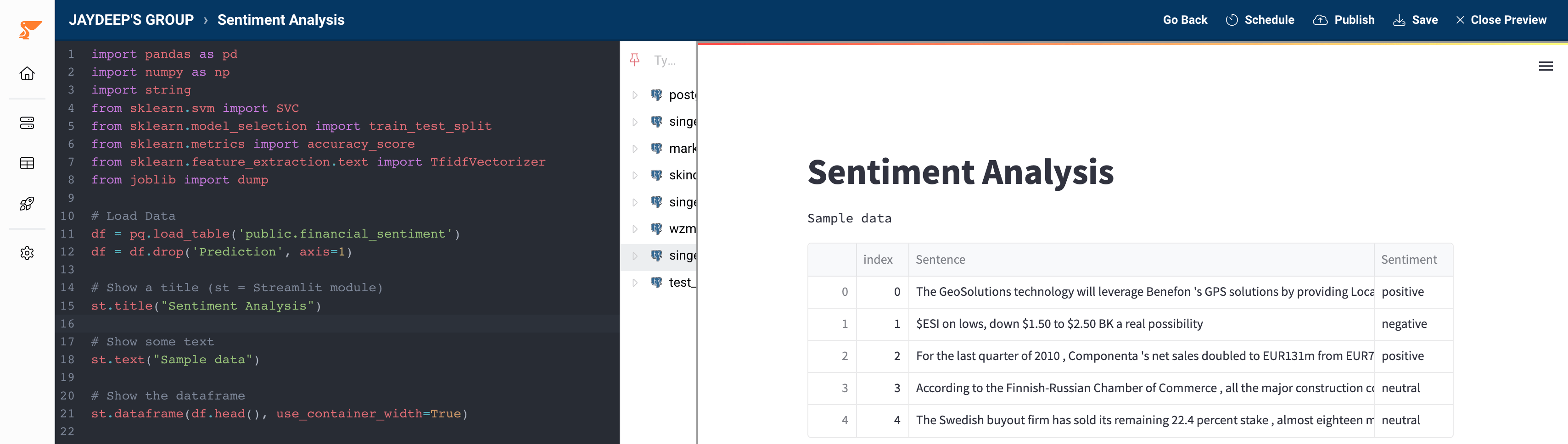 ### Data Pre-processing
Let's start with cleaning the text by **removing punctuations** and **repeating common words** (these are called stop words in NLP) to make it ready for future use.
```python theme={null}
def clean_text(text):
'''
This function will:
1. remove punctuations
2. remove common words
3. return the cleaned text
'''
# create a list of stop words
stop_words = ["i", "me", "my", "myself", "we", "our", "ours", "ourselves", "you", "your", "yours", "yourself", "yourselves", "he", "him", "his", "himself", "she", "her", "hers", "herself", "it", "its", "itself", "they", "them", "their", "theirs", "themselves", "what", "which", "who", "whom", "this", "that", "these", "those", "am", "is", "are", "was", "were", "be", "been", "being", "have", "has", "had", "having", "do", "does", "did", "doing", "a", "an", "the", "and", "but", "if", "or", "because", "as", "until", "while", "of", "at", "by", "for", "with", "about", "against", "between", "into", "through", "during", "before", "after", "above", "below", "to", "from", "up", "down", "in", "out", "on", "off", "over", "under", "again", "further", "then", "once", "here", "there", "when", "where", "why", "how", "all", "any", "both", "each", "few", "more", "most", "other", "some", "such", "no", "nor", "not", "only", "own", "same", "so", "than", "too", "very", "s", "t", "can", "will", "just", "don", "should", "now"]
no_punc = [word for word in text if word not in string.punctuation]
no_punc_str = "".join(no_punc)
return "".join([word for word in no_punc_str if word.lower() not in stop_words])
df["cleaned"] = df["Sentence"].apply(clean_text)
# Encoding the Sentiment column
df["mapped_sentiments"] = np.where(df["Sentiment"]=="positive", 1, np.where(df["Sentiment"]=="negative", -1, 0))
st.header('Clean data')
st.dataframe(df.head())
```
### Data Pre-processing
Let's start with cleaning the text by **removing punctuations** and **repeating common words** (these are called stop words in NLP) to make it ready for future use.
```python theme={null}
def clean_text(text):
'''
This function will:
1. remove punctuations
2. remove common words
3. return the cleaned text
'''
# create a list of stop words
stop_words = ["i", "me", "my", "myself", "we", "our", "ours", "ourselves", "you", "your", "yours", "yourself", "yourselves", "he", "him", "his", "himself", "she", "her", "hers", "herself", "it", "its", "itself", "they", "them", "their", "theirs", "themselves", "what", "which", "who", "whom", "this", "that", "these", "those", "am", "is", "are", "was", "were", "be", "been", "being", "have", "has", "had", "having", "do", "does", "did", "doing", "a", "an", "the", "and", "but", "if", "or", "because", "as", "until", "while", "of", "at", "by", "for", "with", "about", "against", "between", "into", "through", "during", "before", "after", "above", "below", "to", "from", "up", "down", "in", "out", "on", "off", "over", "under", "again", "further", "then", "once", "here", "there", "when", "where", "why", "how", "all", "any", "both", "each", "few", "more", "most", "other", "some", "such", "no", "nor", "not", "only", "own", "same", "so", "than", "too", "very", "s", "t", "can", "will", "just", "don", "should", "now"]
no_punc = [word for word in text if word not in string.punctuation]
no_punc_str = "".join(no_punc)
return "".join([word for word in no_punc_str if word.lower() not in stop_words])
df["cleaned"] = df["Sentence"].apply(clean_text)
# Encoding the Sentiment column
df["mapped_sentiments"] = np.where(df["Sentiment"]=="positive", 1, np.where(df["Sentiment"]=="negative", -1, 0))
st.header('Clean data')
st.dataframe(df.head())
```
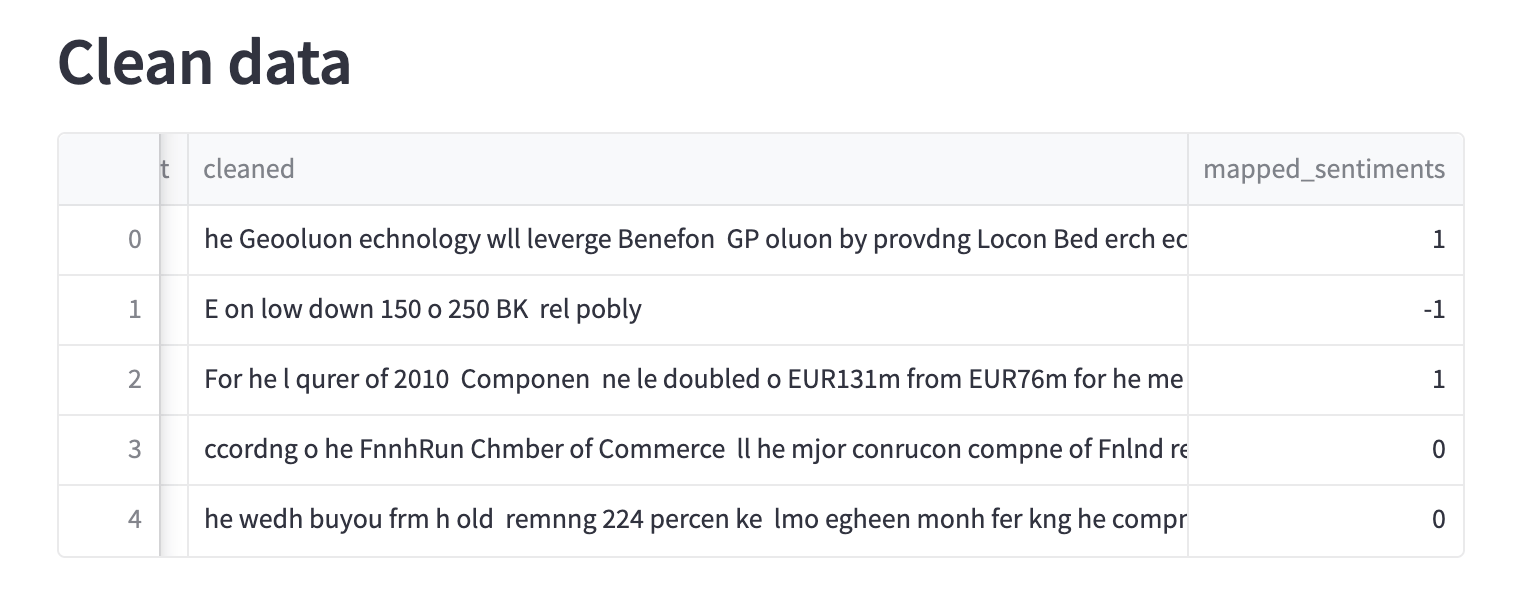 To learn more about data pre-processing in NLP visit this [guide](https://www.analyticsvidhya.com/blog/2021/06/text-preprocessing-in-nlp-with-python-codes/) or [here](https://www.kaggle.com/code/colearninglounge/nlp-data-preprocessing-and-cleaning).
### Model Training & Evaluation
```python theme={null}
X = df["cleaned"]
y = df["mapped_sentiments"]
# Creating train test split
X_train, X_test, y_train, y_test = train_test_split(X, y, test_size=0.25, random_state = 42)
# Initializing vectorizer and fitting it on training data
vec = TfidfVectorizer()
vec.fit(X_train)
# Transforming sentences to numeric format(sparse metrices)
X_train_vec = vec.transform(X_train)
X_test_vec = vec.transform(X_test)
model = SVC(kernel='linear', C=0.6, probability=True)
model.fit(X_train_vec, y_train)
pred = model.predict(X_test_vec)
st.header('Evaluation')
accuracy = accuracy_score(y_test, pred)
st.text("Accuracy: " + str(accuracy))
# Saving the model & vectorizer
dump(model, '/data_app/model_financial_sentiment')
dump(vec, '/data_app/vectorizer_financial_sentiment')
st.success('Model saved successfully!')
```
To learn more about data pre-processing in NLP visit this [guide](https://www.analyticsvidhya.com/blog/2021/06/text-preprocessing-in-nlp-with-python-codes/) or [here](https://www.kaggle.com/code/colearninglounge/nlp-data-preprocessing-and-cleaning).
### Model Training & Evaluation
```python theme={null}
X = df["cleaned"]
y = df["mapped_sentiments"]
# Creating train test split
X_train, X_test, y_train, y_test = train_test_split(X, y, test_size=0.25, random_state = 42)
# Initializing vectorizer and fitting it on training data
vec = TfidfVectorizer()
vec.fit(X_train)
# Transforming sentences to numeric format(sparse metrices)
X_train_vec = vec.transform(X_train)
X_test_vec = vec.transform(X_test)
model = SVC(kernel='linear', C=0.6, probability=True)
model.fit(X_train_vec, y_train)
pred = model.predict(X_test_vec)
st.header('Evaluation')
accuracy = accuracy_score(y_test, pred)
st.text("Accuracy: " + str(accuracy))
# Saving the model & vectorizer
dump(model, '/data_app/model_financial_sentiment')
dump(vec, '/data_app/vectorizer_financial_sentiment')
st.success('Model saved successfully!')
```
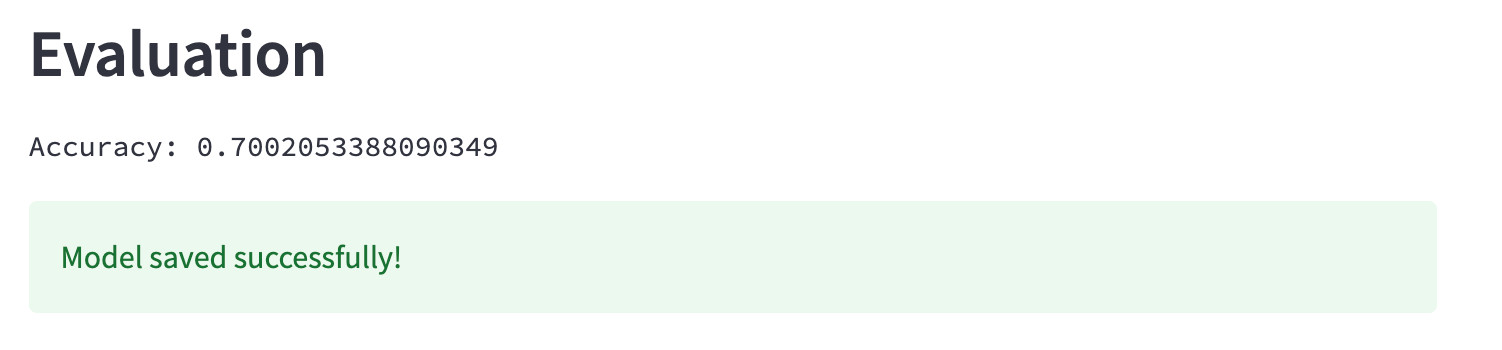 To learn more about vectorizing sentences click [here](https://scikit-learn.org/stable/modules/classes.html#module-sklearn.feature_extraction.text).
Expand this to see the full code
```python theme={null}
import pandas as pd
import numpy as np
import string
from sklearn.svm import SVC
from sklearn.model_selection import train_test_split
from sklearn.metrics import accuracy_score
from sklearn.feature_extraction.text import TfidfVectorizer
from joblib import dump
# Load Data
dbconn = pq.dbconnect('dw_123')
df = dbconn.fetch('db_name', 'schema_name', 'support_tickets', df = True)
df = df.drop('Prediction', axis=1)
# Show a title (st = Streamlit module)
st.title("Sentiment Analysis")
# Show some text
st.text("Sample data")
# Show the dataframe
st.dataframe(df.head(), use_container_width=True)
def clean_text(text):
'''
This function will:
1. remove punctuations
2. remove common words
3. return the cleaned text
'''
# create a list of stop words
stop_words = ["i", "me", "my", "myself", "we", "our", "ours", "ourselves", "you", "your", "yours", "yourself", "yourselves", "he", "him", "his", "himself", "she", "her", "hers", "herself", "it", "its", "itself", "they", "them", "their", "theirs", "themselves", "what", "which", "who", "whom", "this", "that", "these", "those", "am", "is", "are", "was", "were", "be", "been", "being", "have", "has", "had", "having", "do", "does", "did", "doing", "a", "an", "the", "and", "but", "if", "or", "because", "as", "until", "while", "of", "at", "by", "for", "with", "about", "against", "between", "into", "through", "during", "before", "after", "above", "below", "to", "from", "up", "down", "in", "out", "on", "off", "over", "under", "again", "further", "then", "once", "here", "there", "when", "where", "why", "how", "all", "any", "both", "each", "few", "more", "most", "other", "some", "such", "no", "nor", "not", "only", "own", "same", "so", "than", "too", "very", "s", "t", "can", "will", "just", "don", "should", "now"]
no_punc = [word for word in text if word not in string.punctuation]
no_punc_str = "".join(no_punc)
return "".join([word for word in no_punc_str if word.lower() not in stop_words])
df["cleaned"] = df["Sentence"].apply(clean_text)
# Encoding the Sentiment column
df["mapped_sentiments"] = np.where(df["Sentiment"]=="positive", 1, np.where(df["Sentiment"]=="negative", -1, 0))
st.header('Clean data')
st.dataframe(df.head())
X = df["cleaned"]
Y = df["mapped_sentiments"]
# Creating train test split
X_train, X_test, Y_train, Y_test = train_test_split(X, Y, test_size=0.25, random_state = 42)
# Initializing vectorizer and fitting it on training data
vec = TfidfVectorizer()
vec.fit(X_train)
# Transforming sentences to numeric format(sparse metrices)
X_train_vec = vec.transform(X_train)
X_test_vec = vec.transform(X_test)
model = SVC(kernel='linear', C=0.6, probability=True)
model.fit(X_train_vec, Y_train)
pred = model.predict(X_test_vec)
st.header('Evaluation')
accuracy = accuracy_score(Y_test, pred)
st.text("Accuracy: " + str(accuracy))
# Saving the model & vectorizer
dump(model, '/data_app/model_financial_sentiment')
dump(vec, '/data_app/vectorizer_financial_sentiment')
st.success('Model saved successfully!')
```
## Next Steps
1. Using **Peliqan** you can **create an app for business users to consume** the model you have created in a **simple and intuitive UI**. Learn more about [creating apps for users to consume your model](/low-code-python-data-apps/predictions-machine-learning-templates/create-an-app-for-business-users-to-get-predictions)**.**
2. You can make **predictions on real-time incoming data** using the saved model. Learn more about [making real-time predictions on new incoming data.](/low-code-python-data-apps/predictions-machine-learning-templates/write-predictions-to-a-table)
3. You can make real-time predictions on new incoming data and send [**alerts to Slack**](/low-code-python-data-apps/predictions-machine-learning-templates/send-alerts-to-slack) if the model makes a prediction **above a certain threshold**.
This documentation is built and hosted on [Mintlify](https://mintlify.com), a developer documentation platform.
To learn more about vectorizing sentences click [here](https://scikit-learn.org/stable/modules/classes.html#module-sklearn.feature_extraction.text).
Expand this to see the full code
```python theme={null}
import pandas as pd
import numpy as np
import string
from sklearn.svm import SVC
from sklearn.model_selection import train_test_split
from sklearn.metrics import accuracy_score
from sklearn.feature_extraction.text import TfidfVectorizer
from joblib import dump
# Load Data
dbconn = pq.dbconnect('dw_123')
df = dbconn.fetch('db_name', 'schema_name', 'support_tickets', df = True)
df = df.drop('Prediction', axis=1)
# Show a title (st = Streamlit module)
st.title("Sentiment Analysis")
# Show some text
st.text("Sample data")
# Show the dataframe
st.dataframe(df.head(), use_container_width=True)
def clean_text(text):
'''
This function will:
1. remove punctuations
2. remove common words
3. return the cleaned text
'''
# create a list of stop words
stop_words = ["i", "me", "my", "myself", "we", "our", "ours", "ourselves", "you", "your", "yours", "yourself", "yourselves", "he", "him", "his", "himself", "she", "her", "hers", "herself", "it", "its", "itself", "they", "them", "their", "theirs", "themselves", "what", "which", "who", "whom", "this", "that", "these", "those", "am", "is", "are", "was", "were", "be", "been", "being", "have", "has", "had", "having", "do", "does", "did", "doing", "a", "an", "the", "and", "but", "if", "or", "because", "as", "until", "while", "of", "at", "by", "for", "with", "about", "against", "between", "into", "through", "during", "before", "after", "above", "below", "to", "from", "up", "down", "in", "out", "on", "off", "over", "under", "again", "further", "then", "once", "here", "there", "when", "where", "why", "how", "all", "any", "both", "each", "few", "more", "most", "other", "some", "such", "no", "nor", "not", "only", "own", "same", "so", "than", "too", "very", "s", "t", "can", "will", "just", "don", "should", "now"]
no_punc = [word for word in text if word not in string.punctuation]
no_punc_str = "".join(no_punc)
return "".join([word for word in no_punc_str if word.lower() not in stop_words])
df["cleaned"] = df["Sentence"].apply(clean_text)
# Encoding the Sentiment column
df["mapped_sentiments"] = np.where(df["Sentiment"]=="positive", 1, np.where(df["Sentiment"]=="negative", -1, 0))
st.header('Clean data')
st.dataframe(df.head())
X = df["cleaned"]
Y = df["mapped_sentiments"]
# Creating train test split
X_train, X_test, Y_train, Y_test = train_test_split(X, Y, test_size=0.25, random_state = 42)
# Initializing vectorizer and fitting it on training data
vec = TfidfVectorizer()
vec.fit(X_train)
# Transforming sentences to numeric format(sparse metrices)
X_train_vec = vec.transform(X_train)
X_test_vec = vec.transform(X_test)
model = SVC(kernel='linear', C=0.6, probability=True)
model.fit(X_train_vec, Y_train)
pred = model.predict(X_test_vec)
st.header('Evaluation')
accuracy = accuracy_score(Y_test, pred)
st.text("Accuracy: " + str(accuracy))
# Saving the model & vectorizer
dump(model, '/data_app/model_financial_sentiment')
dump(vec, '/data_app/vectorizer_financial_sentiment')
st.success('Model saved successfully!')
```
## Next Steps
1. Using **Peliqan** you can **create an app for business users to consume** the model you have created in a **simple and intuitive UI**. Learn more about [creating apps for users to consume your model](/low-code-python-data-apps/predictions-machine-learning-templates/create-an-app-for-business-users-to-get-predictions)**.**
2. You can make **predictions on real-time incoming data** using the saved model. Learn more about [making real-time predictions on new incoming data.](/low-code-python-data-apps/predictions-machine-learning-templates/write-predictions-to-a-table)
3. You can make real-time predictions on new incoming data and send [**alerts to Slack**](/low-code-python-data-apps/predictions-machine-learning-templates/send-alerts-to-slack) if the model makes a prediction **above a certain threshold**.
This documentation is built and hosted on [Mintlify](https://mintlify.com), a developer documentation platform.