> ## Documentation Index
> Fetch the complete documentation index at: https://help.peliqan.io/llms.txt
> Use this file to discover all available pages before exploring further.
# Lead Conversion
> Predict which leads have the most propensity to convert.
Predict which leads have the most propensity to convert.
We will train a machine learning (ML) model based on historical lead conversion data, in order to predict likelihood of conversion for new leads.
Determining the **value of each lead** is a critical factor for businesses that want to **maximize their sales efforts**. It helps them identify which leads are **most likely to convert** and generate revenue over time.
Here is an example on how to build an ML model in Peliqan.io with a few lines of Python code.
### Import required modules
```python theme={null}
from sklearn.model_selection import train_test_split
from sklearn.linear_model import LogisticRegression
from sklearn.metrics import accuracy_score
from sklearn.preprocessing import LabelEncoder
from collections import defaultdict
from joblib import dump
import pandas as pd
```
### Load a dataset
Load data from a table into a dataframe (df). The table needs to contains lead data, including an indication if these leads converted (historical data).
```python theme={null}
# Load Data
dbconn = pq.dbconnect(pq.DW_NAME)
df = dbconn.fetch(pq.DW_NAME, 'crm', 'leads', df=True)
```
### Using Streamlit to build an app
We use the [Streamlit](https://docs.streamlit.io/library/api-reference/text) module (st), built into Peliqan.io, to build a UI and show data.
```python theme={null}
# Show a title (st = Streamlit module)
st.title("Lead Conversion")
# Show some text
st.text("Predict Hot Leads")
# Show the dataframe
st.dataframe(df.head(), use_container_width=True)
```
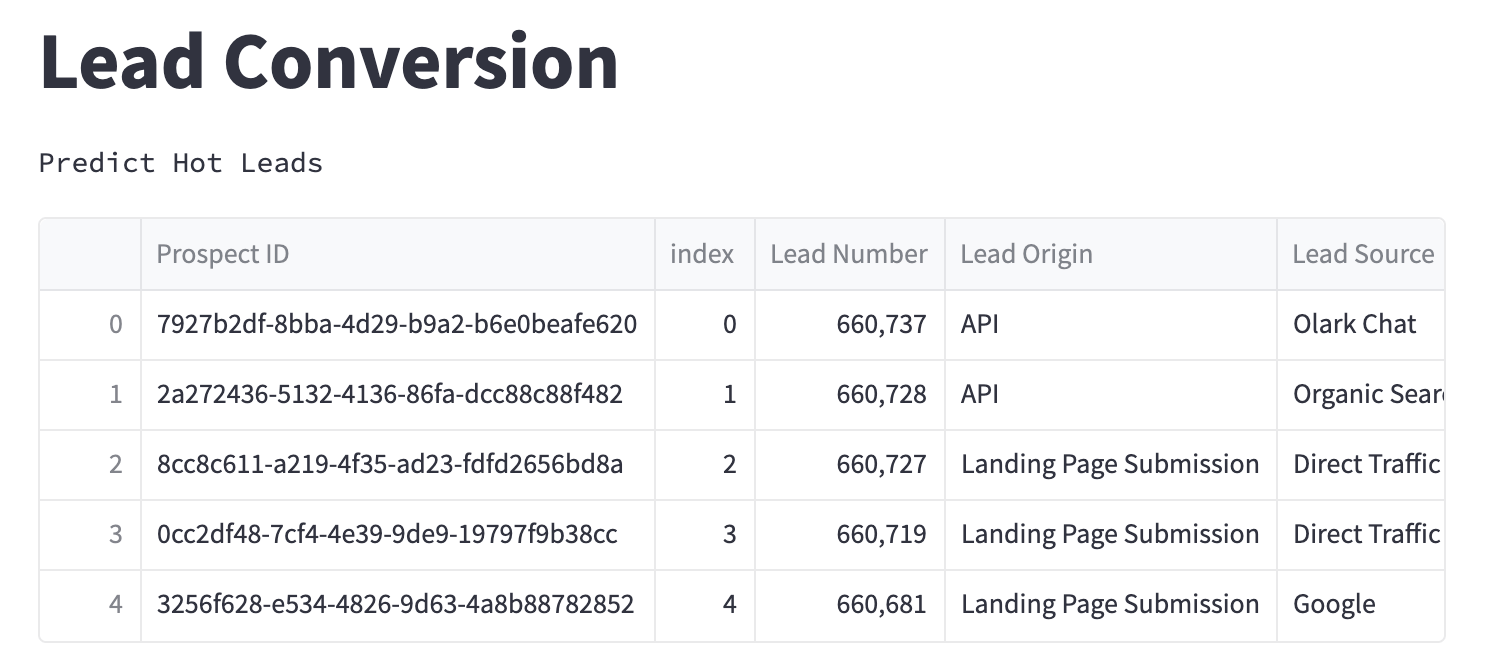
This is what the output looks like:
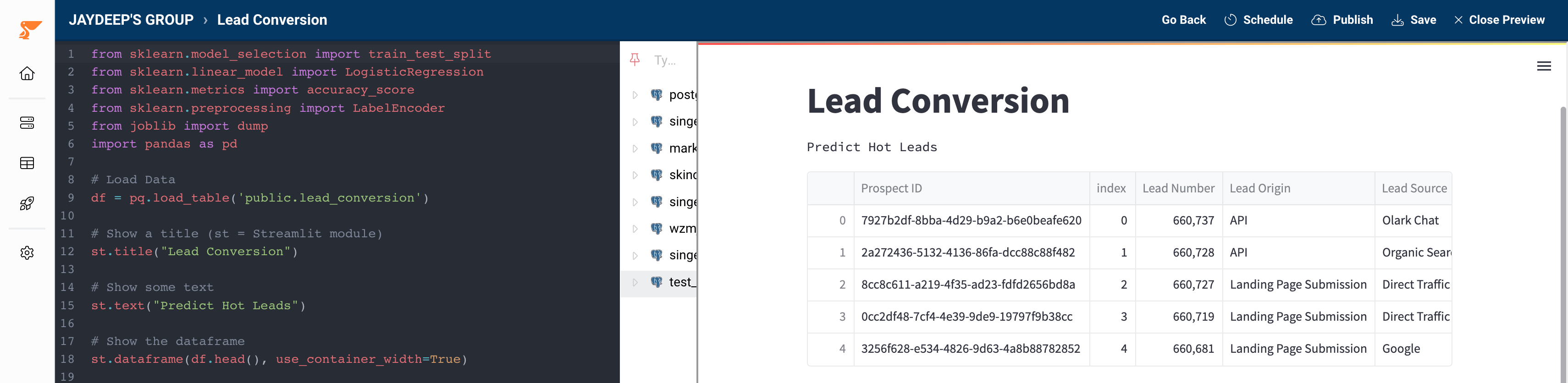
 Here’s our code in the Peliqan low-code editor, with a preview:
 ### Prepare the data
We remove unwanted columns (features) from our leads and convert categories (e.g. lead source) to a numerical value:
```python theme={null}
# Drop unwanted features
drop_features = ['Prospect ID', 'index', 'Prediction']
df = df.drop(drop_features, axis=1)
encoder = defaultdict(LabelEncoder)
# Apply Label Encoding to convert categorical variables to Numerical
cat_cols = df.select_dtypes('object').columns
df[cat_cols] = df[cat_cols].apply(lambda x: encoder[x.name].fit_transform(x))
# Save the label encoder for future predictions
dump(encoder, '/data_app/encoder_lead_conversion')
```
### Train and save the model
Once the data is ready we split it into a training set and a testing sets to evaluate the model. We save the model to make more predictions later on.
```python theme={null}
# Training data to train model on
X = df.drop('Converted', axis=1)
# Feature to predict
Y = df['Converted']
# Split data into train test and train model with .fit()
X_train, X_test, Y_train, Y_test = train_test_split(X, Y, test_size=.30, random_state=0)
model = LogisticRegression().fit(X_train,Y_train)
# Make prediction
pred = model.predict(X_test)
# Evaluate the model
accuracy = accuracy_score(pred, Y_test)
st.text("Accuracy: " + str(accuracy))
# Save the model for future real-time predictions
dump(model, '/data_app/model_lead_conversion')
st.success('Model saved successfully!')
```
Expand this to see the full code
```python theme={null}
from sklearn.model_selection import train_test_split
from sklearn.linear_model import LogisticRegression
from sklearn.metrics import accuracy_score
from sklearn.preprocessing import LabelEncoder
from collections import defaultdict
from joblib import dump
import pandas as pd
# Load Data
dbconn = pq.dbconnect('dw_123')
df = dbconn.fetch('dw_123', 'crm', 'leads', df=True)
# Show a title (st = Streamlit module)
st.title("Lead Conversion - predict hot leads")
# Show some text
st.text("Predict Hot Leads")
# Show the dataframe
st.dataframe(df.head(), use_container_width=True)
# Drop unwanted features
drop_features = ['Prospect ID', 'index', 'Prediction']
df = df.drop(drop_features, axis=1)
encoder = defaultdict(LabelEncoder)
# Apply Label Encoding to convert categorical variables to Numerical
cat_cols = df.select_dtypes('object').columns
df[cat_cols] = df[cat_cols].apply(lambda x: encoder[x.name].fit_transform(x))
# Save the label encoder for future predictions
dump(encoder, '/data_app/encoder_lead_conversion')
# Training data to train model on
X = df.drop('Converted', axis=1)
# Feature to predict
Y = df['Converted']
# Split data into train test and train model with .fit()
X_train, X_test, Y_train, Y_test = train_test_split(X, Y, test_size=.30, random_state=0)
model = LogisticRegression().fit(X_train,Y_train)
# Make prediction
pred = model.predict(X_test)
# Evaluate model
accuracy = accuracy_score(pred, Y_test)
st.text("Accuracy: " + str(accuracy))
# Save the model for future real-time predictions
dump(model, '/data_app/model_lead_conversion')
st.success('Model saved successfully')
```
## Next Steps
1. You can make **predictions on real-time incoming data** using the saved model. Learn more about [making real-time predictions on new incoming data.](/low-code-python-data-apps/predictions-machine-learning-templates/write-predictions-to-a-table)
2. You can make real-time predictions on new incoming data and send [**alerts to slack**](/low-code-python-data-apps/predictions-machine-learning-templates/send-alerts-to-slack) if the model makes a prediction **above a certain threshold**.
3. Using **Peliqan** you can **create an app for business users to consume** the model you have made. Learn more about [creating apps for users to consume your ML model](/low-code-python-data-apps/predictions-machine-learning-templates/create-an-app-for-business-users-to-get-predictions)**.**
This documentation is built and hosted on [Mintlify](https://mintlify.com), a developer documentation platform.
### Prepare the data
We remove unwanted columns (features) from our leads and convert categories (e.g. lead source) to a numerical value:
```python theme={null}
# Drop unwanted features
drop_features = ['Prospect ID', 'index', 'Prediction']
df = df.drop(drop_features, axis=1)
encoder = defaultdict(LabelEncoder)
# Apply Label Encoding to convert categorical variables to Numerical
cat_cols = df.select_dtypes('object').columns
df[cat_cols] = df[cat_cols].apply(lambda x: encoder[x.name].fit_transform(x))
# Save the label encoder for future predictions
dump(encoder, '/data_app/encoder_lead_conversion')
```
### Train and save the model
Once the data is ready we split it into a training set and a testing sets to evaluate the model. We save the model to make more predictions later on.
```python theme={null}
# Training data to train model on
X = df.drop('Converted', axis=1)
# Feature to predict
Y = df['Converted']
# Split data into train test and train model with .fit()
X_train, X_test, Y_train, Y_test = train_test_split(X, Y, test_size=.30, random_state=0)
model = LogisticRegression().fit(X_train,Y_train)
# Make prediction
pred = model.predict(X_test)
# Evaluate the model
accuracy = accuracy_score(pred, Y_test)
st.text("Accuracy: " + str(accuracy))
# Save the model for future real-time predictions
dump(model, '/data_app/model_lead_conversion')
st.success('Model saved successfully!')
```
Expand this to see the full code
```python theme={null}
from sklearn.model_selection import train_test_split
from sklearn.linear_model import LogisticRegression
from sklearn.metrics import accuracy_score
from sklearn.preprocessing import LabelEncoder
from collections import defaultdict
from joblib import dump
import pandas as pd
# Load Data
dbconn = pq.dbconnect('dw_123')
df = dbconn.fetch('dw_123', 'crm', 'leads', df=True)
# Show a title (st = Streamlit module)
st.title("Lead Conversion - predict hot leads")
# Show some text
st.text("Predict Hot Leads")
# Show the dataframe
st.dataframe(df.head(), use_container_width=True)
# Drop unwanted features
drop_features = ['Prospect ID', 'index', 'Prediction']
df = df.drop(drop_features, axis=1)
encoder = defaultdict(LabelEncoder)
# Apply Label Encoding to convert categorical variables to Numerical
cat_cols = df.select_dtypes('object').columns
df[cat_cols] = df[cat_cols].apply(lambda x: encoder[x.name].fit_transform(x))
# Save the label encoder for future predictions
dump(encoder, '/data_app/encoder_lead_conversion')
# Training data to train model on
X = df.drop('Converted', axis=1)
# Feature to predict
Y = df['Converted']
# Split data into train test and train model with .fit()
X_train, X_test, Y_train, Y_test = train_test_split(X, Y, test_size=.30, random_state=0)
model = LogisticRegression().fit(X_train,Y_train)
# Make prediction
pred = model.predict(X_test)
# Evaluate model
accuracy = accuracy_score(pred, Y_test)
st.text("Accuracy: " + str(accuracy))
# Save the model for future real-time predictions
dump(model, '/data_app/model_lead_conversion')
st.success('Model saved successfully')
```
## Next Steps
1. You can make **predictions on real-time incoming data** using the saved model. Learn more about [making real-time predictions on new incoming data.](/low-code-python-data-apps/predictions-machine-learning-templates/write-predictions-to-a-table)
2. You can make real-time predictions on new incoming data and send [**alerts to slack**](/low-code-python-data-apps/predictions-machine-learning-templates/send-alerts-to-slack) if the model makes a prediction **above a certain threshold**.
3. Using **Peliqan** you can **create an app for business users to consume** the model you have made. Learn more about [creating apps for users to consume your ML model](/low-code-python-data-apps/predictions-machine-learning-templates/create-an-app-for-business-users-to-get-predictions)**.**
This documentation is built and hosted on [Mintlify](https://mintlify.com), a developer documentation platform.