> ## Documentation Index
> Fetch the complete documentation index at: https://help.peliqan.io/llms.txt
> Use this file to discover all available pages before exploring further.
# ionBIZ - Getting started in Peliqan
> Connect ionBIZ to Peliqan by creating an Application with OData scopes, and use low-code Python scripts to write back relations and other objects.
ionBIZ is a Project Management solution from ionProjects, part of Visma. This article provides an overview to get started with the **ionBIZ** connector in **Peliqan**. Please [contact support](https://peliqan.io/contact) if you have any additional questions or remarks.
## How to connect ionBIZ
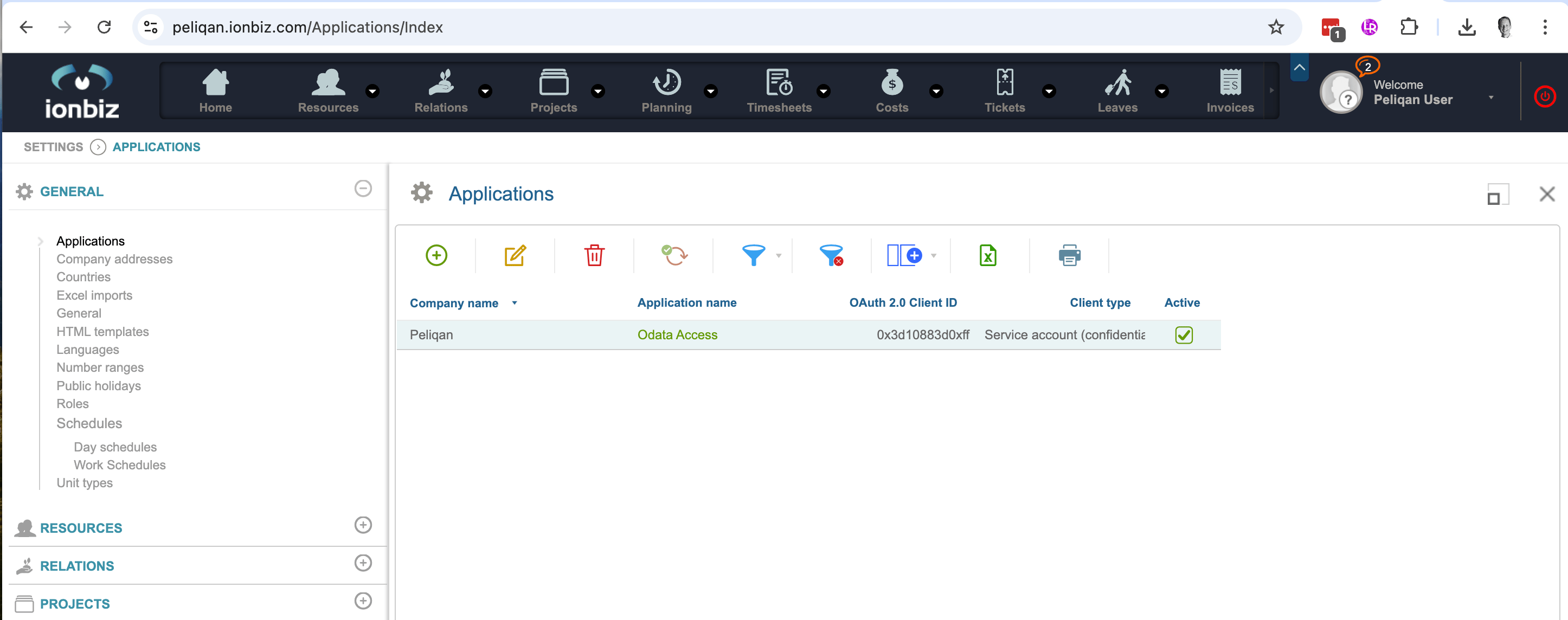
First create an "Application" in ionBiz:
1. Login to IonBiz, click on the user profile in the top right corner.
2. Navigate to **Settings > General > Applications**.
3. Add a new **Application**.
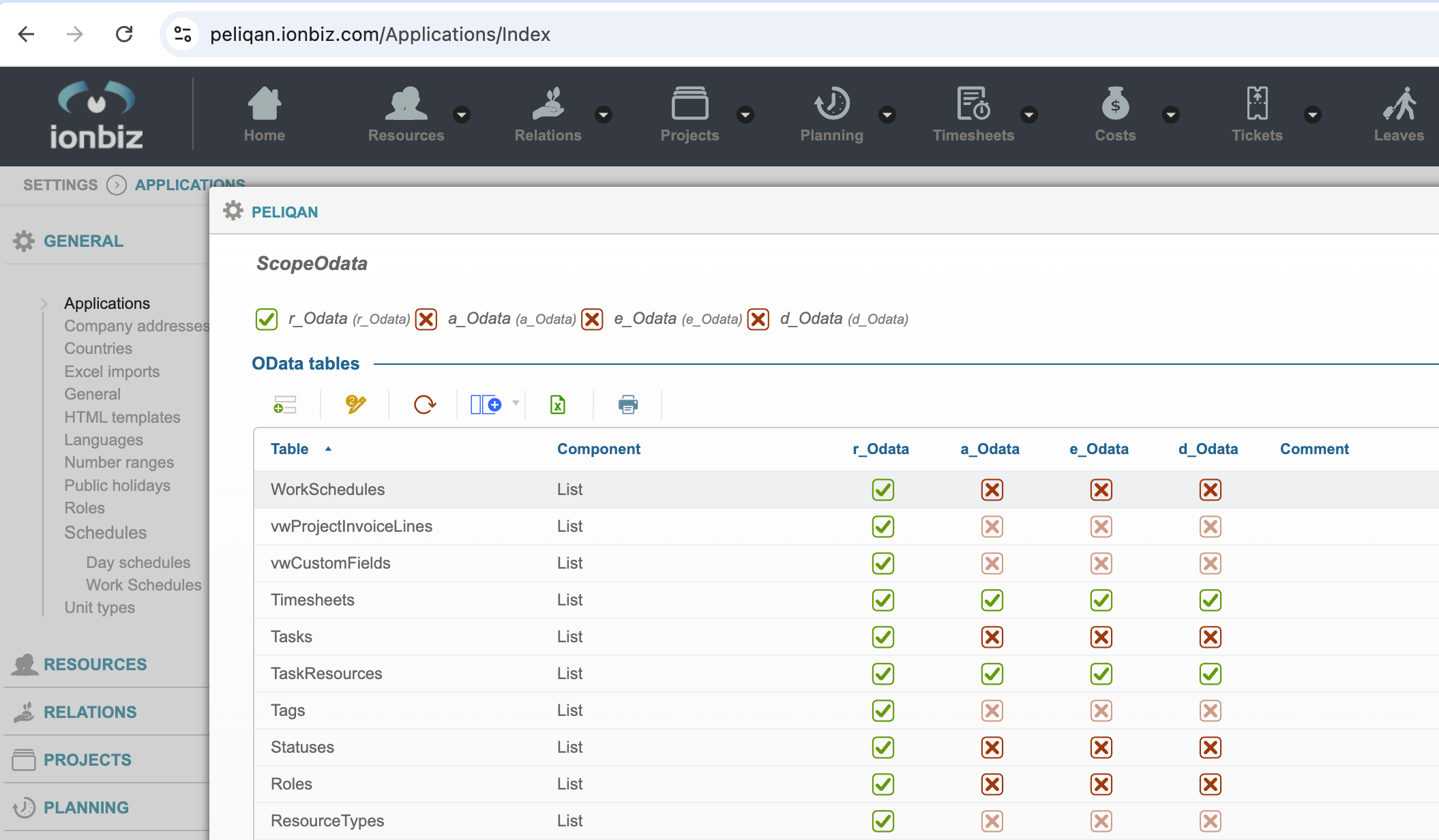
4. Include **Odata** scopes, at least the "read" scope: enable **r\_Odata** under **ScopeOdata**, see screenshot below.
5. Also enable the **r\_Odata** scope in the list of tables, for each table that you want to sync, see below.
6. Copy the **Client Id** and **Client Secret** from the Application and paste them in Peliqan.
Adding an Application in ionBIZ:
 Enabling the **r\_Odata** scope under **ScopeOdata** and for each desired table:
 ## Writeback to ionBIZ
Here's an example on how to add a Relation (e.g. a customer) to ionBIZ using a low-code Python script in Peliqan:
```python theme={null}
ionbiz_api = pq.connect('IonBiz')
relation = {
'Name': "My new relation name",
}
result = ionbiz_api.add('relation', relation)
st.json(result)
```
Here's an example on how to update a Relation:
```python theme={null}
ionbiz_api = pq.connect('IonBiz')
relation = {
'id': 5,
'Name': "My updated relation name",
}
result = ionbiz_api.update('relation', relation)
st.json(result)
```
Here's an example on how to add and update objects in any Model in ionBIZ using generic writeback functions in Peliqan:
```python theme={null}
ionbiz_api = pq.connect('IonBiz')
object = {
'Name': "My new relation",
'model': "Relations",
}
result = ionbiz_api.add('object', object)
st.json(result)
object = {
'id': 123,
'Name': "My updated relation",
'model': "Relations",
}
result = ionbiz_api.update('object', object)
st.json(result)
```
This documentation is built and hosted on [Mintlify](https://mintlify.com), a developer documentation platform.
## Writeback to ionBIZ
Here's an example on how to add a Relation (e.g. a customer) to ionBIZ using a low-code Python script in Peliqan:
```python theme={null}
ionbiz_api = pq.connect('IonBiz')
relation = {
'Name': "My new relation name",
}
result = ionbiz_api.add('relation', relation)
st.json(result)
```
Here's an example on how to update a Relation:
```python theme={null}
ionbiz_api = pq.connect('IonBiz')
relation = {
'id': 5,
'Name': "My updated relation name",
}
result = ionbiz_api.update('relation', relation)
st.json(result)
```
Here's an example on how to add and update objects in any Model in ionBIZ using generic writeback functions in Peliqan:
```python theme={null}
ionbiz_api = pq.connect('IonBiz')
object = {
'Name': "My new relation",
'model': "Relations",
}
result = ionbiz_api.add('object', object)
st.json(result)
object = {
'id': 123,
'Name': "My updated relation",
'model': "Relations",
}
result = ionbiz_api.update('object', object)
st.json(result)
```
This documentation is built and hosted on [Mintlify](https://mintlify.com), a developer documentation platform.