> ## Documentation Index
> Fetch the complete documentation index at: https://help.peliqan.io/llms.txt
> Use this file to discover all available pages before exploring further.
# Custom MCP with OAuth
> Build a custom MCP Server in Peliqan with OAuth for user authentication
If you want to enforce permissions per user in your custom MCP Server, you have to use OAuth. This can be done for example by using SSO (single sign on) with Google, Azure or Peliqan OAuth.
If you want to build a custom MCP Server *without* OAuth (using an API key instead), see [Build a custom MCP Server on Peliqan](/low-code-python-data-apps/by-protocol-rest-webhooks-mqtt/mcp-model-context-protocol/build-a-remote-mcp-server-on-peliqan).
# Contents
# How to build a Custom MCP Server on Peliqan with SSO using OAuth
### Setup the API handler script in Peliqan
Use the following API handler script template in Peliqan:
```python theme={null}
# MCP Server with oAuth
# Version 1.2
#
# SETUP IN PELIQAN:
#
# Add two API endpoints and link them both to this script as APP handler (set both to Public):
# POST /mcp
# GET /mcp/*/*
#
# ADDING CAPABILITIES TO THIS MCP SERVER:
#
# Add more MCP "tools": see below section in code with all MCP tools, decorate your function with @mcp.tool()
##### SETTINGS
# Provider
PROVIDER = "Microsoft" # choose "Google", "Microsoft" or "Peliqan"
# Peliqan account id
peliqan_account_id = 1234
# Add the usernames, and as value the personal API key from Peliqan (See user settings > API token). Store API keys in the Peliqan Secrets store !
user_mappings = {
"user1@acme.com": pq.get_secret(''),
"user2@acme.com": pq.get_secret('')
}
# Google client id:
google_client_id = "75886851179-su9mknnnf3f3sm2fi53fq7viobkjedod.apps.googleusercontent.com"
# Microsft Azure tenant id:
tenant_id = "a35e450d-10f3-43ec-bbb5-4f370161c30c"
# Microsoft token verification config:
MICROSOFT_EXPECTED_AUDIENCE = f""
try:
import jwt
from jwt import PyJWKClient
ms_jwks_client = PyJWKClient(f"")
ms_jwks_client.get_jwk_set() # forces a real fetch now, at load time -- fails fast if tenant_id is garbage
MICROSOFT_ISSUERS = (
f"", # v1.0 tokens
f"", # v2.0 tokens
)
except Exception:
ms_jwks_client = None
print(f"Warning: Microsoft JWKS unreachable with tenant_id={tenant_id!r} -- Microsoft provider disabled")
##### END OF SETTINGS
MCP_URL = f""
AUTHORIZATION_SERVER_URL = MCP_URL
AUTHORIZATION_ENDPOINTS = {
"Peliqan" : f"",
"Google" : "",
"Microsoft" : f"",
}
TOKEN_ENDPOINTS = {
"Peliqan" : f"",
"Google" : "",
"Microsoft" : f"",
}
SCOPES = {
"Peliqan" : ["openid", "email", "profile"],
"Google" : ["openid", "email", "profile"],
"Microsoft" : [f"{MCP_URL}/.default"],
}
AUTHORIZATION_ENDPOINT = AUTHORIZATION_ENDPOINTS[PROVIDER]
TOKEN_ENDPOINT = TOKEN_ENDPOINTS[PROVIDER]
SCOPE = SCOPES[PROVIDER]
import json
import inspect
from typing import get_type_hints
from typing import List, Dict, Any
from urllib.parse import parse_qs
import base64
MCP_TOOLS = []
class mcp:
def tool():
def decorator(func):
sig = inspect.signature(func)
type_hints = get_type_hints(func)
# parse descriptions from docstring using :param style
raw_doc = func.__doc__ or ""
param_docs = {}
for line in raw_doc.splitlines():
line = line.strip()
if line.startswith(":param"):
# example: ":param first_name: the user's first name"
try:
_, rest = line.split("param", 1)
name, desc = rest.split(":", 1)
param_docs[name.strip()] = desc.strip()
except ValueError:
pass
properties = {}
required = []
for name, param in sig.parameters.items():
hint = type_hints.get(name, "any")
type_str = hint.__name__ if isinstance(hint, type) else str(hint)
if type_str == "str":
mcp_type_str = "string"
elif type_str == "int":
mcp_type_str = "number"
else:
mcp_type_str = "string"
prop = {
"type": mcp_type_str,
"description": param_docs.get(name, "")
}
if param.default is not inspect._empty:
prop["default"] = param.default
else:
required.append(name)
properties[name] = prop
MCP_TOOLS.append({
"name": func.__name__,
"description": raw_doc.strip().split("\n")[0] if raw_doc else "",
"inputSchema": {
"type": "object",
"properties": properties,
"required": required
}
})
return func
return decorator
def get_tool_response_format(tool_name):
func = globals().get(tool_name)
response_annotation = inspect.signature(func).return_annotation
if hasattr(response_annotation, "__name__"):
return response_annotation.__name__
return str(response_annotation).replace("typing.", "").replace("class '", "").replace("'>","")
########################### ADD MCP TOOLS BELOW ###########################
@mcp.tool()
def say_hello(first_name: str, last_name: str = "") -> str:
"""
Peliqan will say hello.
:param first_name: the user's first name
:param last_name: optional last name
"""
return f"Hi there {first_name} {last_name} from Peliqan MCP server with OAuth!"
@mcp.tool()
def list_tables() -> List[Dict[str, Any]]:
"""
Returns list of all the tables in the Peliqan account.
"""
all_tables = []
for db in pq_personal.list_databases():
for table in db["tables"]:
schema_name = next((s["name"] for s in db["schemas"] if s["id"] == table["schema_id"]), None)
all_tables.append({
"db_id": db["id"],
"db": db["name"],
"schema_id": table["schema_id"],
"schema": schema_name,
"table_id": table["id"],
"table": table["name"]
})
return all_tables
@mcp.tool()
def list_columns(table_id: int) -> List[str]:
"""
Returns list of all the fields (columns) of a table.
"""
table_meta = pq_personal.get_table(table_id)
columns = table_meta.get("all_fields", [])
column_names = [col["name"] for col in columns if not col["name"].startswith("_sdc")]
return column_names
@mcp.tool()
def execute_query(query: str) -> List[Dict[str, Any]]:
"""
Executes an SQL query on the data warehouse and returns a list of rows.
"""
query = query.replace('"' + pq_personal.DW_NAME + '".', '').replace(pq_personal.DW_NAME + '.', '')
print("Final SQL query to execute:")
print(query)
dbconn = pq_personal.dbconnect(pq_personal.DW_NAME)
rows = dbconn.fetch(pq_personal.DW_NAME, query = query)
return rows
########################### END OF MCP TOOLS ###########################
def log_request(request):
print("request method: ", request['method'])
print("request url: ", request['url'])
print("request query string: ", request['query_string'])
print("request headers: ", request['headers'])
print("request body:")
try:
print(json.dumps(request['data'], indent=2))
except:
print(request['data'])
def log_response(response):
print("Response:")
print(json.dumps(response, indent=2))
def mcp_response_initialize(id):
response_initialize = {
"jsonrpc": "2.0",
"id": id,
"result": {
"protocolVersion": "2025-03-26",
"capabilities": {
"callTool": True,
"listTools": True,
"tools": {
"listChanged": False
}
},
"serverInfo": {
"name": "peliqan-mcp",
"version": "0.0.1"
}
}
}
return response_initialize
def mcp_response_tools_list(id):
response_tools_list = {
"jsonrpc": "2.0",
"id": id,
"result": {
"tools": MCP_TOOLS
}
}
return response_tools_list
def mcp_response_tools_call(id, response_type):
response_tools_call = {
"jsonrpc": "2.0",
"id": id,
"result": {
"content": [
{
"type": response_type,
response_type: ""
}
],
"isError": False
}
}
return response_tools_call
def mcp_response_oauth_protected_resource():
# response for call to /.well-known/oauth-protected-resource
response_oauth_protected_resource = {
"resource": MCP_URL,
"authorization_servers": [AUTHORIZATION_SERVER_URL],
"scopes_supported": SCOPE,
"bearer_methods_supported": ["header"]
}
return response_oauth_protected_resource
def mcp_response_authorization_server_openid_config():
# response for call to /.well-known/openid-configuration
response_openid_config_v2 = {
"issuer": AUTHORIZATION_SERVER_URL,
"authorization_endpoint": AUTHORIZATION_ENDPOINT,
"token_endpoint": TOKEN_ENDPOINT,
"response_types_supported": ["code"],
"grant_types_supported": ["authorization_code"]
}
return response_openid_config_v2
def peliqan_access_token(access_token):
import requests
try:
response = requests.get(
"",
headers={
"Authorization": f"Bearer {access_token}"
}
)
response.raise_for_status()
userinfo = response.json()
except Exception:
return None
username = userinfo.get("email")
if not username:
return None
print(f"Peliqan email address from token: {username}")
return username
def google_access_token(access_token):
import requests
try:
response = requests.get(
"",
params={
"access_token": access_token
}
)
response.raise_for_status()
tokeninfo = response.json()
except Exception:
return None
# Ask Google to confirm this token was issued for our own client_id
if google_client_id not in (tokeninfo.get("aud"), tokeninfo.get("azp")):
return None
username = tokeninfo.get("email")
if not username:
return None
print(f"Google email address from token: {username}")
return username
def microsoft_access_token(access_token):
if ms_jwks_client is None:
return None
try:
signing_key = ms_jwks_client.get_signing_key_from_jwt(access_token)
claims = jwt.decode(
access_token,
signing_key.key,
algorithms=["RS256"],
audience=MICROSOFT_EXPECTED_AUDIENCE,
)
if claims.get("iss") not in MICROSOFT_ISSUERS:
return None
except Exception:
return None
username = claims.get("upn") or claims.get("preferred_username")
if not username:
return None
print(f"Azure username from token: {username}")
return username
def check_access_token(access_token):
global pq_personal
if PROVIDER == "Google":
username = google_access_token(access_token)
elif PROVIDER == "Microsoft":
username = microsoft_access_token(access_token)
elif PROVIDER == "Peliqan":
username = peliqan_access_token(access_token)
else:
return None
if username not in user_mappings:
return None
else:
# Apply user impersonation
user_peliqan_api_key = user_mappings[username]
pq_personal = Peliqan(user_peliqan_api_key)
return username
def handler(request):
log_request(request)
if "/.well-known/oauth-protected-resource" in request['url']:
print("MCP Server URL: oAuth protected resource URL called")
return mcp_response_oauth_protected_resource()
elif "/.well-known/openid-configuration" in request['url']:
print("Authorization server URL: openid configuration called")
return mcp_response_authorization_server_openid_config()
elif "Authorization" in request['headers']:
print("Checking Authorization header (should contain access token)")
access_token = request['headers']['Authorization'].replace("Bearer ", "")
username = check_access_token(access_token)
if not username:
print("Unknown user, make sure to add the username to user_mappings")
return "Unauthorized", 401
else:
print("Not authorized")
protected_resource_url = f"{MCP_URL}/.well-known/oauth-protected-resource"
return "Unauthorized", 401, { 'WWW-Authenticate': f'Bearer resource_metadata="{protected_resource_url}"' }
data = request['data']
if not data:
data = "{}"
mcp_req = json.loads(data)
id = 0
if "id" in mcp_req:
id = mcp_req["id"]
mcp_response = mcp_response_initialize(id)
if "method" in mcp_req:
if mcp_req["method"] == "initialize":
response = mcp_response_initialize(id)
elif mcp_req["method"] == "notifications/initialized":
return "", 202
elif mcp_req["method"] == "tools/list":
mcp_response = mcp_response_tools_list(id)
elif mcp_req["method"] == "tools/call":
tool_name = mcp_req["params"]["name"]
args = {}
if "arguments" in mcp_req["params"]:
args = mcp_req["params"]["arguments"]
isError = False
try:
tool_response = globals()[tool_name](**args) #Invoking tool
except Exception as e:
print(e)
tool_response = str(e)
isError = True
tool_response_format = get_tool_response_format(tool_name) # str, List
response_type = "text"
mcp_response = mcp_response_tools_call(id, response_type)
if isError:
mcp_response["result"]["isError"] = isError
if tool_response_format == "str":
mcp_response["result"]["content"][0][response_type] = tool_response
else: # List
mcp_response["result"]["content"][0][response_type] = json.dumps(tool_response)
log_response(mcp_response)
return mcp_response
```
Update the settings in this Python script:
* Your Peliqan account id
* Set the OAuth provider to use: Microsoft Azure, Google or Peliqan OAuth
* Enter your Microsoft Azure tenant id or Google client id (if applicable)
* Add user mappings: the key is the SSO user name or email, the value is the personal API key of the user in Peliqan (see User Settings > API keys)
### Grant permissions based on SSO group memberships
The above template maps individual users from the SSO to Peliqan API keys. You can also grant permissions based on the groups that the user belongs to, e.g. groups in Azure Entra Id. Here’s some example code on how to do that:
```python theme={null}
# Below are code snippets to grant permissions based on SSO groups
group_mappings = {
# For Microsoft: Azure AD group object ID (GUID) mapped to Peliqan API keys (stored in the Peliqan Secret Store)
"3b1f9e2a-7c44-4e1b-9d2f-8a6c1e0d5b77": pq.get_secret("PeliqanKey_Engineering"),
"a4d8c113-2e9f-4a6b-8c5d-1f0e9b3a7c22": pq.get_secret("PeliqanKey_Admins"),
# For Google: Workspace group ID mapped to Peliqan API keys (stored in the Peliqan Secret Store)
"01vlqf1s2b3o9z6": pq.get_secret("PeliqanKey_Engineering"),
"03affnug4hh0j9d": pq.get_secret("PeliqanKey_Admins"),
}
# For Microsoft Azure Entra ID: the group IDs come straight off the already-verified JWT
def microsoft_access_token(access_token):
signing_key = ms_jwks_client.get_signing_key_from_jwt(access_token)
claims = jwt.decode(
access_token, signing_key.key,
algorithms=["RS256"], audience=MICROSOFT_EXPECTED_AUDIENCE,
)
username = claims.get("upn") or claims.get("preferred_username")
# Requires the Azure AD app registration to have "Add groups claim" enabled
# (App registration > Token configuration).
groups = claims.get("groups", [])
return username, groups
username, groups = microsoft_access_token(access_token)
api_key = next((group_mappings[g] for g in groups if g in group_mappings), None)
# For Google: no equivalent token claim exists, so it's a separate lookup: a service account with domain-wide delegation impersonates a Workspace admin to query the Admin SDK Directory API:
google_admin_impersonate_email = "example@googleadmin.com"
def get_google_groups(user_email):
now = int(time.time())
assertion = jwt.encode(
{
"iss": service_account_info["client_email"],
"scope": "",
"aud": "",
"iat": now,
"exp": now + 3600,
"sub": google_admin_impersonate_email, # the admin being impersonated
},
service_account_info["private_key"],
algorithm="RS256",
)
admin_token = requests.post("", data={
"grant_type": "urn:ietf:params:oauth:grant-type:jwt-bearer",
"assertion": assertion,
}).json()["access_token"]
resp = requests.get(
"",
params={"userKey": user_email},
headers={"Authorization": f"Bearer {admin_token}"},
)
return [g["id"] for g in resp.json().get("groups", [])]
groups = get_google_groups(user_email)
api_key = next((group_mappings[g] for g in groups if g in group_mappings), None)
```
### Setup API endpoints in Peliqan
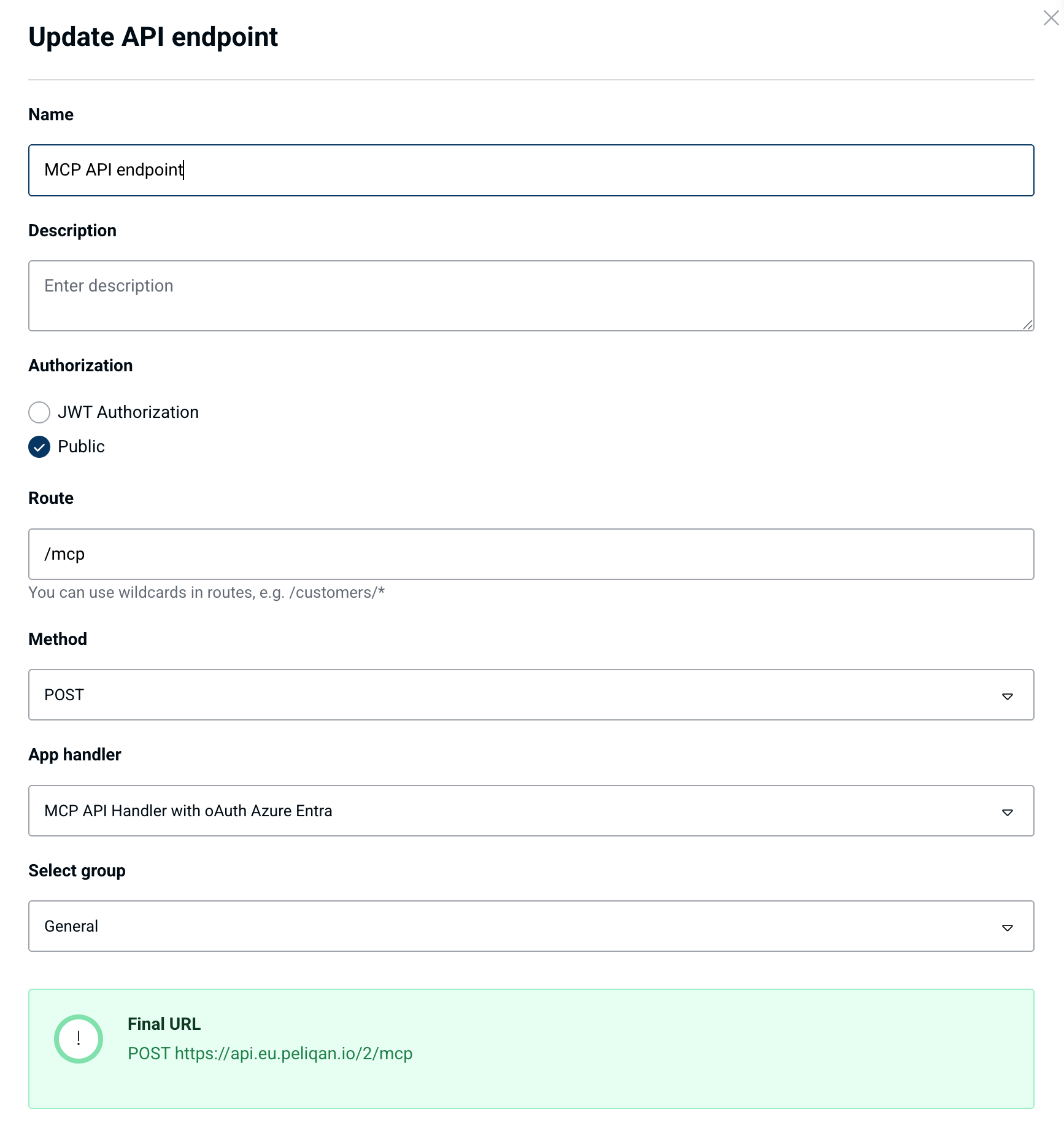
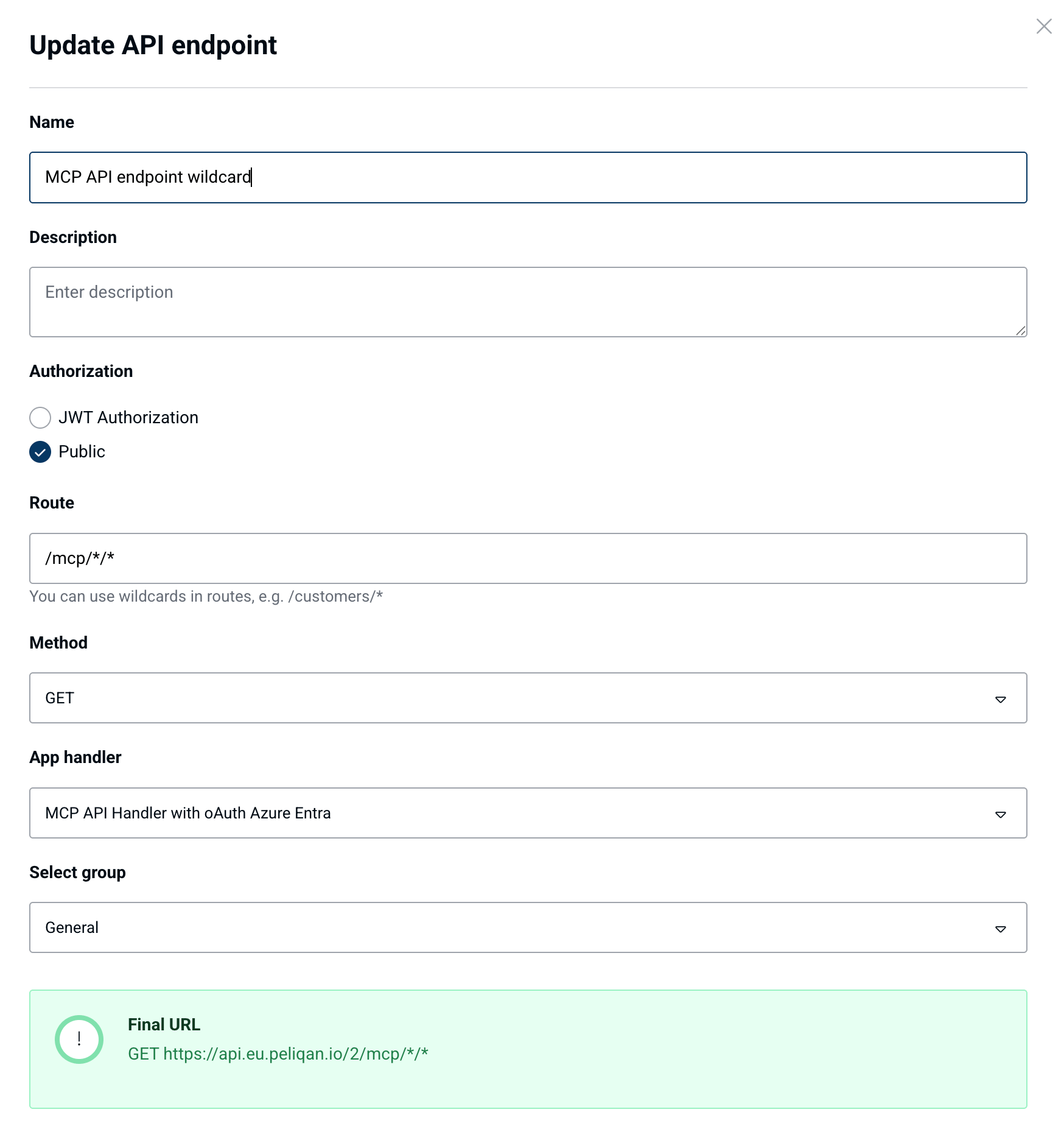
Add two API endpoints and link them both to the above API handler script:
* `POST /mcp`
* `GET /mcp/*/*`
Set both endpoints to “public”:
 # Create an OAuth app
### Google OAuth app
Create an app in Google Cloud Console: [https://console.cloud.google.com/](https://console.cloud.google.com/) under “API & Services” > OAuth consent screen.
Create an internal app and copy the client\_id and client\_secret:
* Authorized redirect URI: see below (depends on the AI Client that you will use)
* App type (audience): "internal"
* OAuth 2.0 client type: Web application
* Data access: you do not have to add scopes here
### Microsoft Azure OAuth app
You need to create two apps in Azure under App registrations:
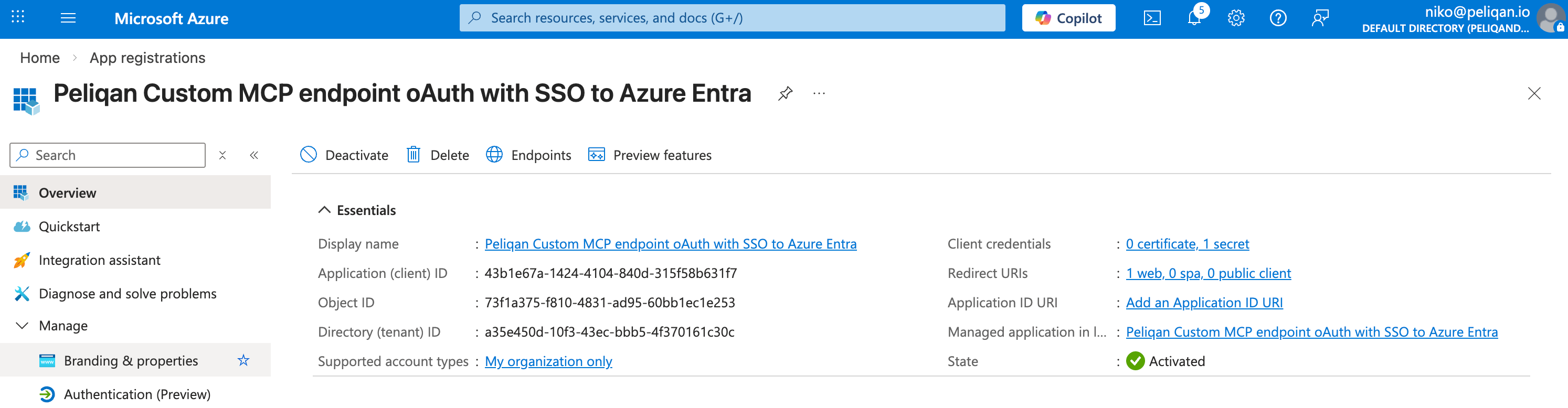
**1. App registration for oAuth authorization flow (with client secret)**
* Client id
* Client secret
* Redirect URI: see below (depends on the AI Client that you will use)
# Create an OAuth app
### Google OAuth app
Create an app in Google Cloud Console: [https://console.cloud.google.com/](https://console.cloud.google.com/) under “API & Services” > OAuth consent screen.
Create an internal app and copy the client\_id and client\_secret:
* Authorized redirect URI: see below (depends on the AI Client that you will use)
* App type (audience): "internal"
* OAuth 2.0 client type: Web application
* Data access: you do not have to add scopes here
### Microsoft Azure OAuth app
You need to create two apps in Azure under App registrations:
**1. App registration for oAuth authorization flow (with client secret)**
* Client id
* Client secret
* Redirect URI: see below (depends on the AI Client that you will use)
 **2. App registration for the MCP Server resource**
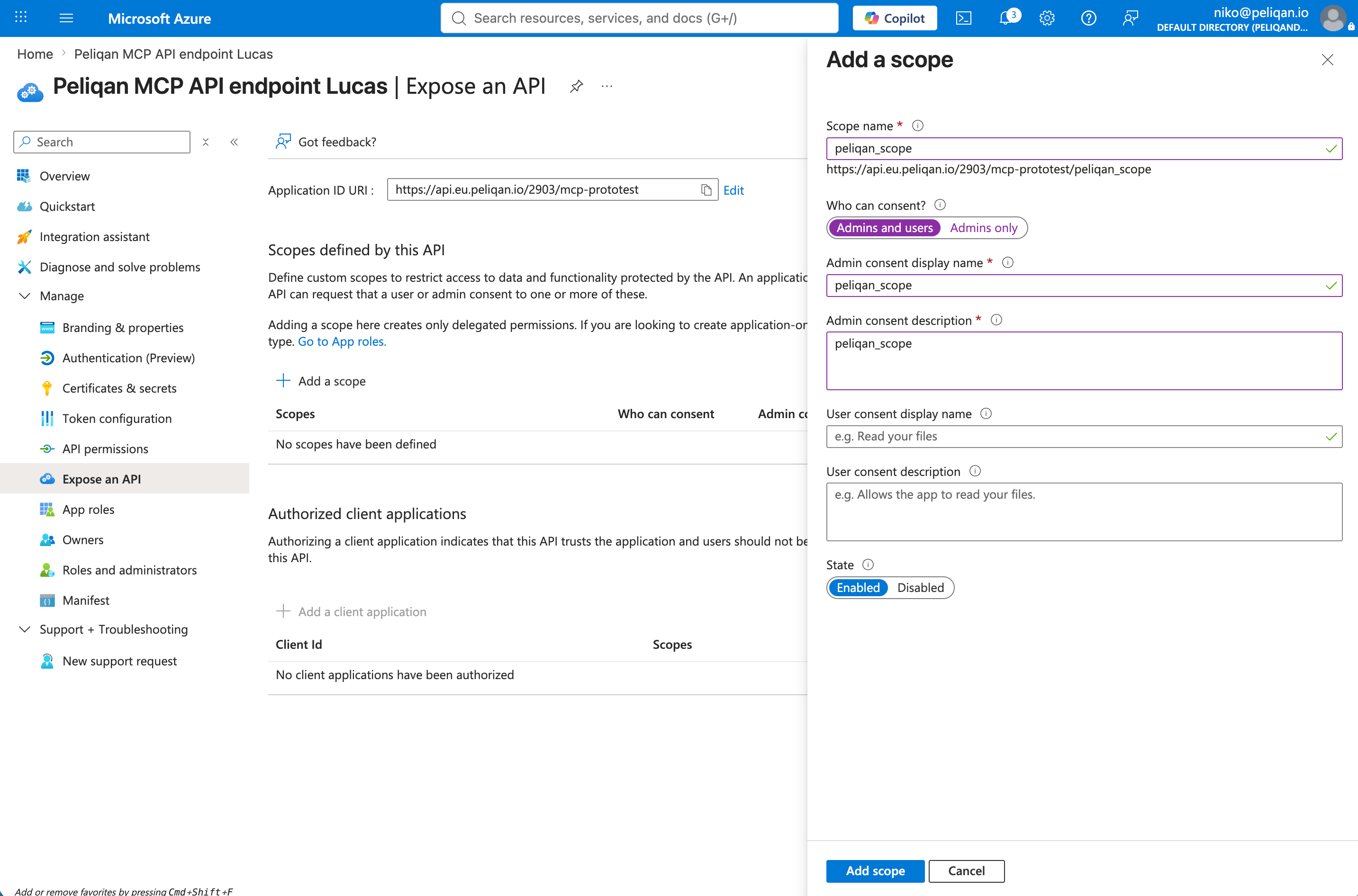
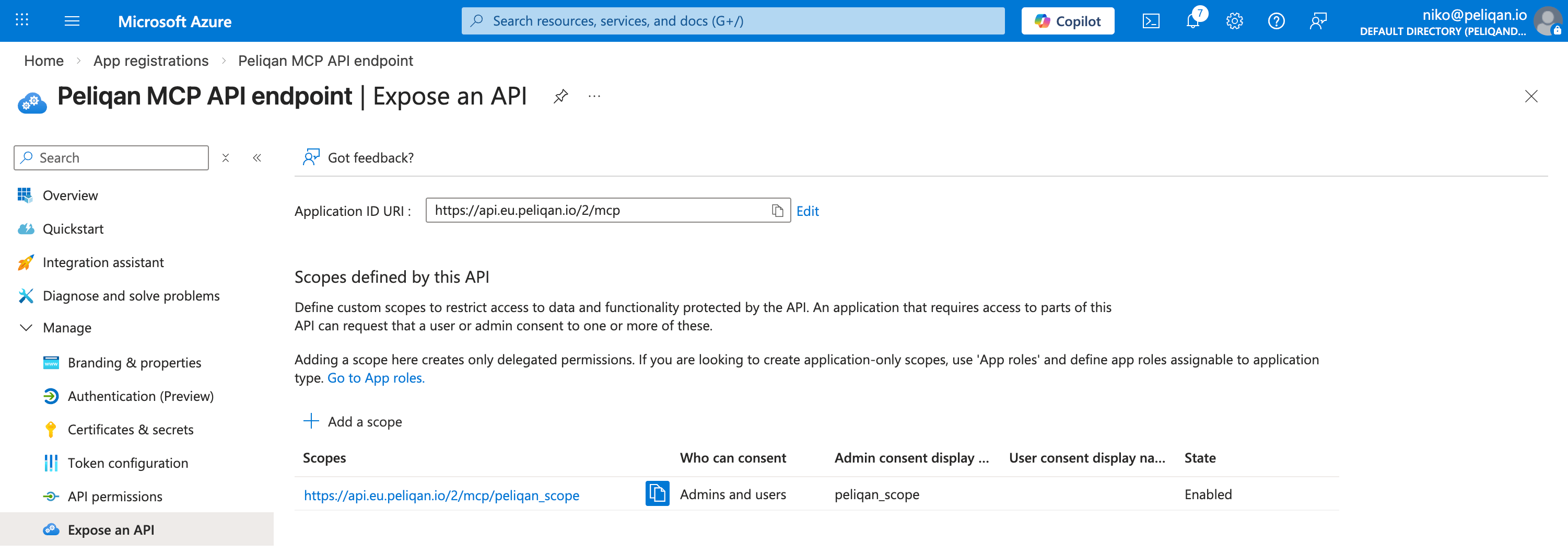
* Set the **Application ID URI**: for example `https://api.eu.peliqan.io/123/mcp` (use the exact URL of this MCP Server)
* Add a scope under "**Expose an API**", e.g. "peliqan\_scope"
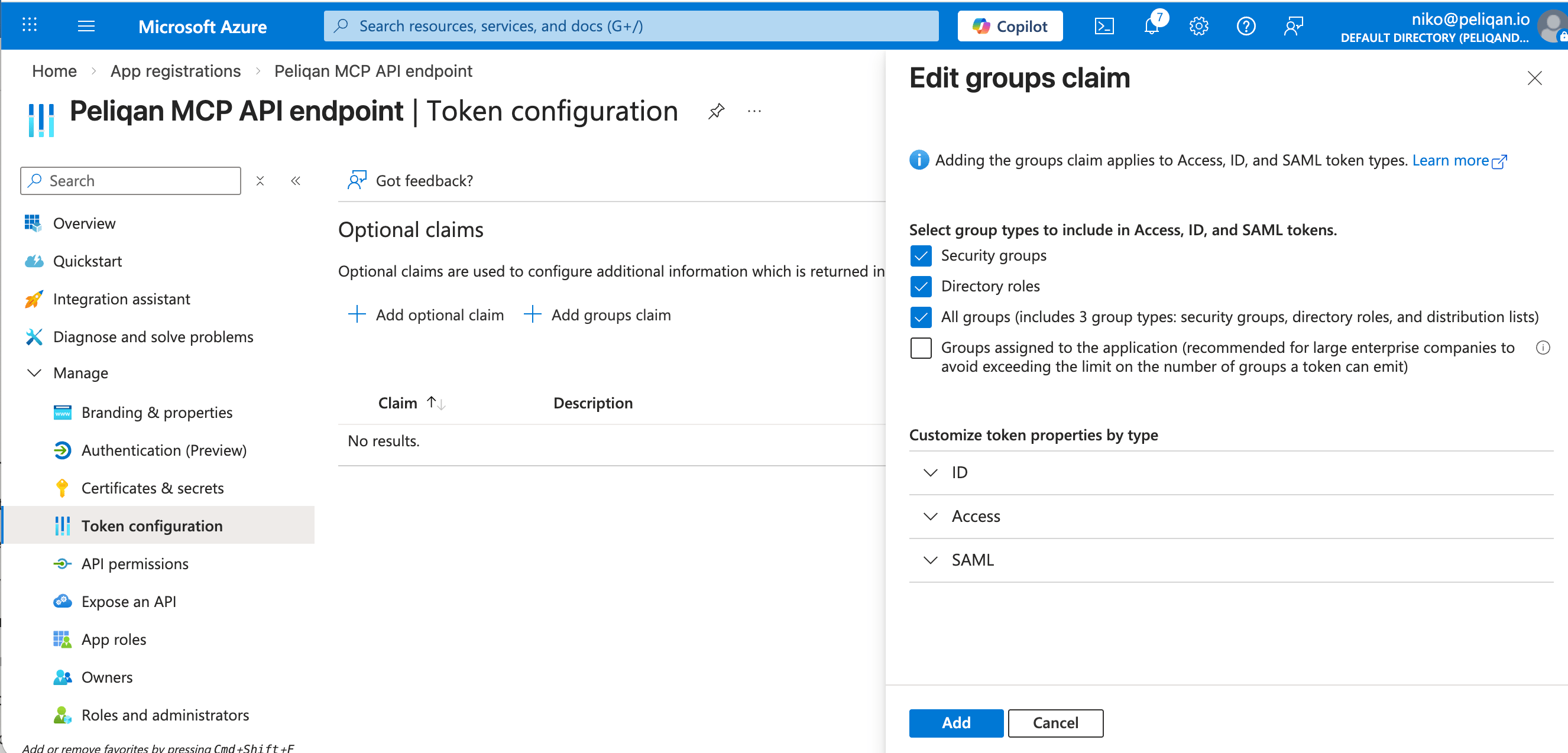
* Add groups claim under “**Token configuration**” > Add groups claim > All groups
**2. App registration for the MCP Server resource**
* Set the **Application ID URI**: for example `https://api.eu.peliqan.io/123/mcp` (use the exact URL of this MCP Server)
* Add a scope under "**Expose an API**", e.g. "peliqan\_scope"
* Add groups claim under “**Token configuration**” > Add groups claim > All groups
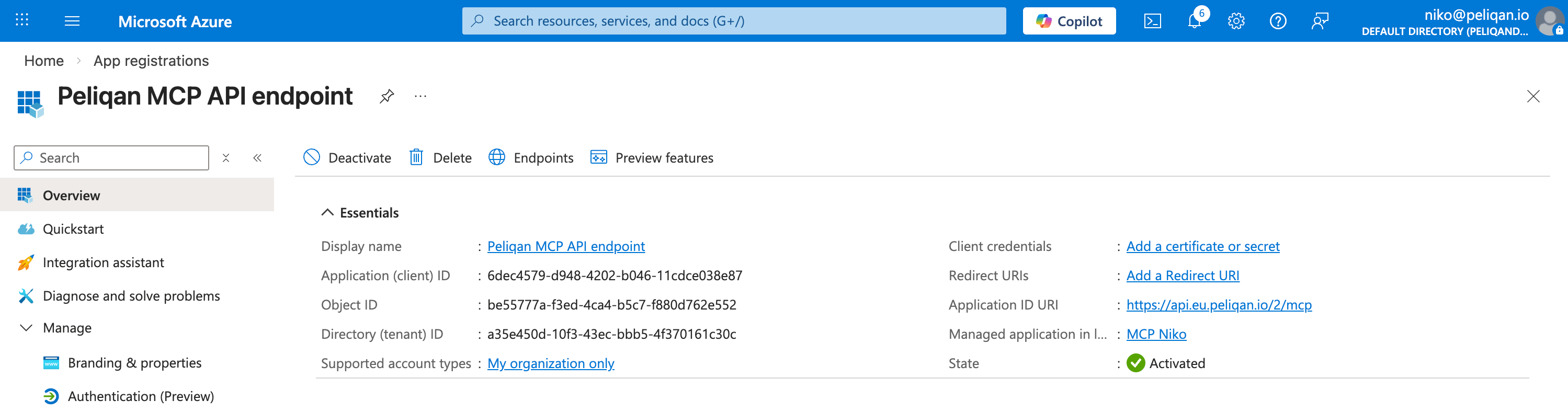 Expose an API:
 Result of adding a scope:
 Add groups claim
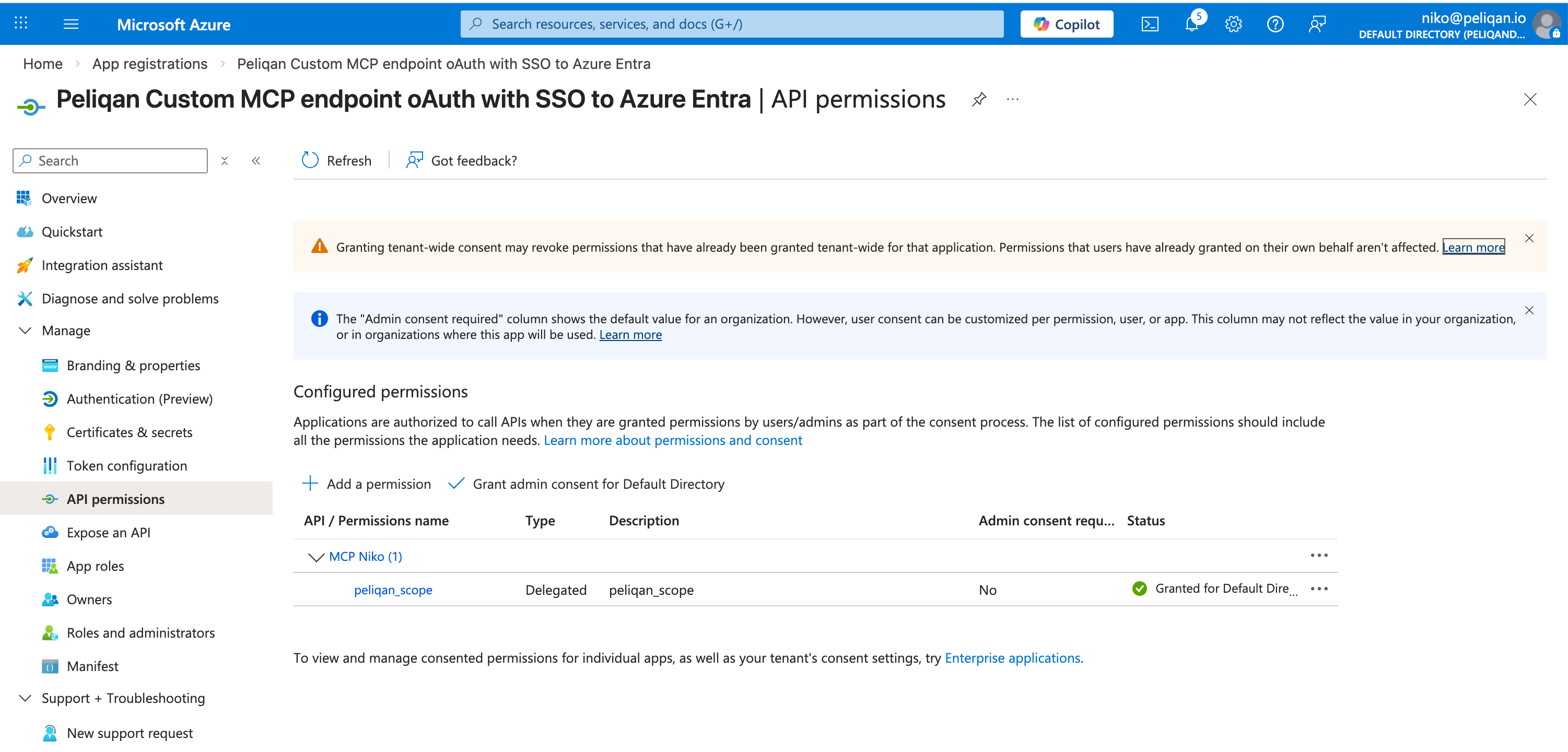
 Add the second app in the first app under "**API permissions**" > “+ Add a permission” > APIs my organization uses > find the second app, check its scope under “Permissions” and click on “Add permissions”:
 ### Peliqan OAuth app
Contact [Peliqan support](mailto:support@peliqan.io) and request activation of **OAuth Apps** in your Peliqan account
Register an OAuth2 app in your Peliqan account under **Settings → OAuth2 Apps**.
Enable **scopes**: openid and email.
Redirect URI: see below ((epends on the AI Client that you will use)
**Choose “Confidential”** app (this has a client secret).
### Redirect URI for your app
The Redirect URI depends on the client that you will use:
* Redirect URI for **Claude**: `https://claude.ai/api/mcp/auth_callback`
* Redirect URI for **ChatGPT**: see ChatGPT Settings > Create app > oAuth > Advanced. For example: `https://chatgpt.com/connector/oauth/xxxxxxxxxx`
*Note for ChatGPT: you’ll need to start adding an MCP Server in ChatGPT, and click on Advanced Settings to see the redirect URI from ChatGPT. Once you have it, cancel adding the app in ChatGPT (we’ll complete this step below).*
* Redirect URI for **Microsoft Copilot**: for example `https://global.consent.azure-apim.net/redirect/cr25b-5f...ea2a`
*Note for Copilot: you’ll need to start adding an MCP Server in Copilot (with authentication type oAuth, see details below) and save, in order to see the newly generated redirect URI.*
# Configure your MCP Server using OAuth in an AI Client
### Configure your MCP Server in ChatGPT
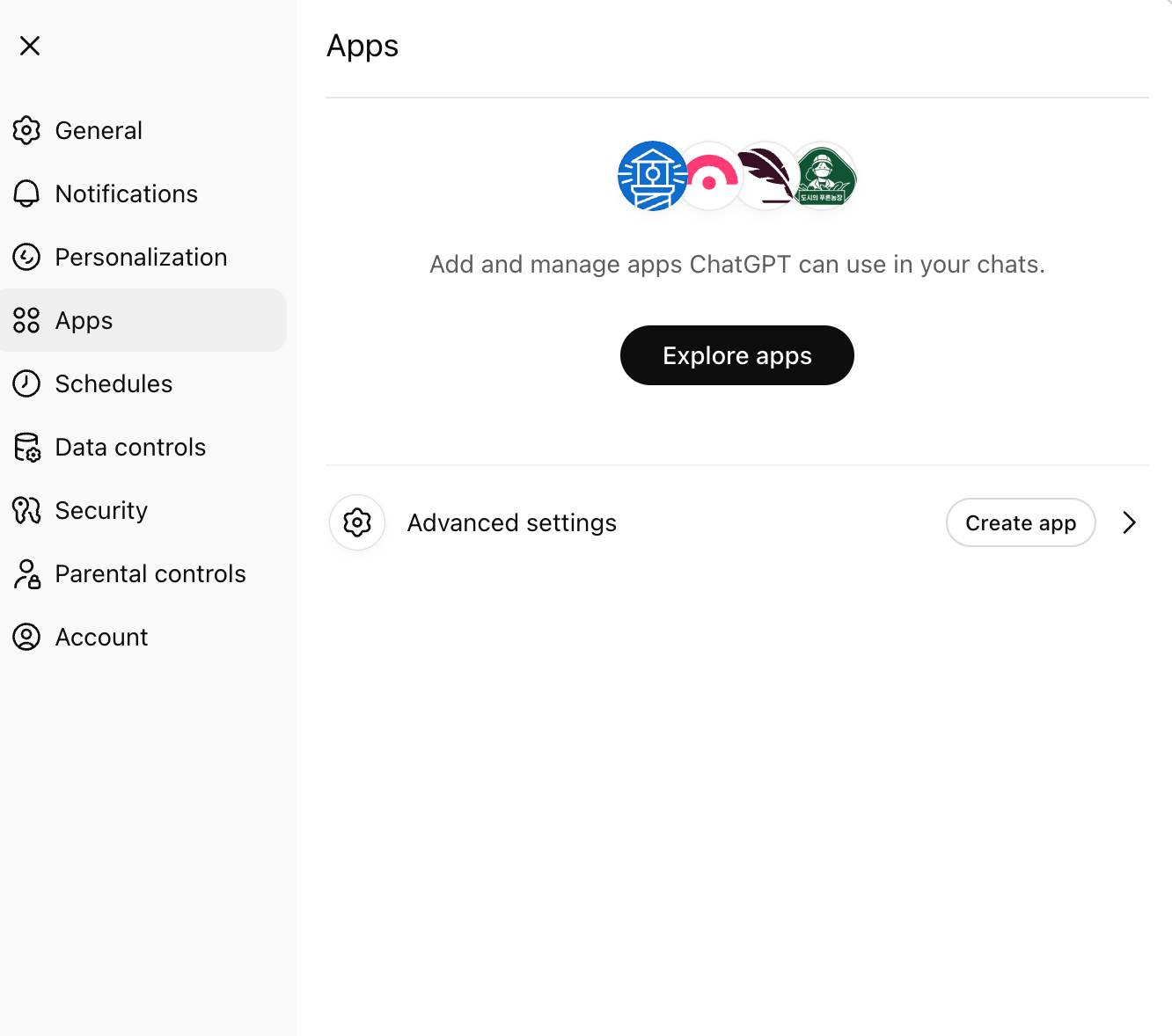
In ChatGPT click on your account name (bottom left corner), click Settings.
In Settings, go to Apps, and click “Create App”:
### Peliqan OAuth app
Contact [Peliqan support](mailto:support@peliqan.io) and request activation of **OAuth Apps** in your Peliqan account
Register an OAuth2 app in your Peliqan account under **Settings → OAuth2 Apps**.
Enable **scopes**: openid and email.
Redirect URI: see below ((epends on the AI Client that you will use)
**Choose “Confidential”** app (this has a client secret).
### Redirect URI for your app
The Redirect URI depends on the client that you will use:
* Redirect URI for **Claude**: `https://claude.ai/api/mcp/auth_callback`
* Redirect URI for **ChatGPT**: see ChatGPT Settings > Create app > oAuth > Advanced. For example: `https://chatgpt.com/connector/oauth/xxxxxxxxxx`
*Note for ChatGPT: you’ll need to start adding an MCP Server in ChatGPT, and click on Advanced Settings to see the redirect URI from ChatGPT. Once you have it, cancel adding the app in ChatGPT (we’ll complete this step below).*
* Redirect URI for **Microsoft Copilot**: for example `https://global.consent.azure-apim.net/redirect/cr25b-5f...ea2a`
*Note for Copilot: you’ll need to start adding an MCP Server in Copilot (with authentication type oAuth, see details below) and save, in order to see the newly generated redirect URI.*
# Configure your MCP Server using OAuth in an AI Client
### Configure your MCP Server in ChatGPT
In ChatGPT click on your account name (bottom left corner), click Settings.
In Settings, go to Apps, and click “Create App”:
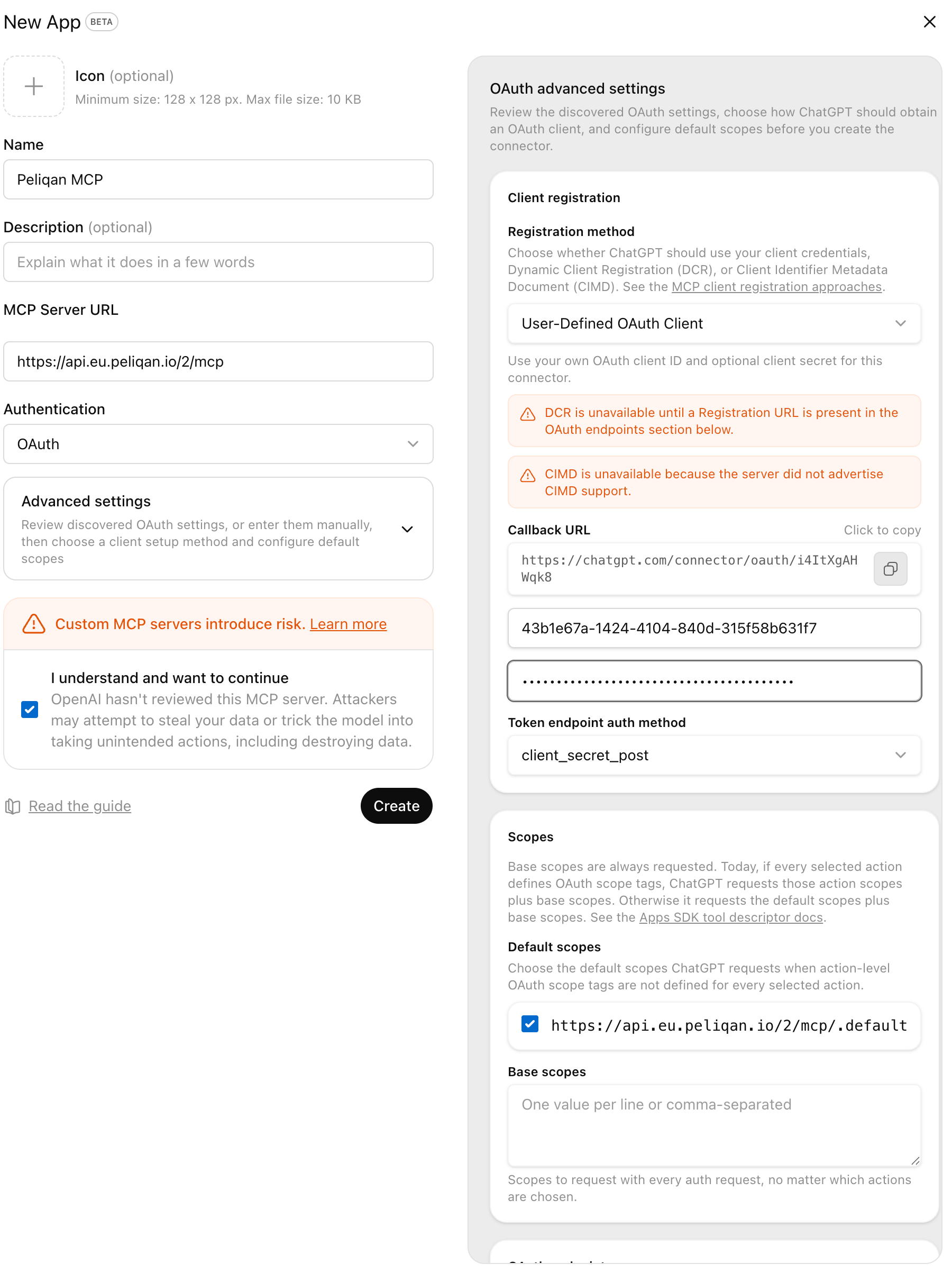
 * Fill in the URL of your MCP Server URL: `https://api.eu.peliqan.io/*{your_peliqan_account_id}*/mcp`
* Select “OAuth” for Authentication
* Check the checkbox “I understand”
* Open Advanced Settings: enter the `client id` and `client secret` from your app created in Google Cloud Console, Microsoft Azure or your Peliqan OAuth app. See for example the client id *43b1e67a-1424-4104-840d-315f58b631f7* the screenshot below.
* Click on the “Create” button
* Test your MCP Server: ask ChatGPT “Ask the Peliqan MCP to say hello.”
* Fill in the URL of your MCP Server URL: `https://api.eu.peliqan.io/*{your_peliqan_account_id}*/mcp`
* Select “OAuth” for Authentication
* Check the checkbox “I understand”
* Open Advanced Settings: enter the `client id` and `client secret` from your app created in Google Cloud Console, Microsoft Azure or your Peliqan OAuth app. See for example the client id *43b1e67a-1424-4104-840d-315f58b631f7* the screenshot below.
* Click on the “Create” button
* Test your MCP Server: ask ChatGPT “Ask the Peliqan MCP to say hello.”
 ### Configure your MCP Server in Claude
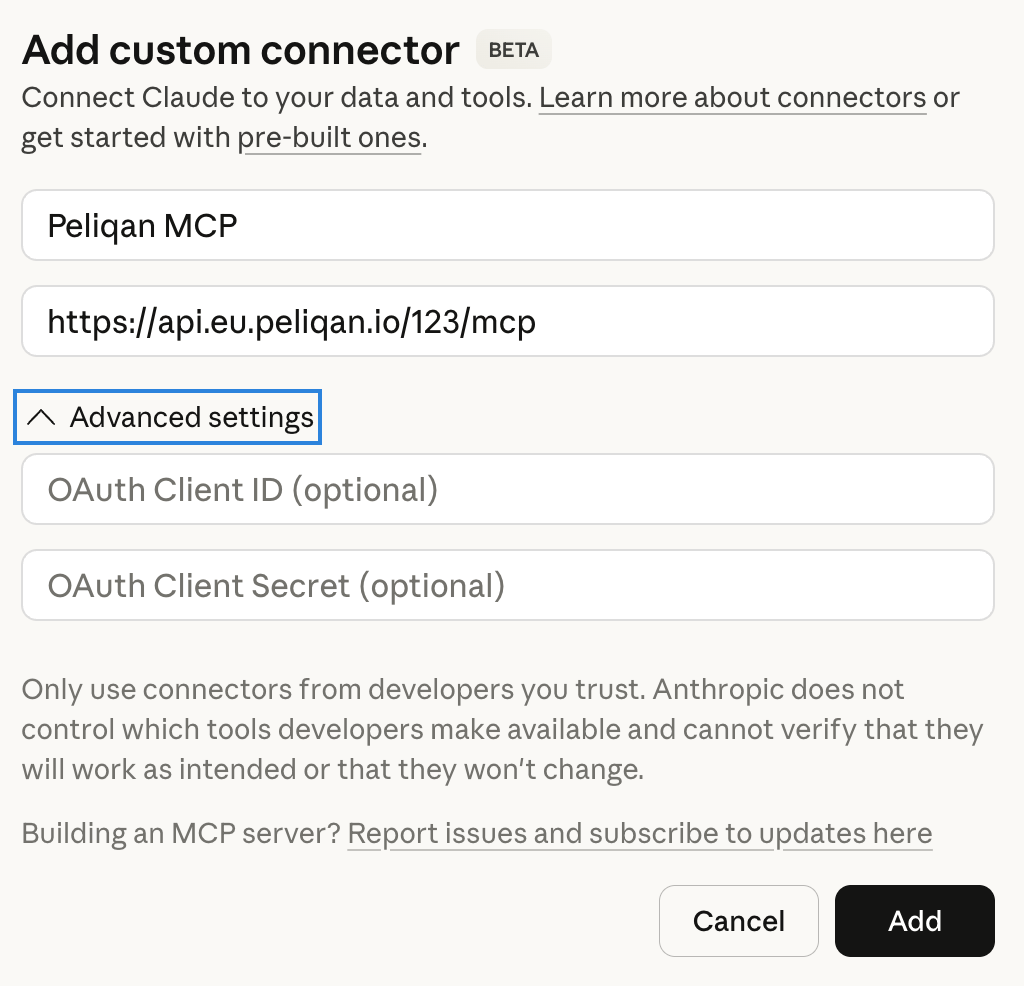
In Claude, go to Customize > Connectors. Click the “+” icon and select “Add custom connector”.
Enter the URL of your custom MCP Server, expand the “Advanced” section and enter the `client_id` and `client_secret` from your app created in Google Cloud Console, Microsoft Azure or your Peliqan OAuth app.
### Configure your MCP Server in Claude
In Claude, go to Customize > Connectors. Click the “+” icon and select “Add custom connector”.
Enter the URL of your custom MCP Server, expand the “Advanced” section and enter the `client_id` and `client_secret` from your app created in Google Cloud Console, Microsoft Azure or your Peliqan OAuth app.
 ### Configure your MCP Server in Microsoft Copilot
This documentation assumes you are using Microsoft Azure as OAuth provider.
In Copilot Studio, add an Agent and add a Tool of type “MCP Server” to the agent.
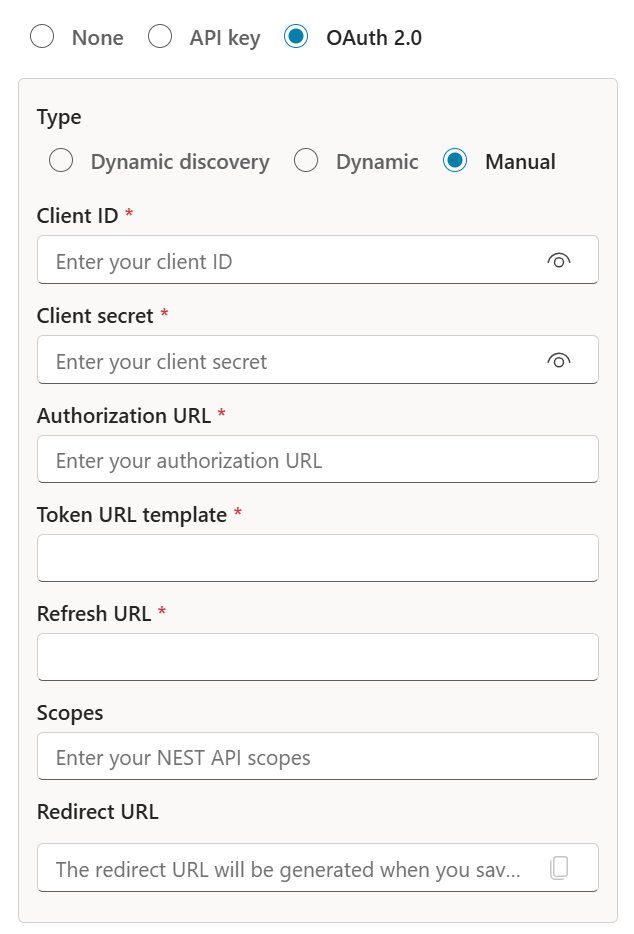
Select oAuth for the MCP Server authentication type, and enter following details:
* `client_id` and `client_secret` from your first Azure app
* Authorization URL: `https://login.microsoftonline.com/{tenant_id}/oauth2/v2.0/authorize`
* Token URL template: `https://login.microsoftonline.com/{tenant_id}/oauth2/v2.0/token`
* Refresh url: `https://login.microsoftonline.com/{tenant_id}/oauth2/v2.0/token`
* Scopes: `https://api.eu.peliqan.io/123/mcp/peliqan_scope openid profile offline_access`
*Note: the first scope is the scope URL from your second Azure app*
After saving, copy the redirect URI generated by Copilot and use it in the Azure app registration for the second app (see above).
Add an MCP Server in Copilot Studio:
### Configure your MCP Server in Microsoft Copilot
This documentation assumes you are using Microsoft Azure as OAuth provider.
In Copilot Studio, add an Agent and add a Tool of type “MCP Server” to the agent.
Select oAuth for the MCP Server authentication type, and enter following details:
* `client_id` and `client_secret` from your first Azure app
* Authorization URL: `https://login.microsoftonline.com/{tenant_id}/oauth2/v2.0/authorize`
* Token URL template: `https://login.microsoftonline.com/{tenant_id}/oauth2/v2.0/token`
* Refresh url: `https://login.microsoftonline.com/{tenant_id}/oauth2/v2.0/token`
* Scopes: `https://api.eu.peliqan.io/123/mcp/peliqan_scope openid profile offline_access`
*Note: the first scope is the scope URL from your second Azure app*
After saving, copy the redirect URI generated by Copilot and use it in the Azure app registration for the second app (see above).
Add an MCP Server in Copilot Studio:
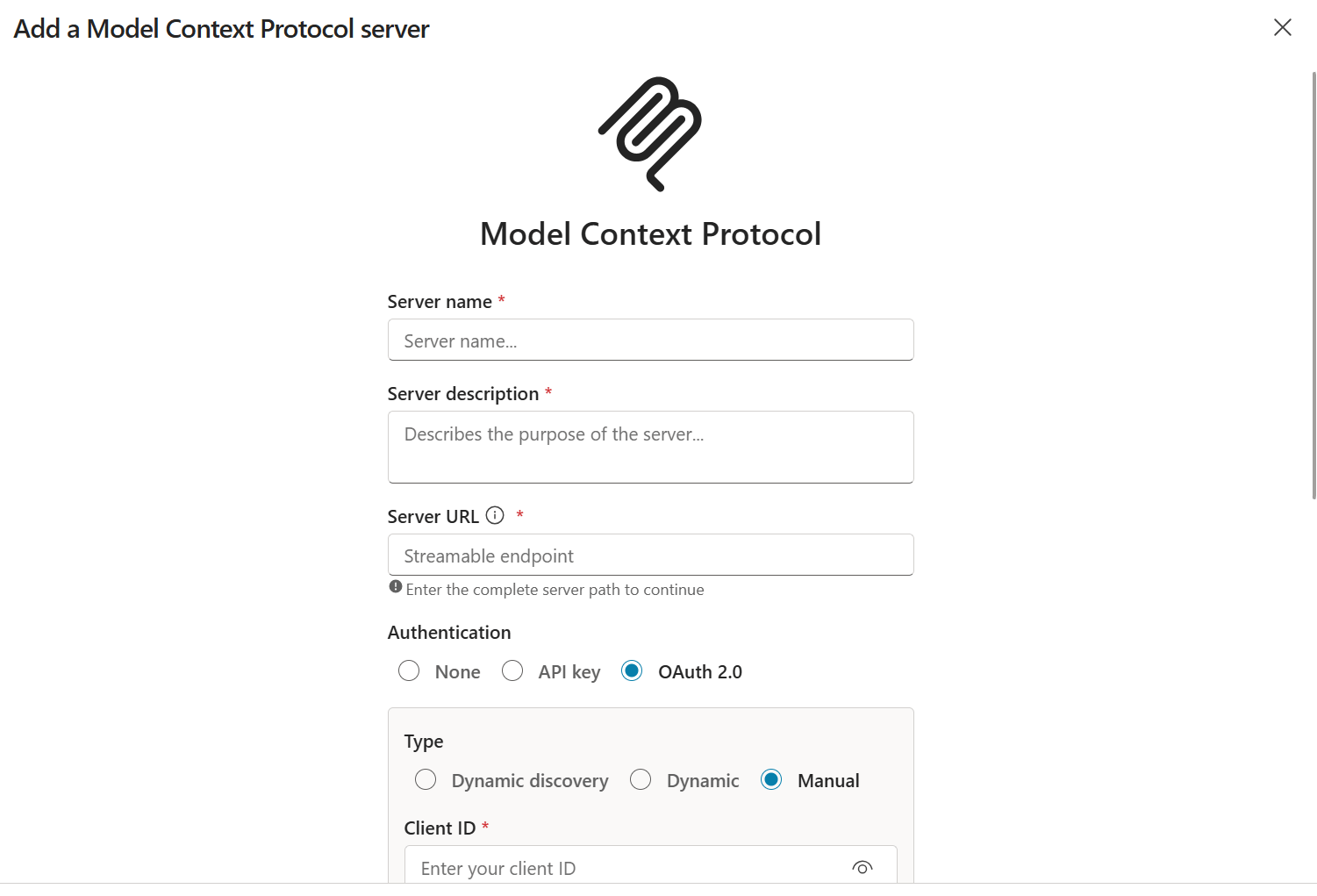 Enter OAuth details for the MCP Server:
 Publish your agent in Copilot Studio to make it available in Copilot chat. Next, you can access your Agent in Copilot chat and use it to access your MCP Server.
In Copilot, each user will have to add a connection to the Agent (MCP server), by authorizing access (oAuth flow) with their Microsoft account.
**Troubleshooting in Copilot Studio**
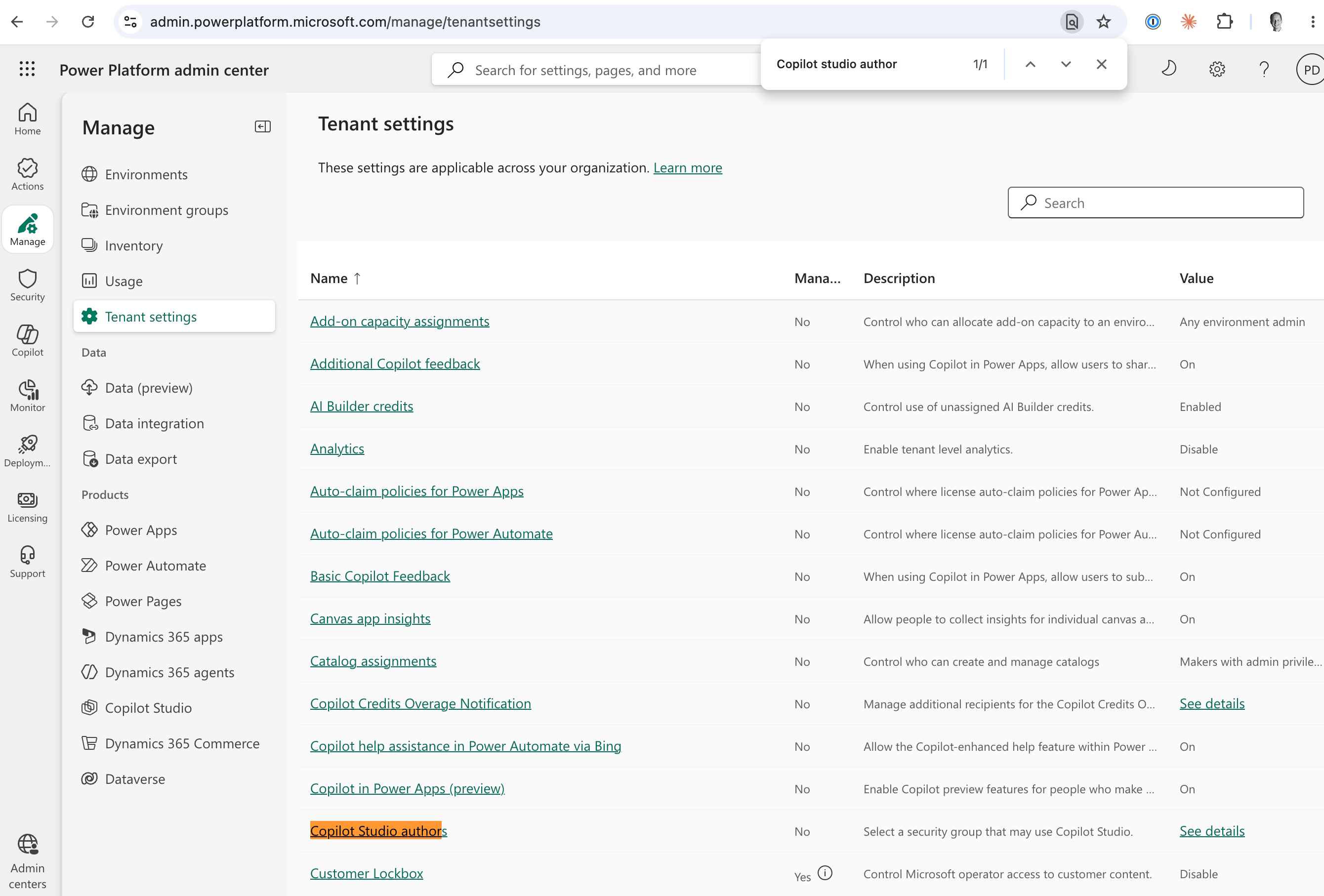
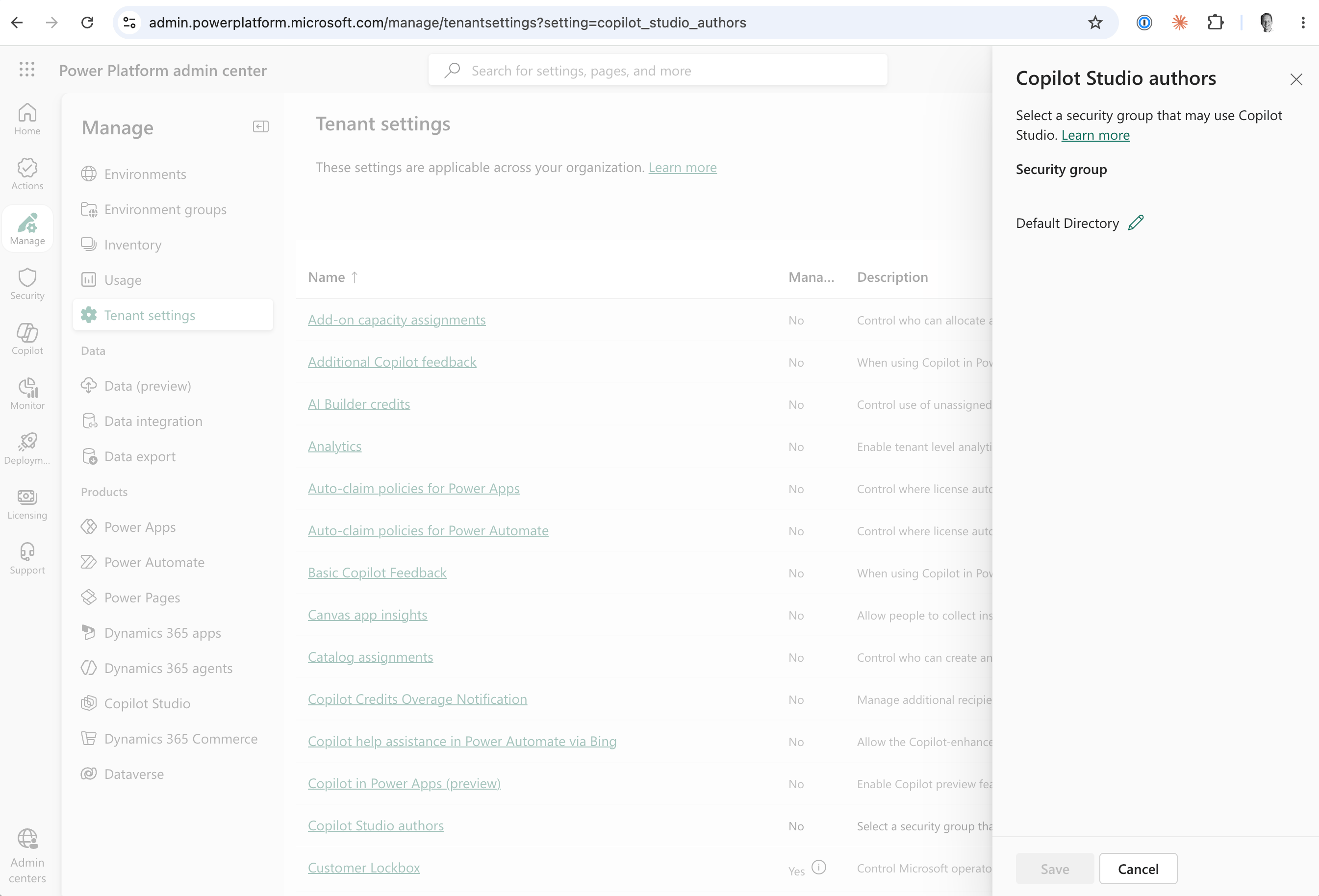
If you don’t have permissions to publish you agent, follow the below steps to allow a user to publish an agent:
Add a security group (to which the user belongs) in Power Automate Admin center, for the setting Manage > Tenant settings > “Copilot studio authors”.
Publish your agent in Copilot Studio to make it available in Copilot chat. Next, you can access your Agent in Copilot chat and use it to access your MCP Server.
In Copilot, each user will have to add a connection to the Agent (MCP server), by authorizing access (oAuth flow) with their Microsoft account.
**Troubleshooting in Copilot Studio**
If you don’t have permissions to publish you agent, follow the below steps to allow a user to publish an agent:
Add a security group (to which the user belongs) in Power Automate Admin center, for the setting Manage > Tenant settings > “Copilot studio authors”.
 If you get an error “A custom connector with display name xxx already exists”, follow the below steps:
Go to Power Automate > More > Discover all > Custom connectors. This will show a list of all “Tools” of type MCP Server that were added to your Copilot agents in the past. Delete old connectors here.
This documentation is built and hosted on [Mintlify](https://mintlify.com), a developer documentation platform.
If you get an error “A custom connector with display name xxx already exists”, follow the below steps:
Go to Power Automate > More > Discover all > Custom connectors. This will show a list of all “Tools” of type MCP Server that were added to your Copilot agents in the past. Delete old connectors here.
This documentation is built and hosted on [Mintlify](https://mintlify.com), a developer documentation platform.